Introduction Getting Ready
Taking Pictures
Playback Set Up
EN-157
NEXTBACK
Contents Glossary Index Nomenclature Menus and Settings Troubleshooting
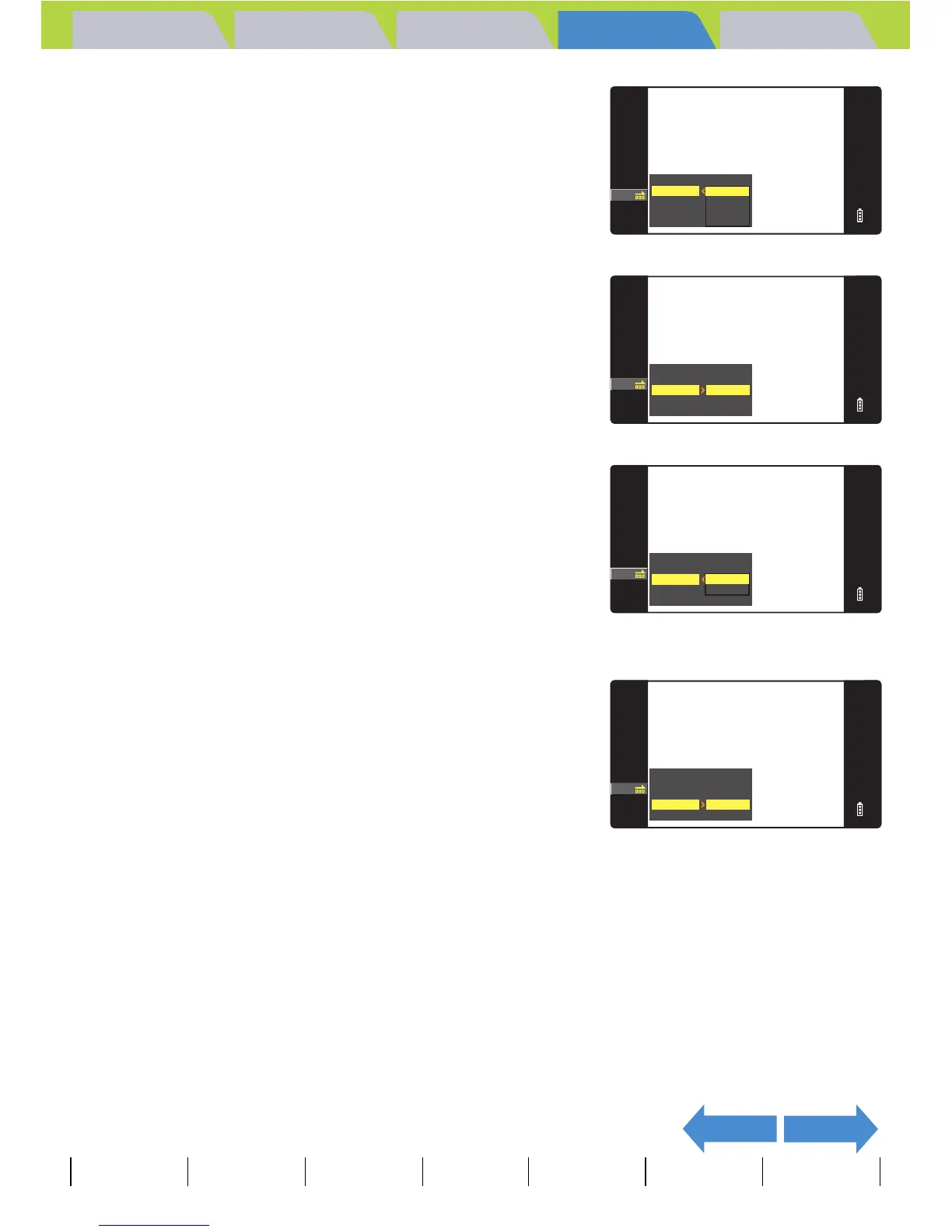
5 Move the selector lever up u or down
d to select the desired value, then
press E.
The available intervals are 2, 10, 15 and 30 seconds.
6 Move the selector lever up u or down
d to select [START FRAME], then
move the lever right r.
7 Move the selector lever up u or down
d to select the starting image, then
press E.
[THIS FRAME] : Starts playback from the currently displayed
image.
[1ST FRAME] : Starts playback from the image with the lowest
number in the file name.
8 Move the selector lever up u or down
d to select [EFFECT], then move the
lever right r.
SETTING AUTO PLAY
RETURN
START FRAME
EFFECT
INTERVAL
2SEC
10SEC
15SEC
30SEC
SETTING AUTO PLAY
RETURN
OFF
EFFECT
INTERVAL
2SEC
START FRAME
THIS FRAME
SETTING AUTO PALY
RETURN
EFFECT
INTERVAL
2SEC
THIS FRAME
1ST FRAME
START FRAME
SETTING AUTO PLAY
RETURN
INTERVAL
2SEC
START FRAME
THIS FRAME
OFF
EFFECT



 To Next Page