Introduction Getting Ready
Taking Pictures
Playback Set Up
EN-24
BACK
Contents Glossary Index Nomenclature Menus and Settings Troubleshooting
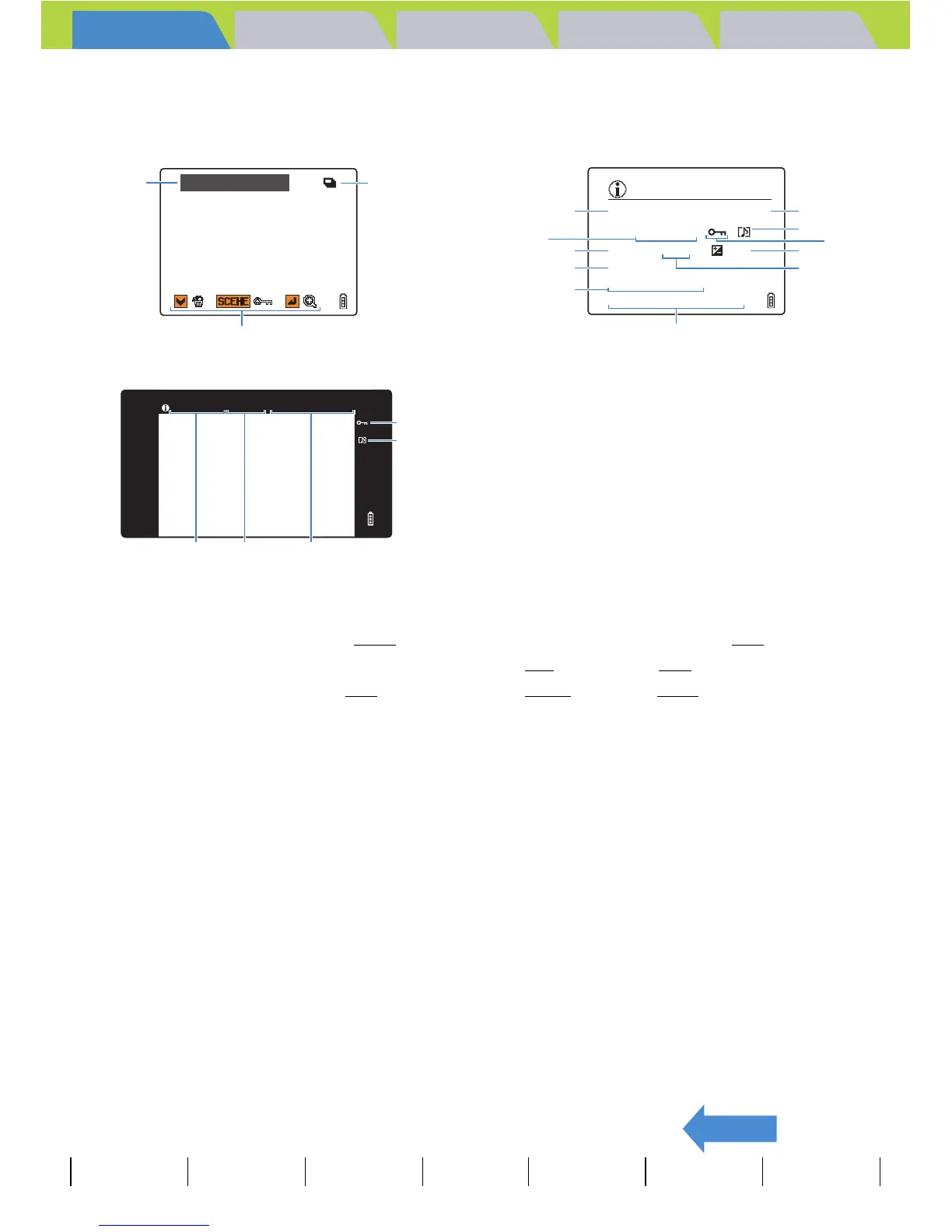
z Display when the selector lever is moved up u
*The operating guide shows a guide to which buttons can be used on a screen.
File No Display
(Move the selector lever up u once)
q Folder numbers and file names Æ p.141
w File size
e Number of pixels (image size) Æ p.78
r Protection status
t Whether or not voice is used
y Shutter speed
u Aperture
Information Display
(Move the selector lever up u twice)
i Exposure compensation Æ p.67
o ISO sensitivity Æ p.69
!0 DPOF settingsÆ p.123
!1 Photography date and time
!2 Continuous shooting mark
!3 Operating guide
100–KICX0001.JPG
q
!2
3
100–KICX_0001 2272X1704 2004.09.01 12:34:56
qe
r
t
!1
* When playing back on a television that
supports D3 or higher video input.
INFORMATION
100–KICX0001.JPG 1600KB
2272X1704
1/125 F2.8 ± 0.3
ISO200
2004.09.01 12:34:56
DPOF 1 PRTS
t
w
q
o
!0
i
u
r
!1
e
y



 To Next Page