1. Introduction
1-4 UniSite-xpi User Manual
DTE/DCE
SELECTOR
(Remote Port)
13
14
POWER SWITCH
15
16
19
18
17
DTE/DCE SELECTOR (Terminal Port)
TERMINAL PORT CONNECTOR
REMOTE PORT CONNECTOR
0048-5
AC RECEPTACLE
LINE FUSE (Behind Door)
12
PARALLEL
PORT
CONNECTOR
9. UniSite-xpi Status Indicators—These indicators provide
information about UniSite-xpi’s operational status:
a) Power Indicator—Lights when the power is on.
b) Terminal Port Indicator—Lights when equipment is connected
properly to the Terminal port.
c) Remote Port Indicator—Lights when equipment is connected
properly to the Remote port.
d) Self-test Indicator—Lights when UniSite-xpi is running a self-
test.
10. Package Specific Module (PSM)—A module that supports a specific
package style.
11. Function Specific Module (FSM)—A module that supports a special
type of programming operation (e.g. set or gang programming).
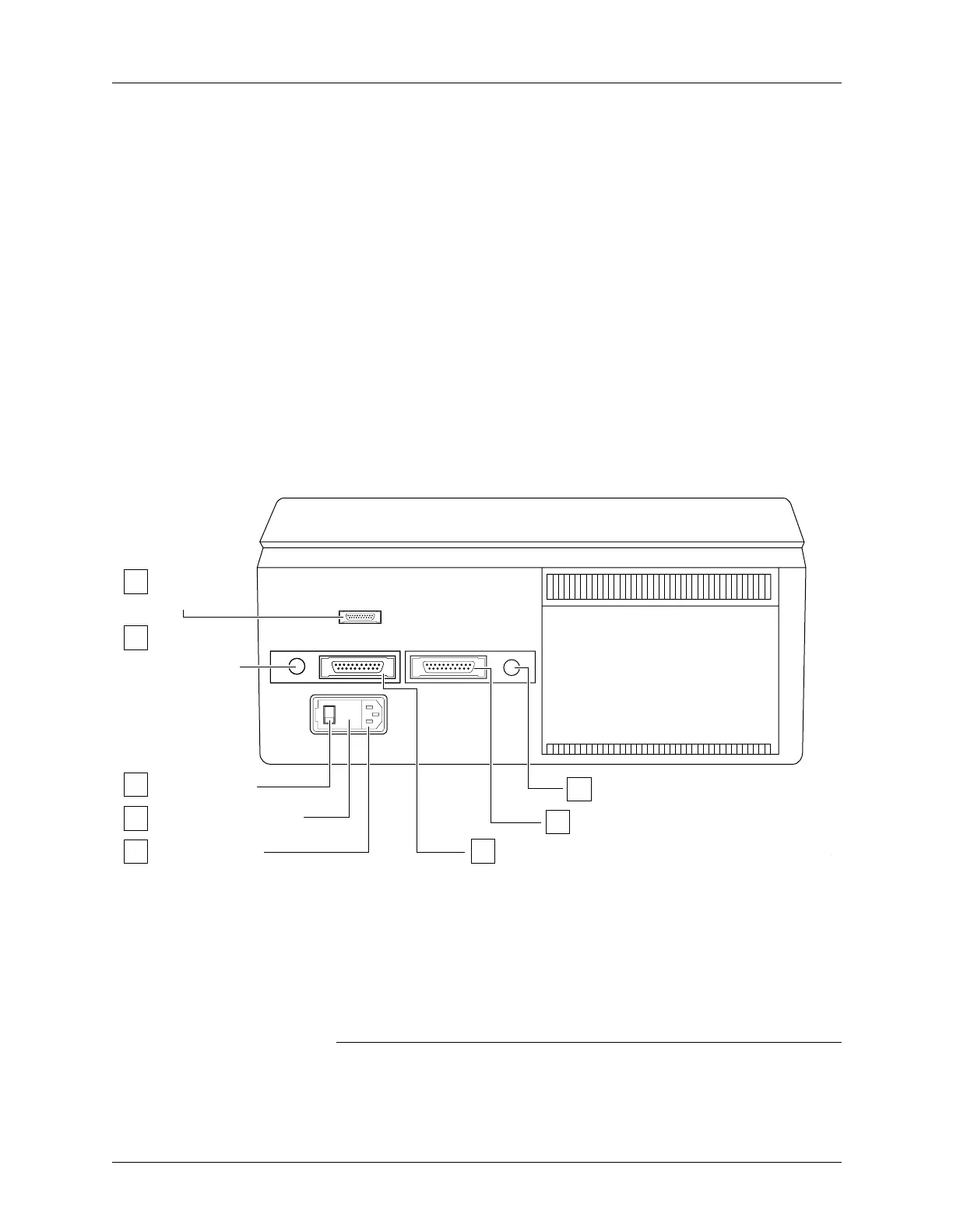
The Back Panel The back panel features of UniSite-xpi are shown in Figure 1-3.
12. Parallel Port Connector—Connects UniSite-xpi to PCs.
13. Remote Port DTE/DCE Selector—Configures the Remote port as
Data Terminal Equipment or Data Communication Equipment.
14. Power Switch—Applies ac power to UniSite-xpi.
15. Line Fuse—Houses the line fuse.
16. AC Receptacle—Connects UniSite-xpi to ac power.
Note: On older units, the positions of the power switch and ac receptacle are
reversed. Older units also have a line voltage selector.
17. Remote Port—Connects UniSite-xpi to PCs, workstations, terminals,
etc.
Figure 1-3
Back Panel Features
DTE/DCE
SELECTOR
(Remote Port)
13
14
POWER SWITCH
15
16
19
18
17
DTE/DCE SELECTOR (Terminal Port)
TERMINAL PORT CONNECTOR
REMOTE PORT CONNECTOR
0048-5
AC RECEPTACLE
LINE FUSE (Behind Door)
12
PARALLEL
PORT
CONNECTOR


 To Next Page