2. Setup and Installation
UniSite-xpi User Manual 2-33
Inserting a PLCC or
LCC Device into a
MatchBook
Use the following procedure to insert a PLCC or LCC device into a
MatchBook.
1. Select the appropriate MatchBook and Base. For example, if you are
using a 44-pin PLCC device, you would select the 44-pin PLCC
MatchBook and the PLCC Base.
2. Insert the appropriate Base into the programmer.
3. Insert the appropriate MatchBook into the Base.
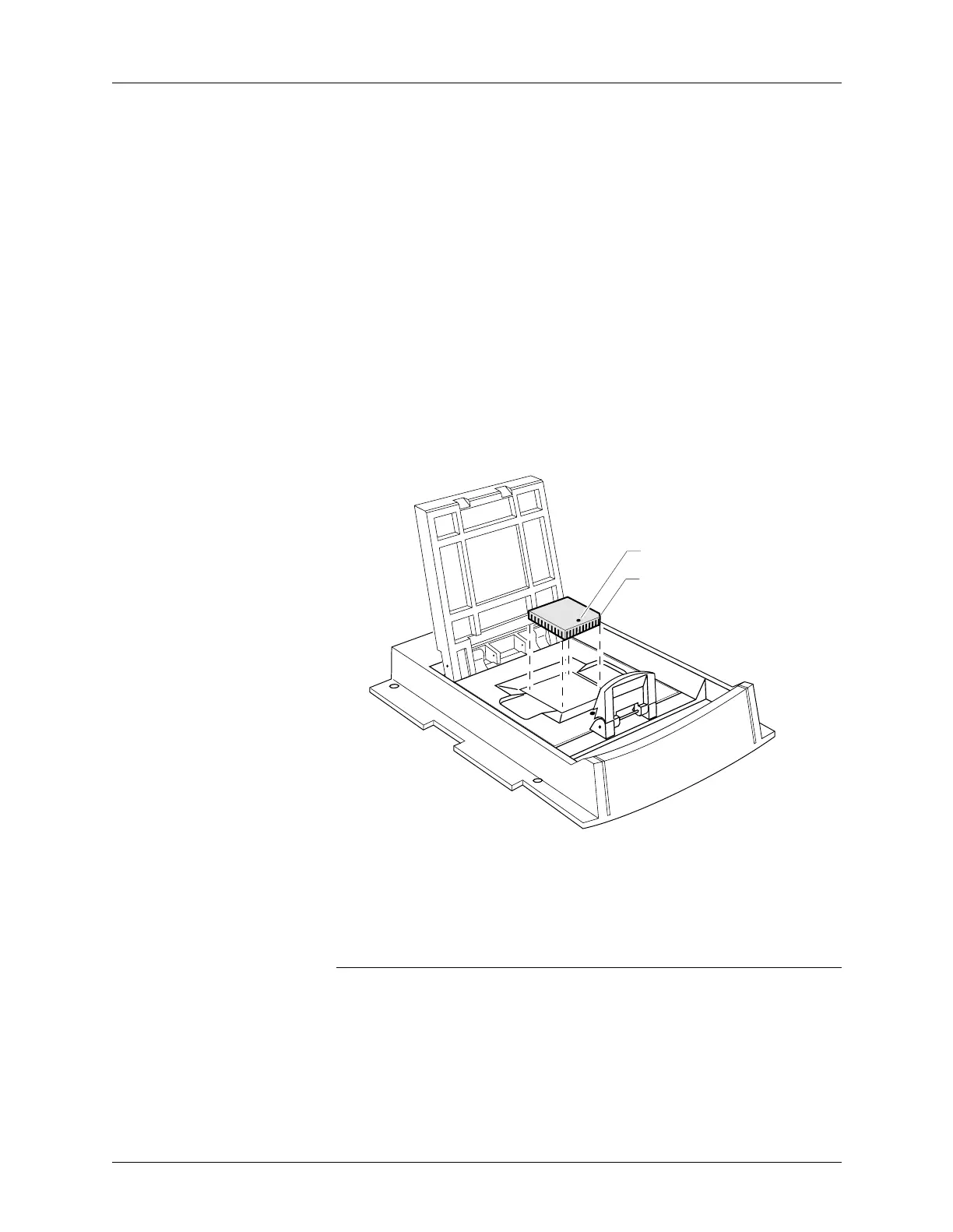
4. Position the PLCC or LCC device so that pin 1 is near the handle on
the Base. There is a small dot molded into each MatchBook to help
you align your device. Each PLCC MatchBook and LCC MatchBook
also has a beveled corner to help you align devices with a chamfered
corner to indicate pin 1. Figure 2-13 illustrates the proper positioning
of a PLCC or LCC device.
5. Insert the device into the open MatchBook.
6. Finally, close the MatchBook and press the retaining latch forward
with your thumb until the latch snaps into place, as shown in
Figure 2-12.
CAUTION: Do not place excessive force on the top of the MatchBook, as
this may cause premature wear on the conductive pad.
Figure 2-13
Inserting a Device into the PLCC
or LCC Base
0538-3
CHAMFERED
CORNER
PIN 1



 To Next Page