Chapter 9 External Interface
PAGE 9-8
9-1-3. Fieldbus Setup
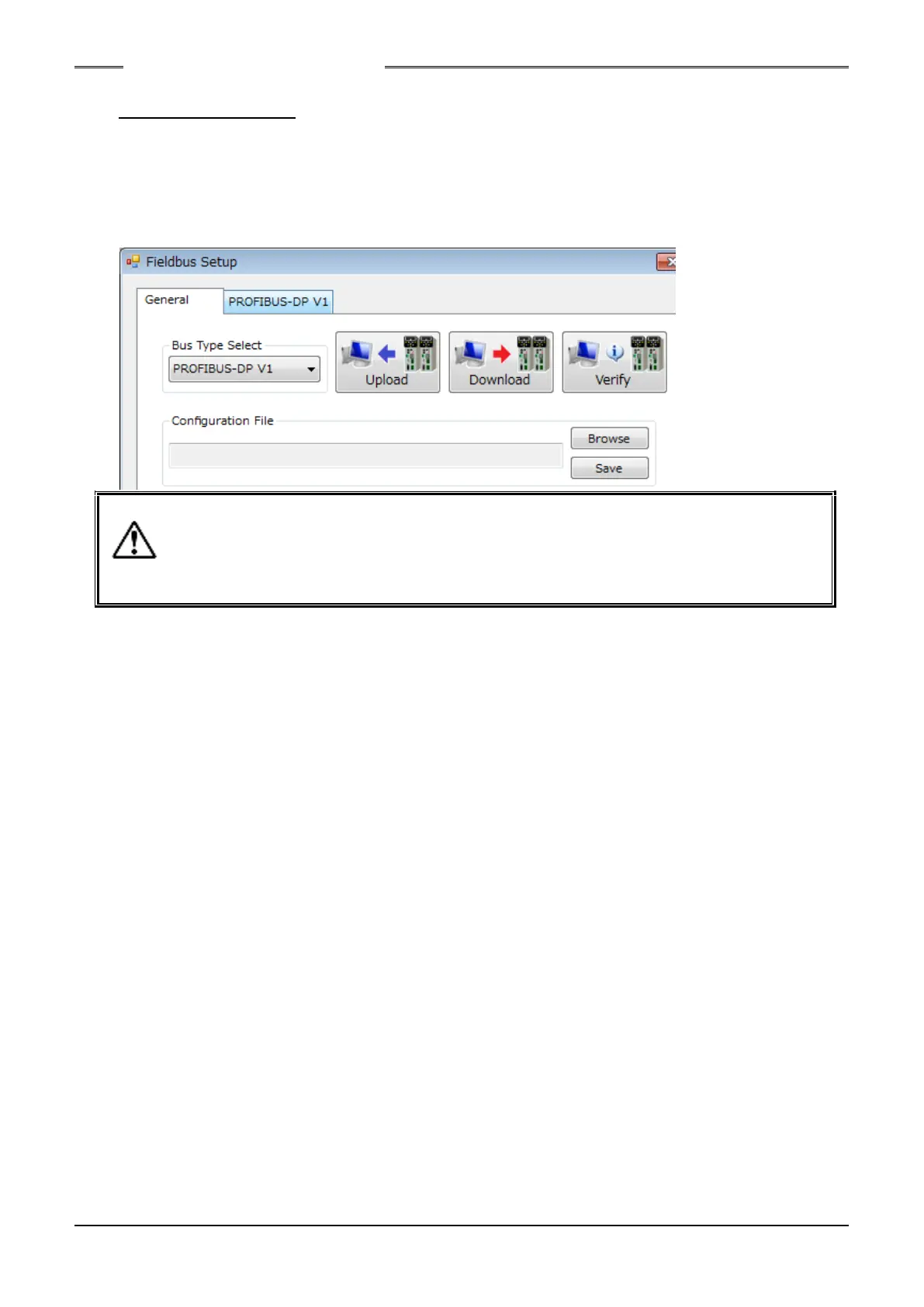
The fieldbus settings are set in the “Fieldbus Setup” menu of the HFC3000 User Console. The
following setting window is displayed when “OPTION” → “Fieldbus Setup” is selected at the menu bar.
In the bus select/communication window, selection of the fieldbus type, uploading, downloading, and
verification of fieldbus settings with respect to the Unit, and browsing and saving of fieldbus settings with
respect to the PC can be performed.
- The standard set values are set as the factory settings in the Unit. Do not change the
settings unless there is a special reason.
- Be sure to perform backup before changing the fieldbus settings of the Unit.
- When executed "Browse" if the file version of "HFC3000 UserConsole" and "A
fieldbus configuration file" is different, A warning window is displayed.
●Bus Type Select: The type of bus is selected from the list. Also, when “Upload” is executed, the bus type is
judged and reflected in the selection part.
●Configuration File
・Browse: A fieldbus configuration file (*.nrfcf) is read from the PC.
・Save: A fieldbus configuration file (*.nrfcf) is saved in the PC.
●Upload: The Fieldbus Setup is read from the HFC3000 for PC communication and I/O (PLC)
control. Also, if the “File version check” checkbox of “Upload/Download” is checked, the
file version check is executed.
●Download: The Fieldbus Setup is written into the HFC3000 for PC communication and I/O (PLC)
control. Also, if the “File version check” checkbox of “Upload/Download” is checked, the
file version check is executed.
*Please refer to “Upload/Download” in the 《HFC3000 User Console Instruction Manual》
regarding the “File Version Check.”
●Verify: The Fieldbus Setup of the HFC3000 for PC communication and I/O
(PLC) control and the Fieldbus Setup in the UserConsole are compared.
S0140185-H



 To Next Page