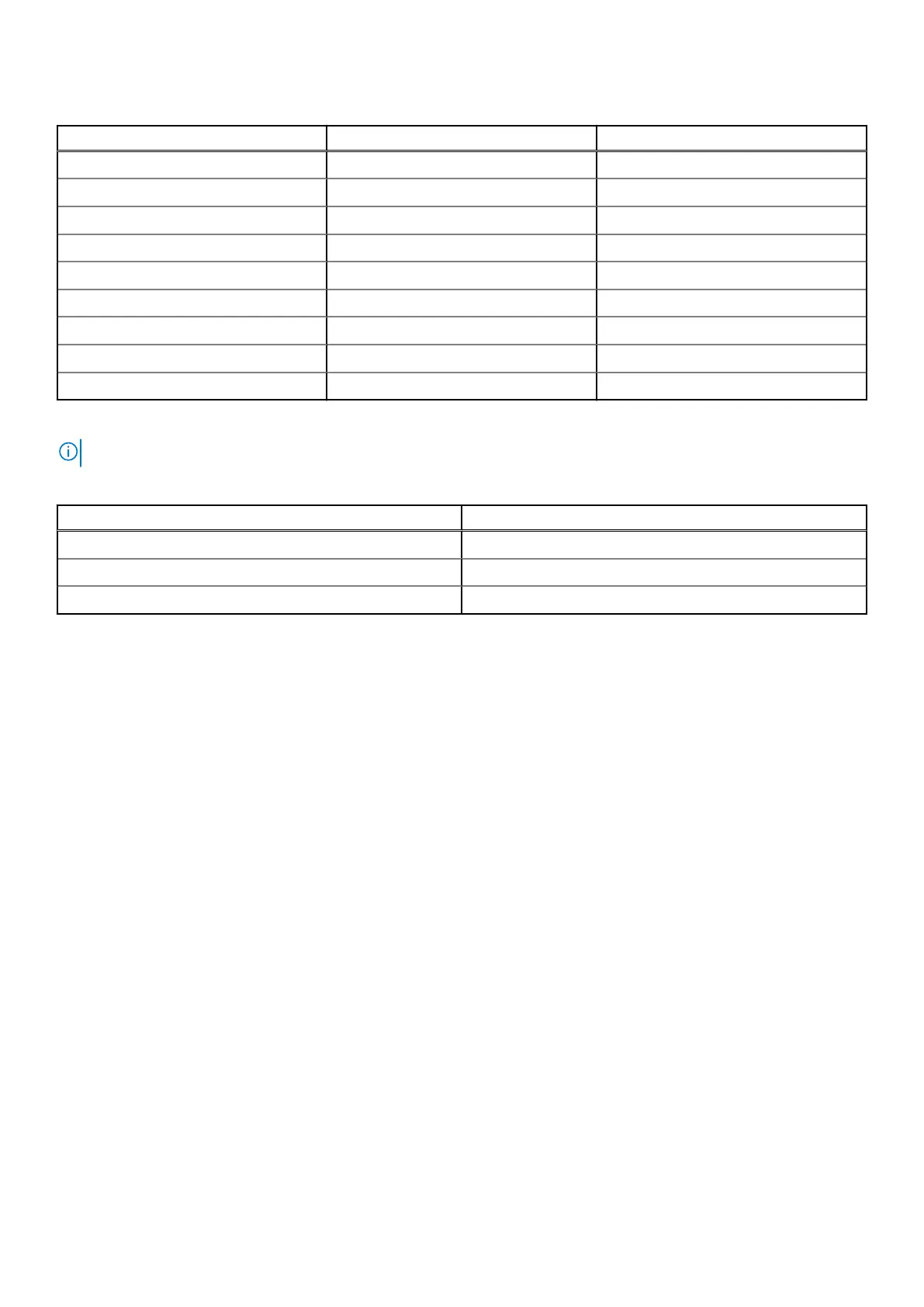
Table 5. Rail kit mounting hardware(continued)
Identifier Part Quantity
B M6x12(P1.0) 2
C #10-32x12 2
D #12-24x12 2
E M5x0.8 nut 2
F M5x0.8 nut 2
G M4x6(P0.7) 6
H M5 (square) 4
I M5 (circle) 6
J M4x13(P0.7) 2
The following hardware is required for each type of rack:
NOTE: If the quantity of a particular piece is not specified, all of that piece is required.
Table 6. Required rail hardware for DS600
Rack type Required mounting hardware
Round hole A, F, G, I
Square hole A, E, G, H, I (x2)
Threaded hole A or B or C or D (depending on rack thread type), G, I (x2), J
Install the rails onto the chassis
Remove the inner rails from the rail kit and install them on the chassis.
Steps
1. Pull the inner rails forward and remove it out from the rail kit.
Install the Disk Shelves in the Rack
25















 To Next Page