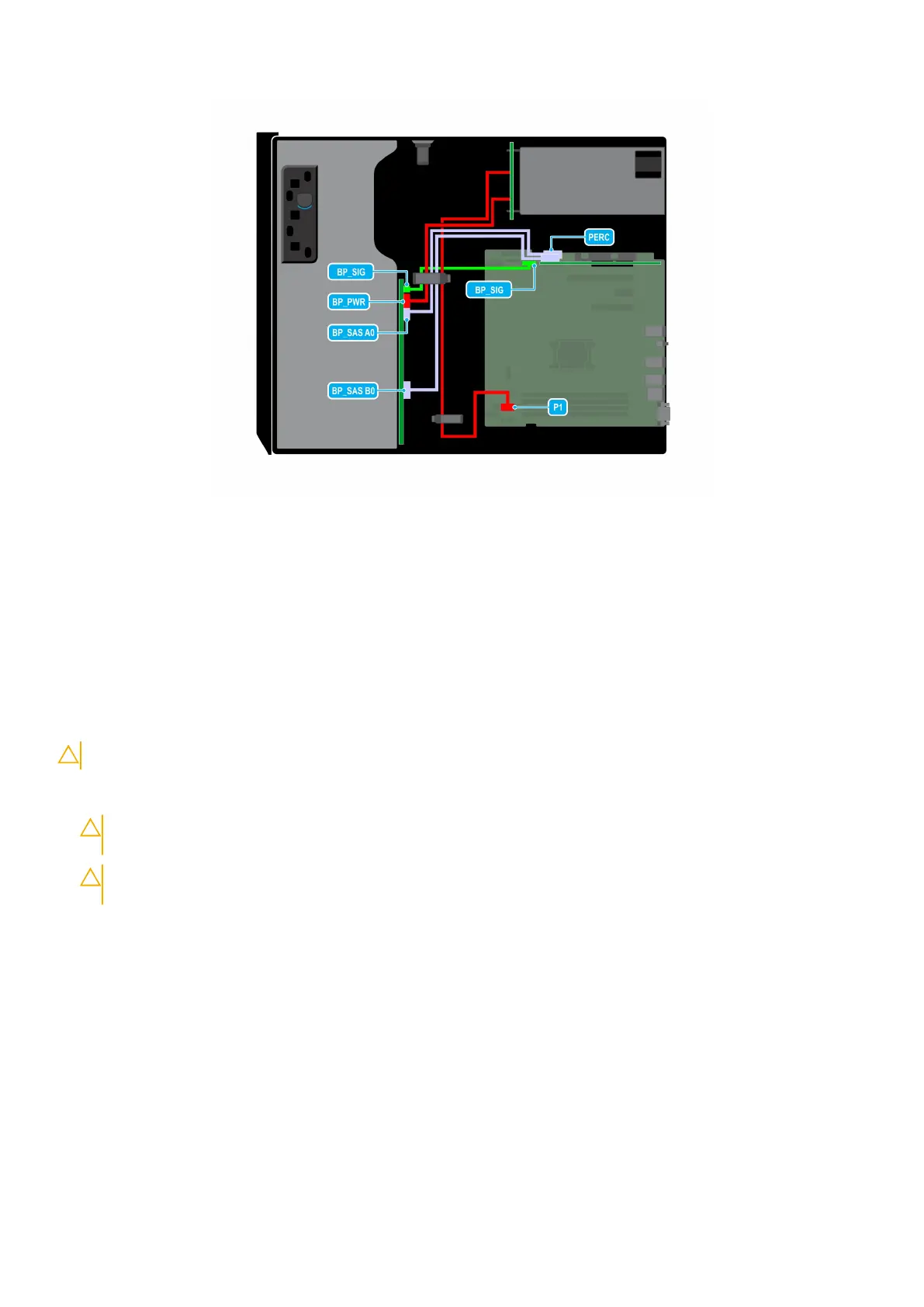
Figure 48. Cable routing - 8 x 3.5-inch SAS/SATA drive backplane with PERC card
Four-slot drive blank
Systems with x8 drive backplanes configured for software RAID support only four drives. The remaining drive slots are pre-
installed with the four-slot drive blank, and cannot be upgraded for additional storage.
Removing a four-slot drive blank
Prerequisites
CAUTION: To maintain proper system cooling, all empty drive slots must have drive blanks installed.
1. Follow the safety guidelines listed in Safety instructions.
2. Follow the procedure listed in Before working inside your system.
CAUTION:
To prevent damage to the drives and backplane, you must remove the drives from the system
before removing the backplane.
CAUTION: Note the slot number of each drive and temporarily label the slots before removing the drives so
that you can replace them in the same locations.
3. Remove the air shroud.
4. Remove all the drives.
5. Remove the drive backplane.
Steps
1. Using a screwdriver, push the release tabs on the corners of the blank from inside the system, to unlock the four-slot hard
drive blank from the chassis.
2. From the front of the system, pull the four-slot hard drive blank at the corners until it is free of the hard drive slot.
Installing and removing system components
51



 To Next Page