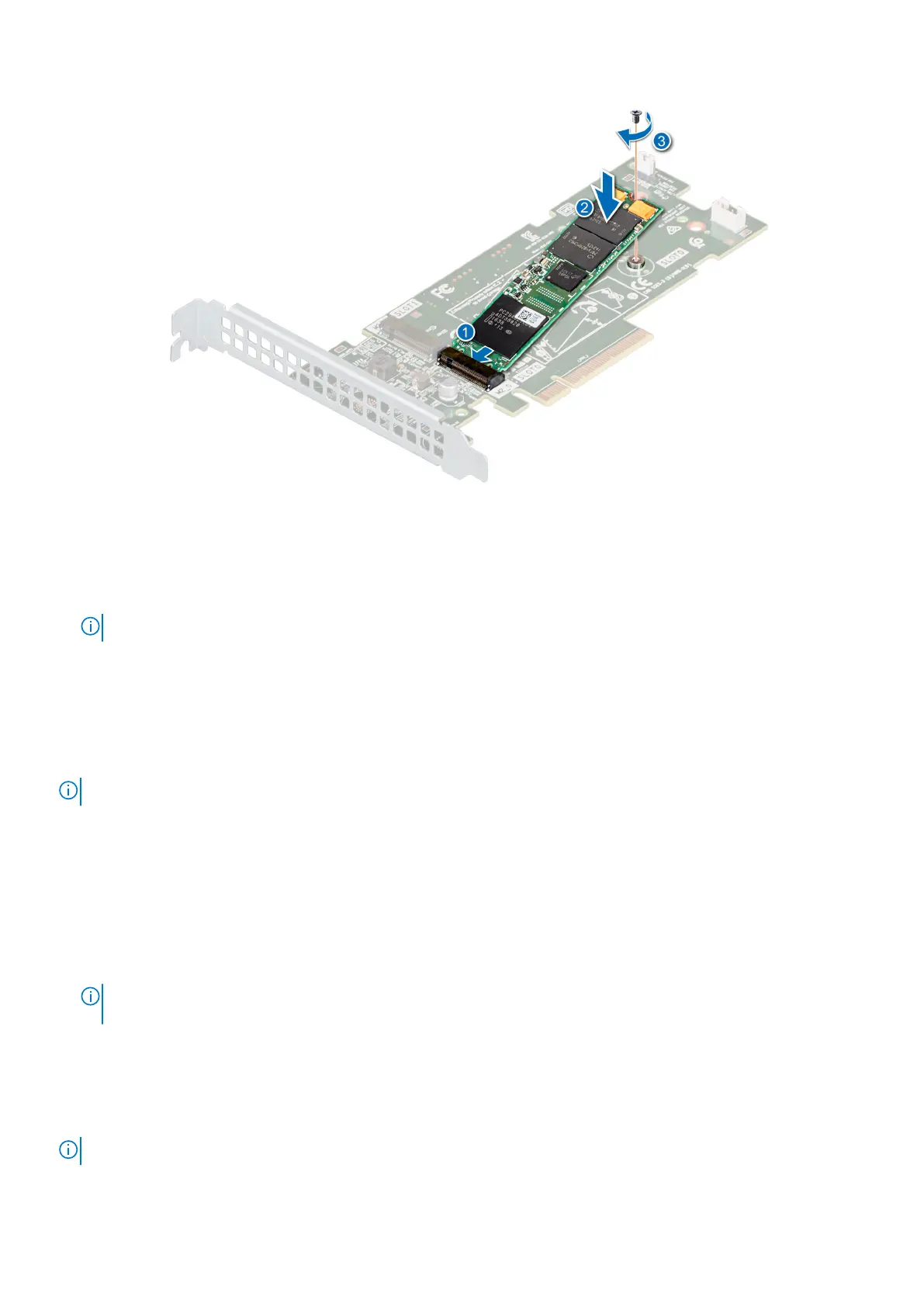
Figure 61. Installing the M.2 SSD module
Next steps
1. Install the BOSS card.
NOTE: The procedure to install the BOSS card is similar to removing an expansion card.
2. Install the air shroud.
3. Follow the procedure listed in the After working inside your system.
Optional IDSDM or vFlash module
The IDSDM or vFlash module combines the IDSDM and/or vFlash features into a single module.
NOTE: The write-protect switch is on the IDSDM or vFlash module.
Removing the optional IDSDM or vFlash card
Prerequisites
1. Follow the safety guidelines listed in Safety instructions.
2. Follow the procedure listed in Before working inside your system.
3. Remove the air shroud.
4. If you are replacing the IDSDM/vFlash card, remove the MicroSD cards.
NOTE:
Temporarily label each SD card with its corresponding slot number before removal. Reinstall the SD cards into
the corresponding slots.
Steps
Holding the pull tab, lift the IDSDM/vFlash card out of the system.
Next steps
NOTE: If you are replacing the IDSDM or vFlash module, remove the MicroSD cards.
1. Replace the IDSDM/vFlash module.
64
Installing and removing system components



 To Next Page