3. Follow the procedure that is listed in After working inside your system.
System battery
Replacing the system battery
Prerequisites
NOTE: There is a danger of a new battery exploding if it is incorrectly installed. Replace the battery only with the same
or equivalent type that the manufacturer recommends. Discard used batteries according to the manufacturer's instructions.
See the safety instructions that came with your system for more information.
1. Follow the safety guidelines listed in Safety instructions.
2. Follow the procedure listed in Before working inside your system.
Steps
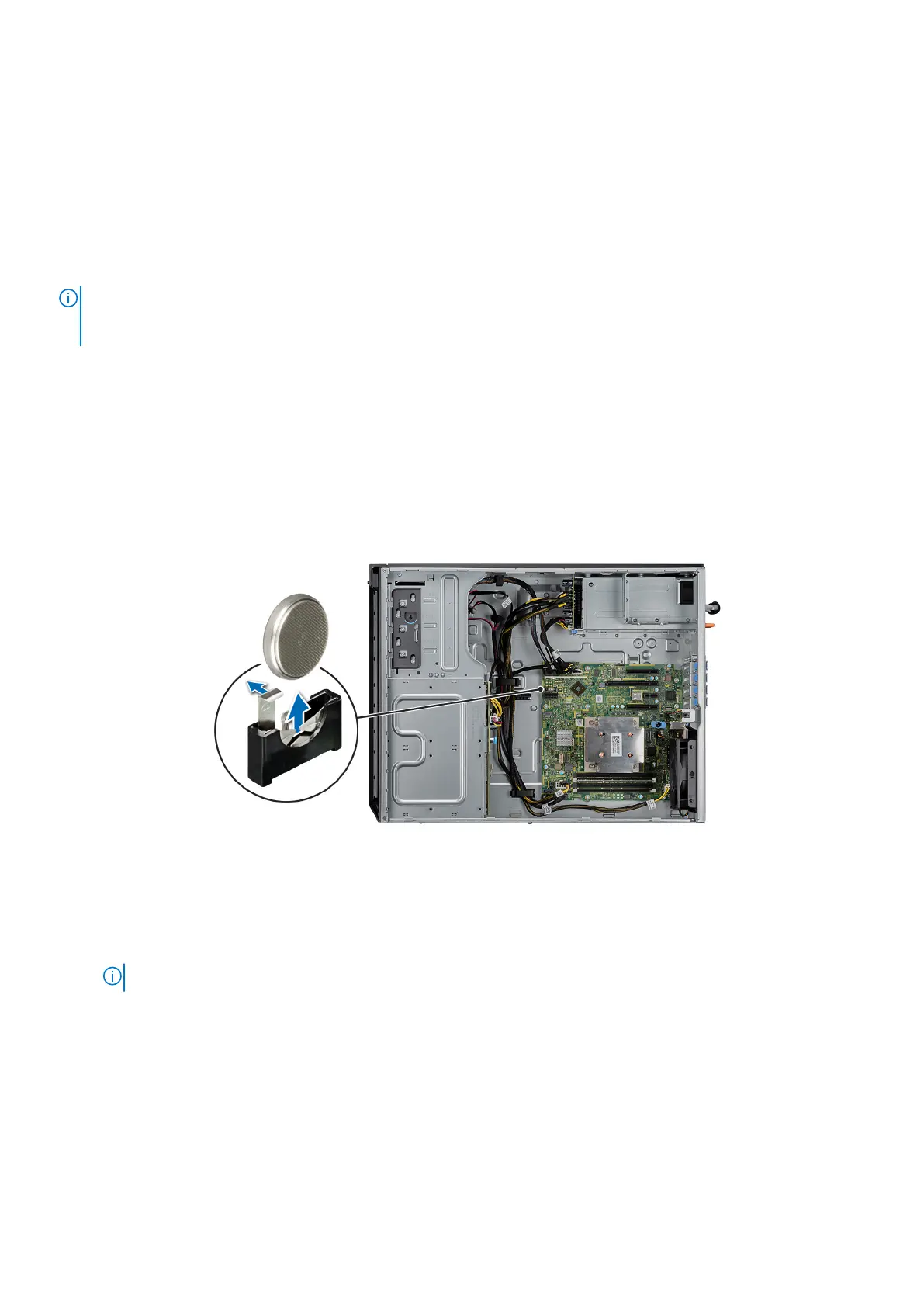
1. Locate the system battery on the system.
2. To remove the battery:
a. Push the battery toward the positive side of the battery until the battery disengages from the connector.
b. Lift the battery away from the system.
Figure 78. Removing the system battery
3. To install a new system battery:
a. Hold the battery with the + sign facing the positive side of the battery connector.
NOTE: Ensure that you do not push the battery clip more than 3.2 millimeters or you might risk damaging the part.
b. Insert the battery down into the connector until the battery snaps into place.
78
Installing and removing system components



 To Next Page