System Overview 1-27
Drives
(continued)
Internal hard-disk drive bays:
Low-profile computers . . . one 3.5-inch bay for a 1-inch-high hard-disk
drive
Midsize computers . . . . . one 3.5-inch bay for a 1-inch-high hard-disk
drive;
one 3.5-inch bay for a 1.6-inch-high hard-
disk drive
Mini tower
computers . . . . . . . . . . . . one 3.5-inch bay for a 1-inch-high hard-disk
drive;
one 3.5-inch bay for a 1.6-inch-high hard-
disk drive
Video
Video type. . . . . . . . . . . . . . . S3 Trio 64V2 86C785 built-in SVGA
controller attached to the PCI bus
Video memory. . . . . . . . . . . . 2 MB
Maximum video
resolutions
1
. . . . . . . . . . . . . . . .
1280 x 1024 pixels with 256 colors, non-
interlaced; 1024 x 768 pixels with
65,536 colors, noninterlaced
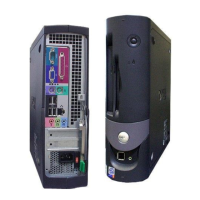
Ports
Externally accessible:
Serial (DTE) . . . . . . . . . . two 9-pin connectors (16550-compatible)
Parallel . . . . . . . . . . . . . . one 25-hole connector (bidirectional)
Video. . . . . . . . . . . . . . . . one 15-hole connector
PS/2-style keyboard . . . . 6-pin mini-DIN connector
PS/2-compatible
mouse . . . . . . . . . . . . . . . 6-pin mini-DIN connector
NIC . . . . . . . . . . . . . . . . . RJ45 connector (on OptiPlex Gn+ models)
USB. . . . . . . . . . . . . . . . . two USB-compliant connectors
1
You may need to use the drivers and utilities provided with your computer to optimize the
video image on your monitor.
Table 1-5. Technical Specifications
(continued)









 To Next Page