Assembly and Installation MATRIX Control Panel OP71
18 PR-2009-0021-GB • Subject to modifications • R5-04/2016
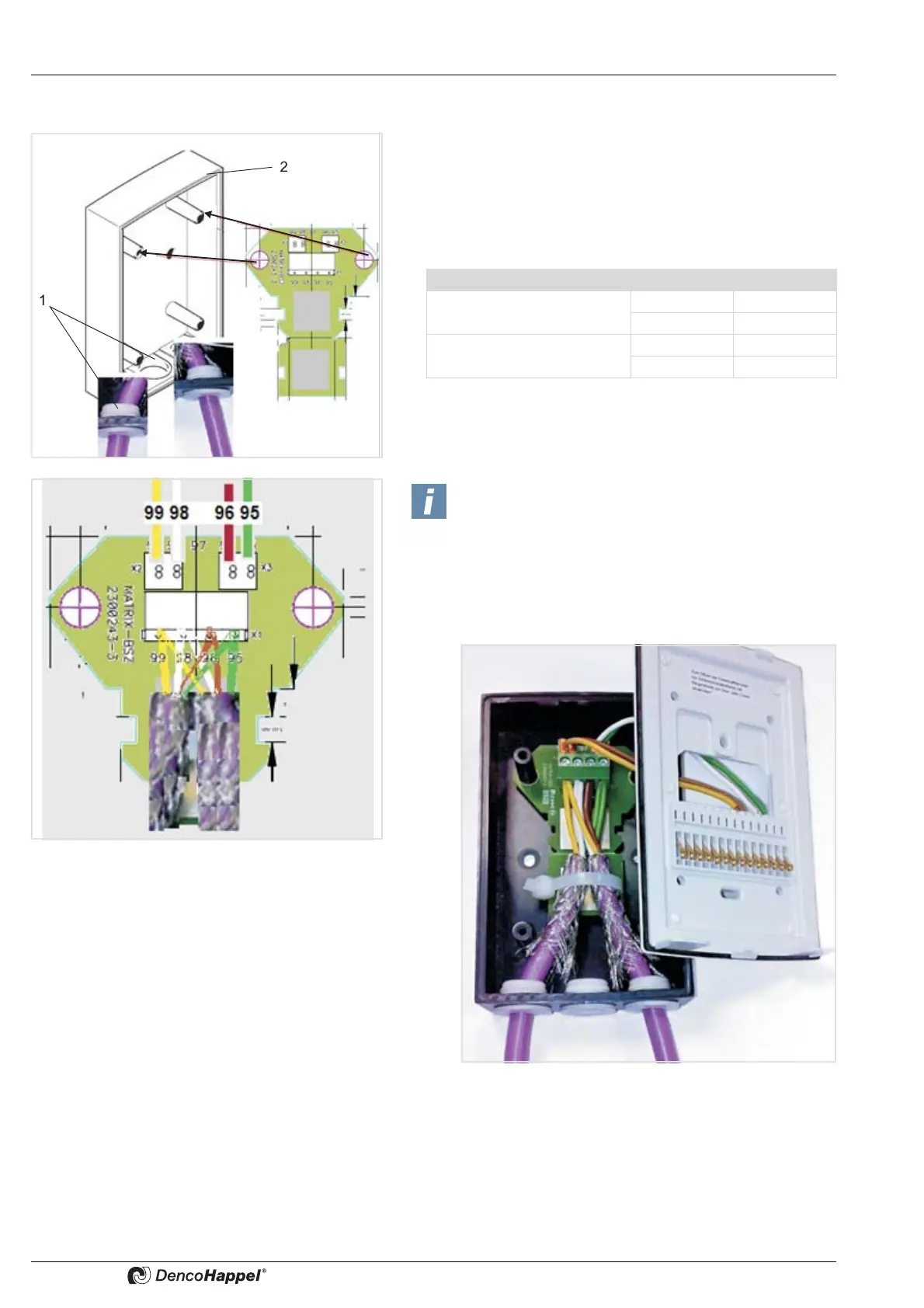
5.2.2 Mounting MATRIX BSZ in the surface-mounted casing of the MATRIX OP5X I (IP54) control panel
• Integrate the circuit board in the surface-mounted socket of
the MATRIX control panel.
• Route the wires through the membrane grommets (1) of the
flush-mounted socket (2) and connect the bus cable (refer to
cable recommendation for MATRIX.Net) as follows:
Tab. 5-2: Terminal designation
• Use the supplied cable to connect the circuit board with the
terminals of the mounting plate of the MATRIX OP5XC
control panel, as illustrated in Tabelle 5-2 on page 18.
Terminal Signal
Supply voltage 95 GND
99 Vcc
MATRIX.Net 96 Low
98 High
Note!
A cable strap is used to provide cable strain relief
and shielding.



 To Next Page