Operating MATRIX control panel OP71 MATRIX Control Panel OP71
32 PR-2009-0021-GB • Subject to modifications • R5-04/2016
8 Operating MATRIX control panel OP71
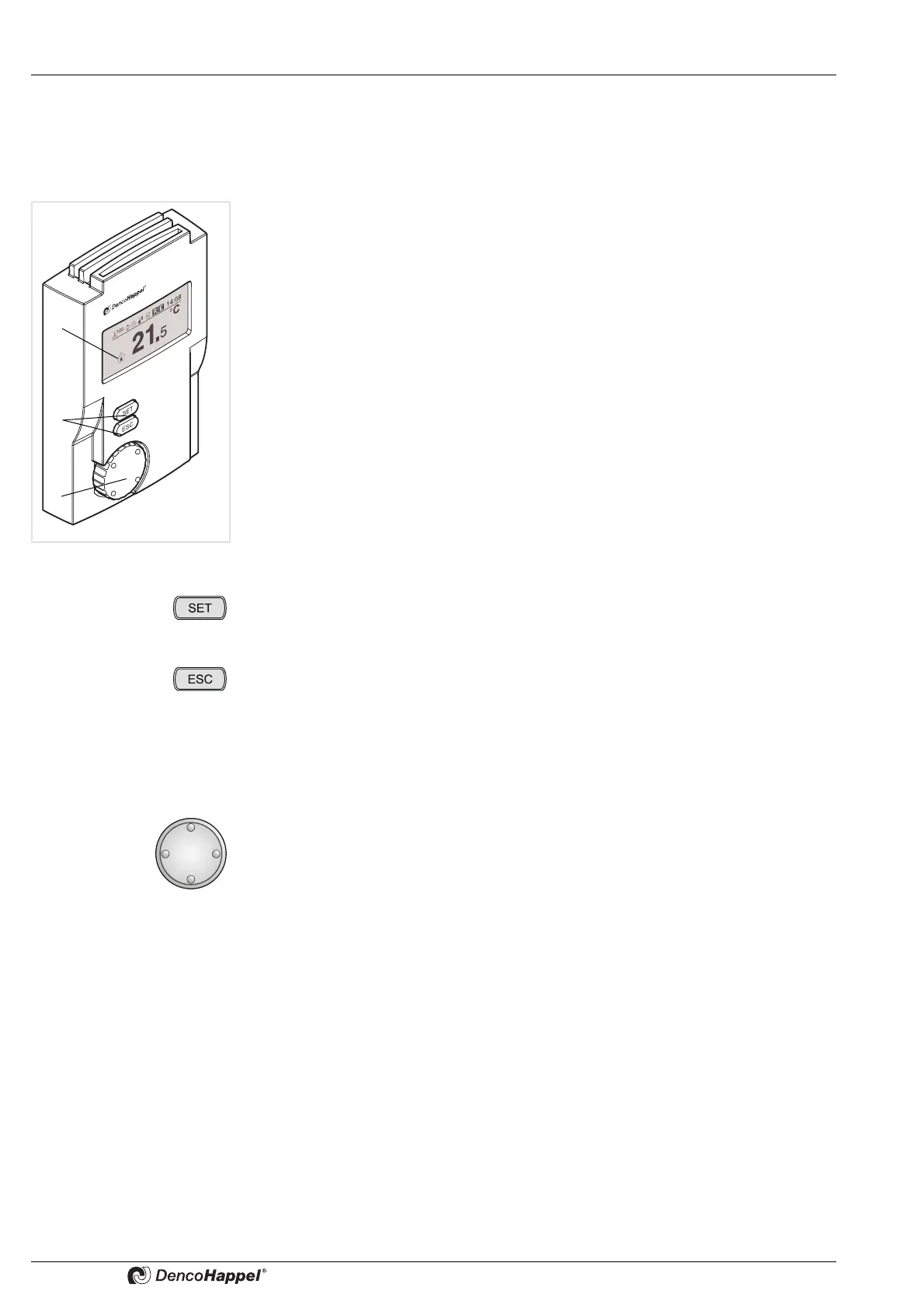
8.1 Overview of the operating elements
The MATRIX control panel OP71 is divided into three areas:
(1) Display
(2) Buttons
(3) Navigator (rotation switch)
Display
The MATRIX control panel OP71 is equipped with a monochrome graphical LCD dis-
play (1) featuring resolution of 128 x 64 dots.
The LCD display has background lighting. The background lighting turns on
automatically if any button or the navigator is pressed and deactivated automatically
20 s after the last operation. The display contrast and the brightness of the backlighting
can be regulated using the menu. In the stand-by mode the home screen is shown on
the display (see „Cluster status display (screen saver)“ on page33).
Buttons
With the “SET” button you can:
– go to a lower menu level and enter data
– save or confirm an entry
With the “ESC” button you can:
– cancel entries at any time
– go to the next higher menu level
– switch over to the basic display
Navigator
With the navigator (rotation switch) you can:
– navigate step by step forwards and backwards through the individual menus
– change parameters (values)
– move the cursor



 To Next Page