ineo+ 353/253/203 1-117
Setup items by operation
1
1.39 Performing IP address filtering
Specify settings for performing IP address filtering.
Performing IP address filtering limits access from specified IP addresses. Specify addresses from which this
machine is accessible and inaccessible.
Specify the settings according to the following flowchart.
1.39.1 TCP/IP Settings
Specify settings to use this machine in a TCP/IP network environment.
For details, refer to "Specifying general settings for TCP/IP-based communication" on page 1-2.
1.39.2 IP Filtering
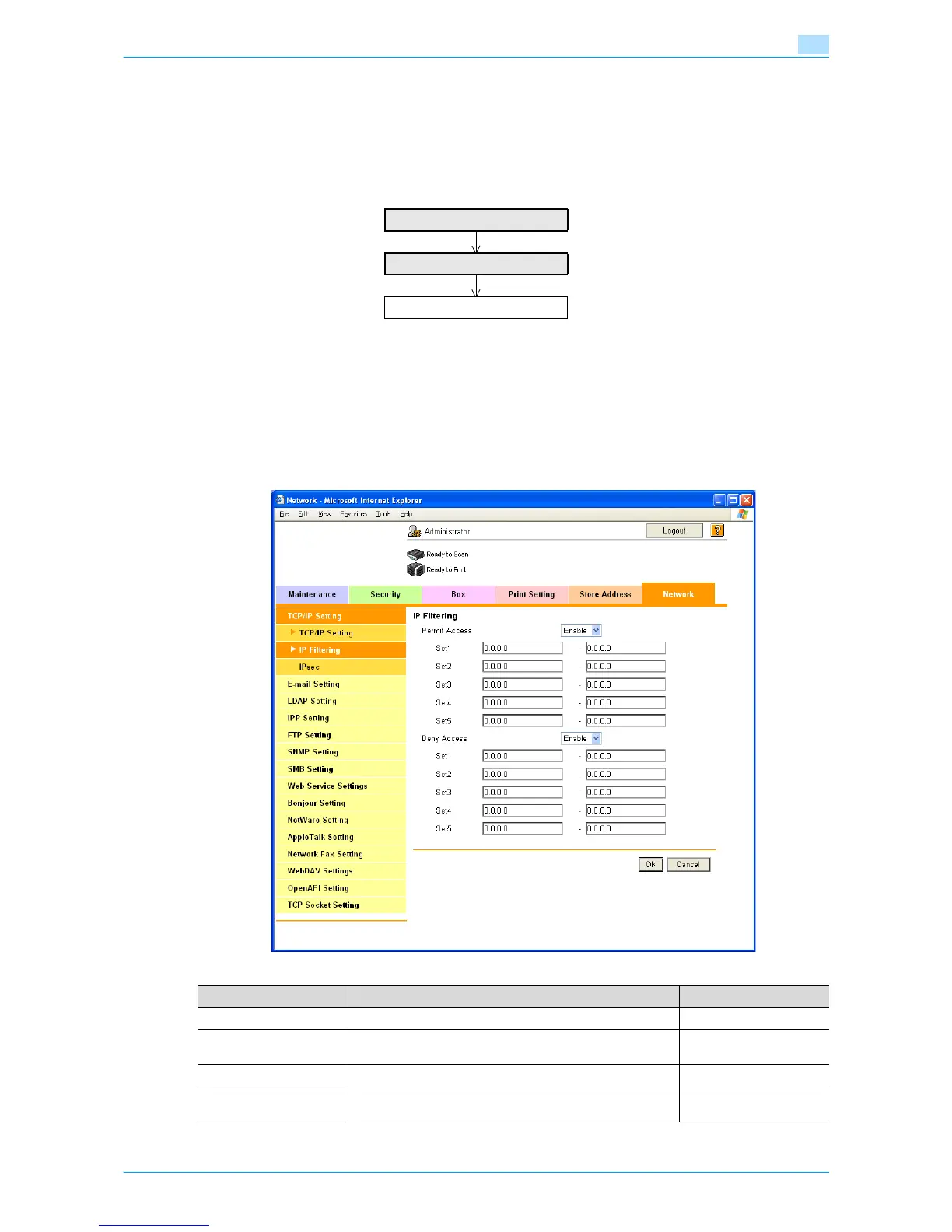
In Administrator mode of Web Connection, select the Network tab - "TCP/IP Setting" - "IP Filtering".
Specify the following settings.
TCP/IP Settings
IP Filtering
Finish
Item Definition Prior confirmation
Permit Access To specify permitted addresses, select "Enable".
Set 1 to 5 Specify permitted addresses. (Format: "***.***.***.***", Range
for ***: 0 to 255)
Permitted addresses
Deny Access To specify denied addresses, select "Enable".
Set 1 to 5 Specify denied addresses. (Format: "***.***.***.***", Range for
***: 0 to 255)
Denied addresses











 To Next Page