ineo+ 353/253/203 1-43
Setup items by operation
1
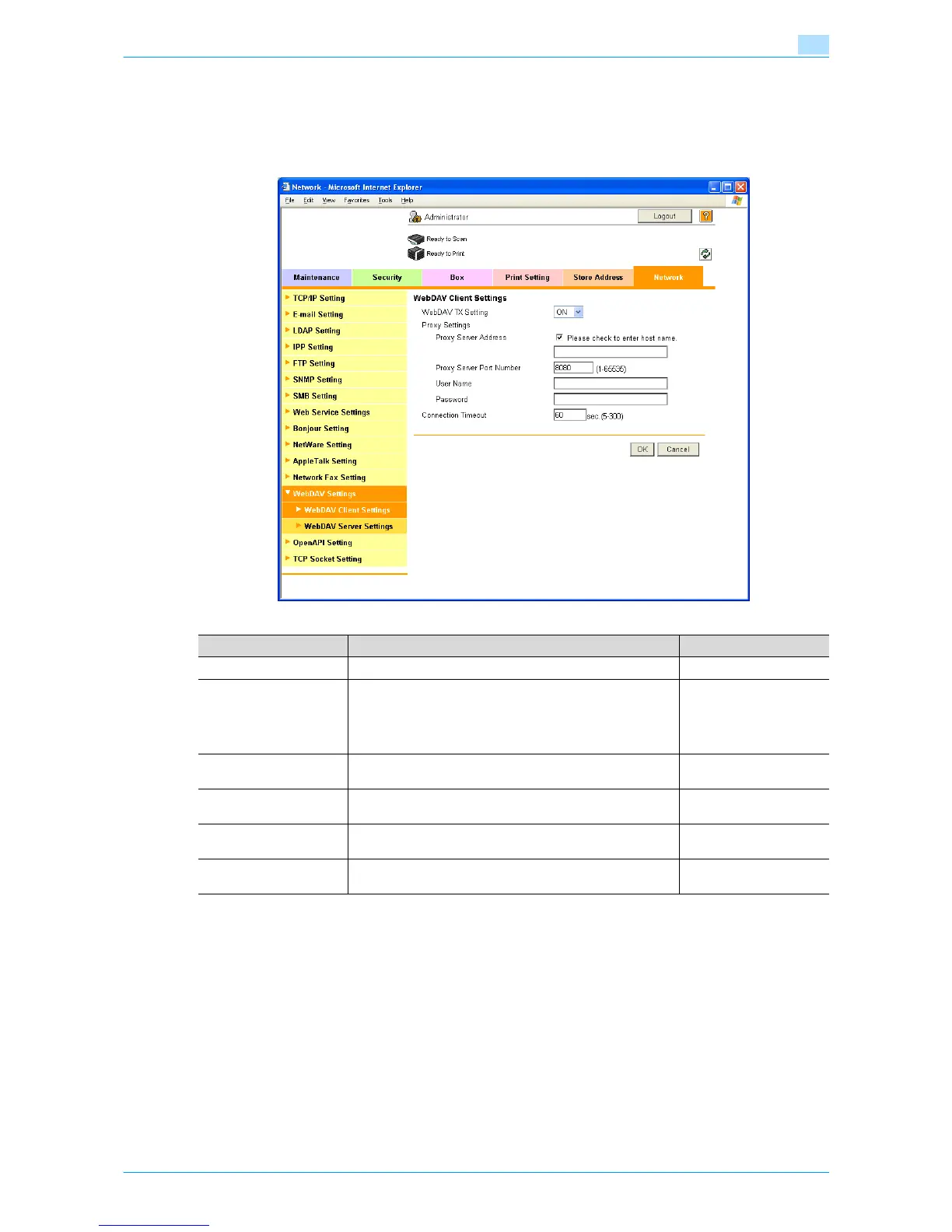
1.14.2 WebDAV Client Settings
In Administrator mode of Web Connection, select the Network tab - "WebDAV Settings" - "WebDAV Client
Settings".
Specify the following settings.
Item Definition Prior confirmation
WebDAV TX Setting Select "ON".
Proxy Server Address To send data via a proxy server, specify the proxy server ad-
dress. (Format: "***.***.***.***", Range for ***: 0 to 255)
If the DNS server is specified, the address can be specified
using the host name.
This item can also be specified with IPv6.
Address of the server
Proxy Server Port
Number
Specify the port number. Port number for the serv-
er
User Name Specify the user name for the proxy server (up to 63 charac-
ters).
Password Specify the password for the proxy server (up to 63 charac-
ters).
Connection Timeout Specify the time period before the server connection times
out.











 To Next Page