ineo+ 353/253/203 1-155
Setup items by operation
1
1.48 Store Address tab settings
From the Store Address tab, transmission destinations and user box destinations for saving data can be
registered and their settings can be changed.
!
Detail
When users are permitted to register addresses, address registration and modification are available in
the User mode as well. For details on settings whether or not to permit address registration by users,
refer to "Restricting address registration by a user" on page 1-143.
1.48.1 Registering or editing an address book destination
Register a new address book, change address book settings or register icons.
Register destinations in the address book in advance, and then they are selectable when sending. Also, an
icon can be registered to a registered address book.
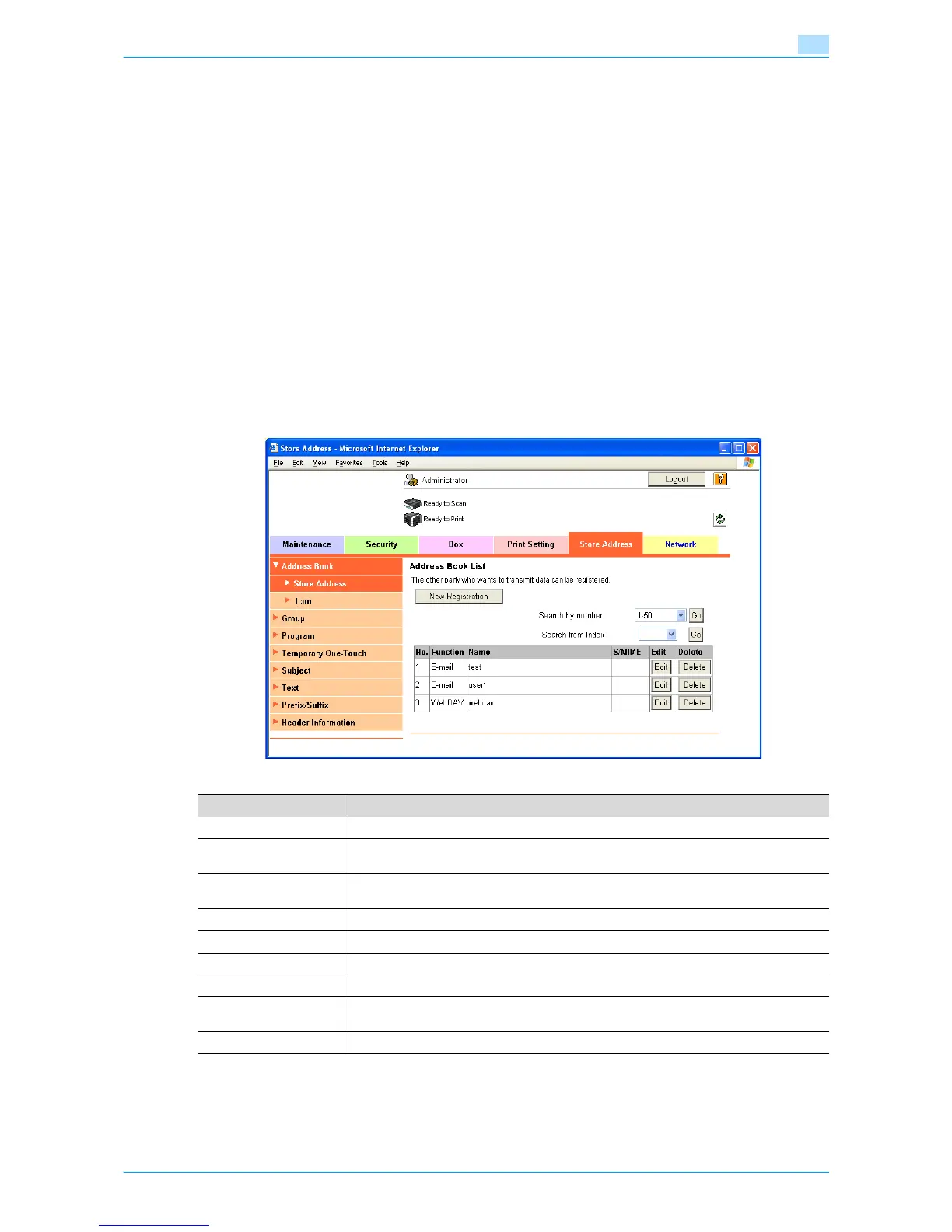
Store Address
In Administrator mode of Web Connection, select the Store Address tab - "Address Book" - "Store Address".
Specify the following settings.
Item Definition
[New Registration] Registers a new destination in the address book.
Search from Number Select a range of registration numbers, and then click [Go] to display the list of destina-
tions of the selected number.
Search from Index Select the search text, and then click [Go] to display the list of destinations of the selected
texts.
No. Displays the registration number.
Function Displays functions for which addresses were registered.
Name Displays registered names.
S/MIME Shows whether or not a certificate is attached to the E-mail destination.
[Edit] Edits the registered address. The settings are the same as ones available during registra-
tion.
[Delete] Deletes the address from the address book.











 To Next Page