ineo+ 353/253/203 1-142
Setup items by operation
1
1.45 Other items on the Security tab
This section describes other items specifiable on the Security tab for the Web Connection.
1.45.1 Limiting accessible destinations by user
Register reference allowed groups and specify whether to allow reference to public users.
Specifying the reference allowed group and the access allowed level for destinations to be registered limits
destinations to be displayed on an accessing user basis at the time of user authentication or logging in to
public mode.
!
Detail
For details on limiting access to destinations, refer to the User’s Guide [Copy Operations].
When registering a user, specify groups accessible to the user and reference allowed level. For details,
refer to "User Registration" on page 1-98.
Specify the group that is allowed to access a destination to be registered when registering an address
book destination and reference allowed level. For details, refer to "Registering or editing an address
book destination" on page 1-155.
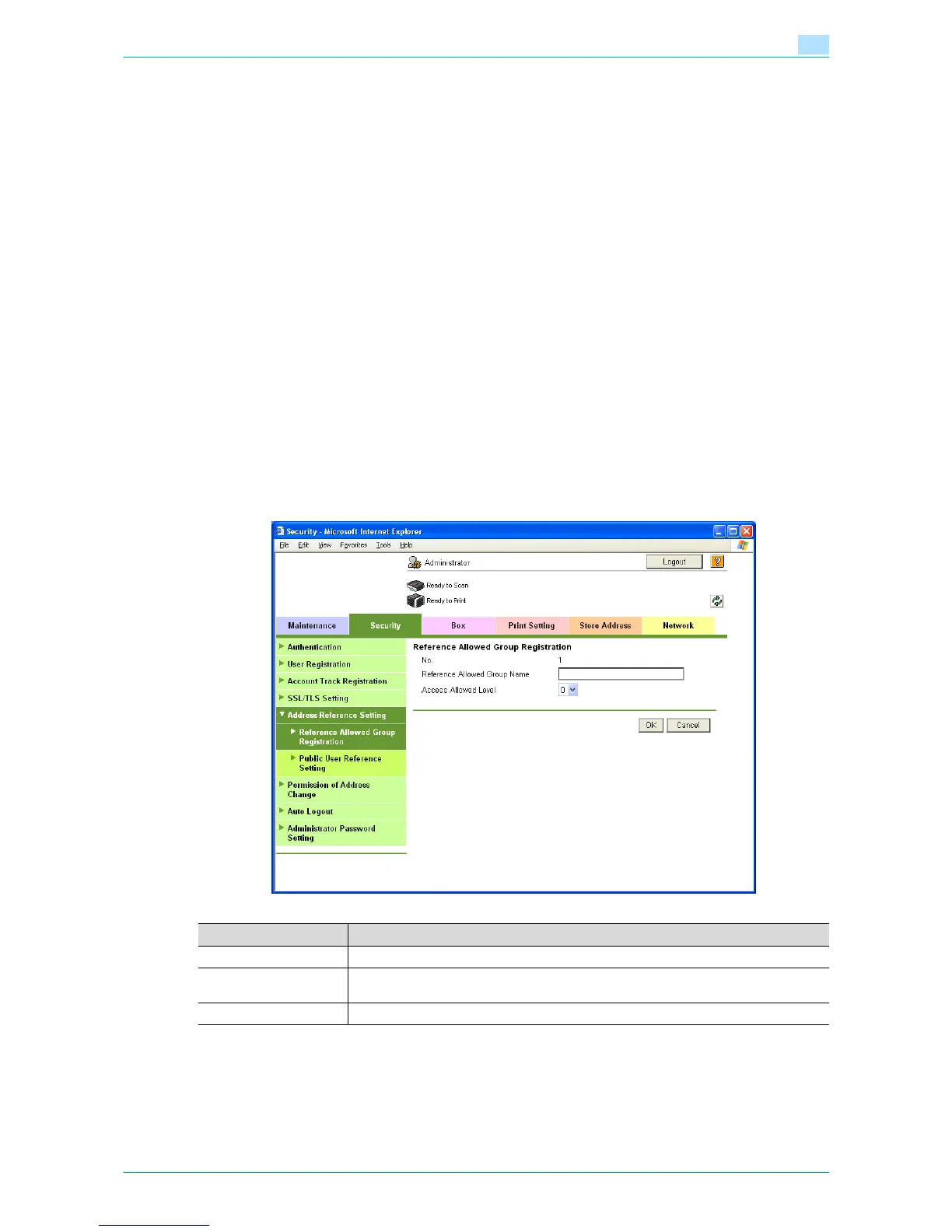
Reference Allowed Group Registration
In Administrator mode of Web Connection, select the Security tab - "Address Reference Setting" -
"Reference Allowed Group Registration" - [Edit].
Specify the following settings.
Item Definition
No. Displays the registration number.
Reference Allowed
Group Name
Specify the reference allowed group name (up to 24 characters).
Access Allowed Level Specify the access allowed level for the group.











 To Next Page