ineo+ 353/253/203 1-73
Setup items by operation
1
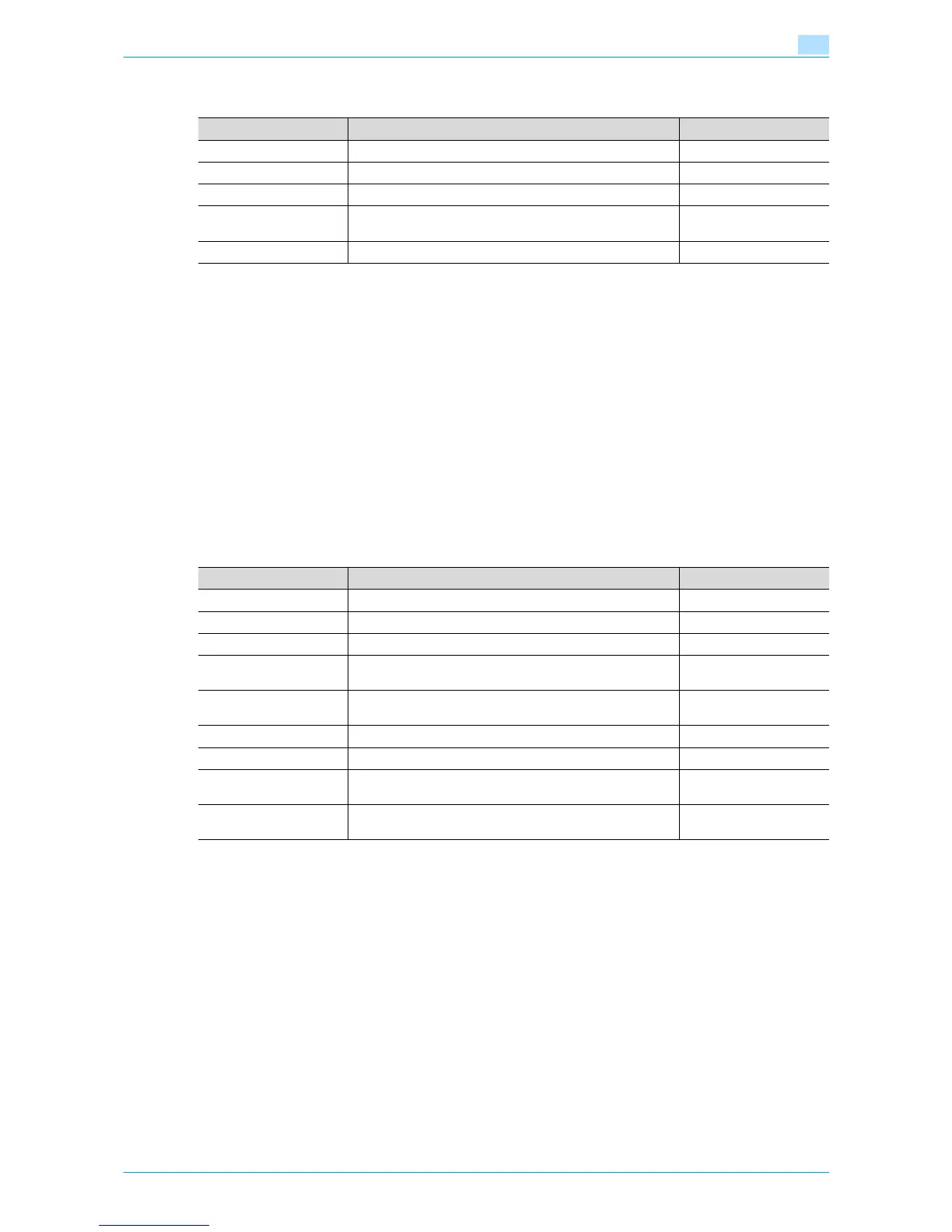
Next, specify the following settings for "NetWare Setting".
For NetWare 4.x/5.x/6 Print Server mode (NDS)
0 To use the printer server mode, the IPX protocol must be loaded on the NetWare server.
1 Log in to NetWare as an administrator from a client computer.
2 Start up NWadmin.
3 Select either the organization or organizational unit container that offers the print service, and then click
"Print Services Quick Setup (non-NDPS)" on the "Tools" menu.
4 Enter the appropriate names in the "Print Server Name", "Printer Name", "Print Queue Name", and
"Print Queue Volume" fields, select "Other/Unknown" from the "Printer type" field, and then click
[Create].
Next, specify the following settings for "NetWare Setting".
For NetWare 5.x/6 Novell Distributed Print Service (NDPS)
0 Before specifying settings for NDPS, check that the NDPS broker and NDPS manager have been
created and loaded.
0 Also, check that the TCP/IP protocol is specified in the NetWare server, the IP address is specified for
this machine, then this machine is running.
1 Log in to NetWare as an administrator from a client computer.
2 Start up NWadmin.
3 Right -click "Organization" or "Organizational unit" container where a printer agent is created, and then
select "NDPS Printer" on the "Create" submenu.
4 In the "NDPS Printer Name" box, enter the "printer name".
5 In the "Printer Agent Source" column, select "Create a New Printer Agent", and then click "Create".
Item Definition Prior confirmation
IPX Setting* Select "ON".
Ethernet Frame Type* Specify the frame type to be used. Frame type
NetWare Print Mode* Select "NPrinter/Rprinter".
Print Server Name* Specify the printer server name to allow it to serve as Nprint-
er/Rprinter (up to 63 characters).
Print server name regis-
tered in step 4
Printer Number* Enter the Nprinter/Rprinter printer number.
Item Definition Prior confirmation
IPX Setting* Select "ON".
Ethernet Frame Type* Specify the frame type to be used. Frame type
NetWare Print Mode* Select "PServer".
Print Server Name* Specify the printer server name to allow it to serve as PServ-
er (up to 63 characters).
Print server name regis-
tered in step 4
Print Server Password* If necessary, specify the password for the printer server (up
to 63 characters).
Polling Interval* Specify an interval to make queries for jobs.
Bindery/NDS Setting Select "NDS".
NDS Context Name Specify the NDS context name connected with the print
server (up to 191 characters).
NDS Tree Name Specify the NDS tree name connected with the printer server
(up to 63 characters).











 To Next Page