ineo+ 353/253/203 1-172
Setup items by operation
1
For Certified Delivery
Application Registration
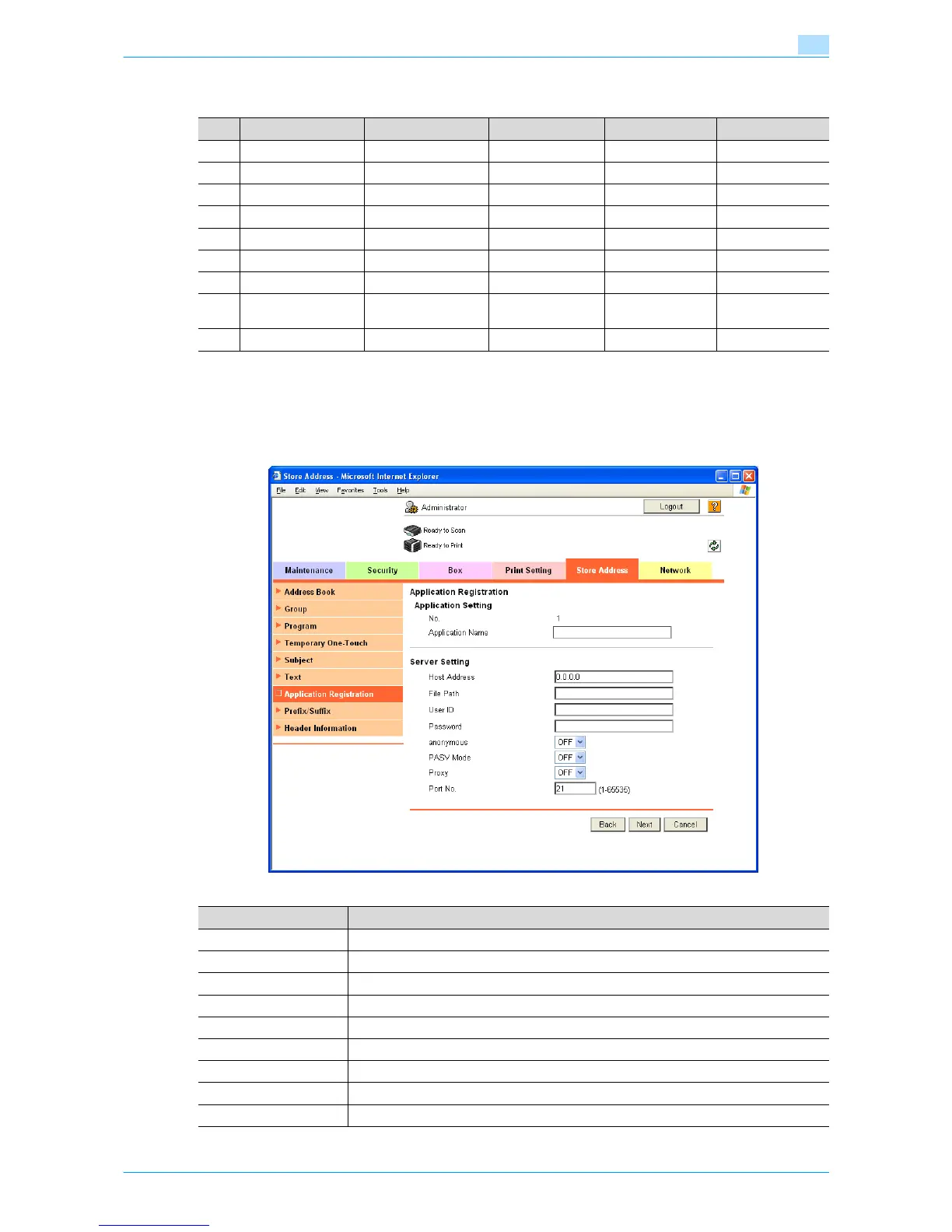
In Administrator mode of Web Connection, select the Store Address tab - "Application Registration" -
[Registration/Edit].
Select the template type, and then specify the following settings.
No. Button Name Function Name Keyboard Type Default Value Options
1 User ID ID ASCII Walkup -
2 Password Password ASCII - -
3 Password Auth# Authentication - - None
4 Subject Subject ASCII - -
5 BillingCode1 BillingCode1 ASCII - -
6 BillingCode2 BillingCode2 ASCII - -
7 CoverSheet Type CoverSheet - - -
8 Document PW DocumentPass-
word
ASCII - -
9 Delivery Method Delivery - - Secure
Item Definition
No. Displays the registration number of the selected application.
Application Name Enter the application name (up to 16 characters).
Host Address Enter the host address for the server registering the application (up to 15 characters).
File Path Enter the application file path (up to 96 characters).
User ID Enter the user ID for logging in to the server (up to 47 characters).
Password Enter the password for logging in to the server (up to 31 characters).
anonymous Specify whether even an anonymous user can access the destination.
PASV Mode Register whether to make communication in the PASV mode.
Proxy Specifies whether or not a proxy server is used.











 To Next Page