ineo+ 353/253/203 1-151
Setup items by operation
1
1.47 Print Setting tab settings
This section describes other items specifiable on the Print Setting tab for the Web Connection.
On the Print Setting tab, specify settings for the print function of this machine.
2
Note
For details on the print function, refer to the User’s Guide [Print Operations].
1.47.1 Specifying initial settings for the print function
Specify initial settings for the print function.
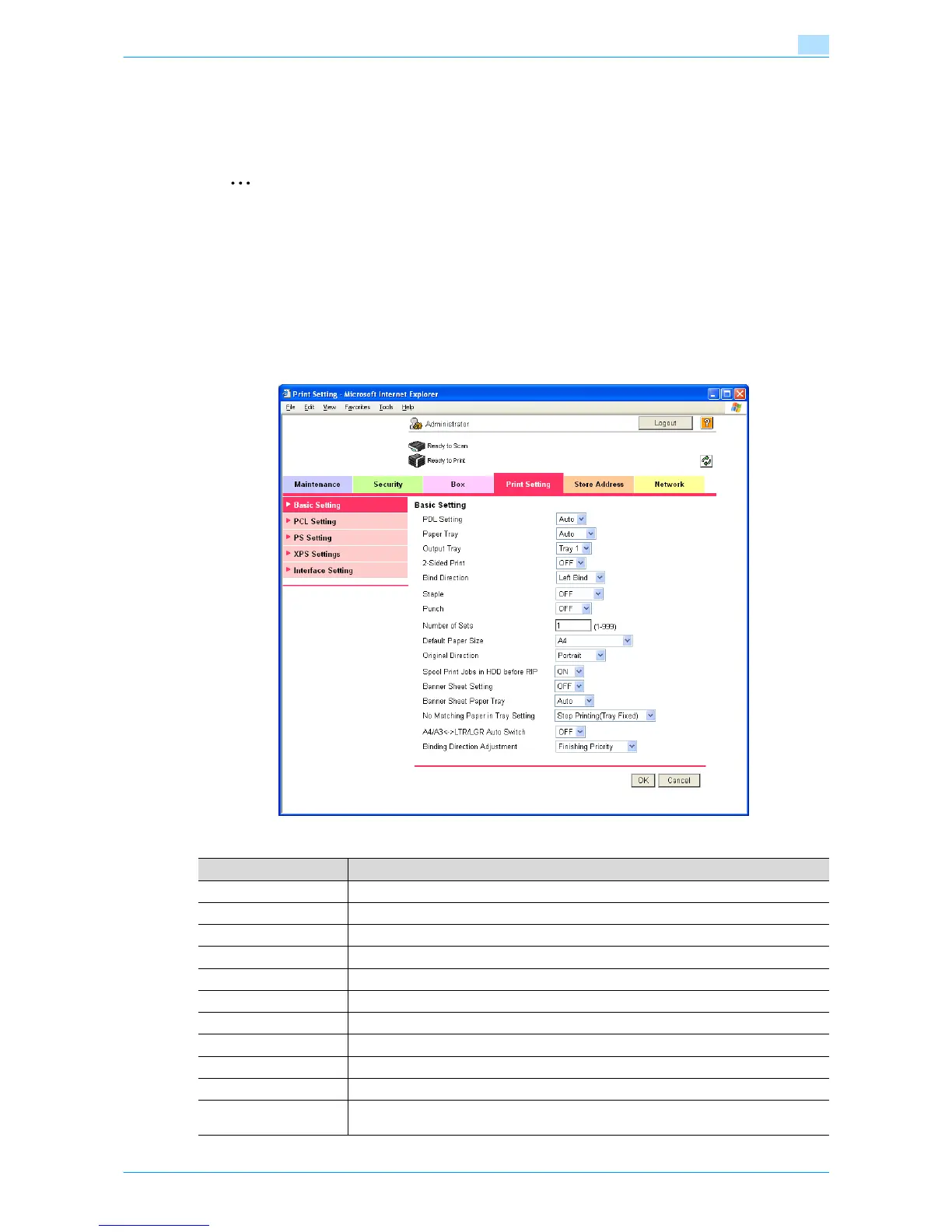
Basic Setting
In Administrator mode of Web Connection, select the Print Setting tab - "Basic Setting".
Specify the following settings.
Item Definition
PDL Setting Specify the PDL language.
Paper Tray Specify the paper tray.
Output Tray Specify the output tray.
2-Sided Print Specify whether to perform 2-sided print.
Bind Direction Specify the binding direction.
Staple Specify whether to perform staple. If yes, specify the number of staples.
Punch Specify whether to perform punch.
Number of Sets Specifies the number of copies to be printed.
Default Paper Size Specifies the paper size.
Original Direction Select the original direction.
Spool Print Jobs in HDD
before RIP
Select whether to spool a print job to HDD.











 To Next Page