EasyManua.ls Logo

Dnepr MT9 - Flywheel Removal and Installation

Dnepr MT9
124 pages
Print Icon
To Next Page IconTo Next Page
To Previous Page IconTo Previous Page
Loading...
..
.
0
re-install
the
clutch
driven
disk,
intermediate
driYing disk,
the
second
driven
dish:
and
the
clutch
bea
rin
g disk;
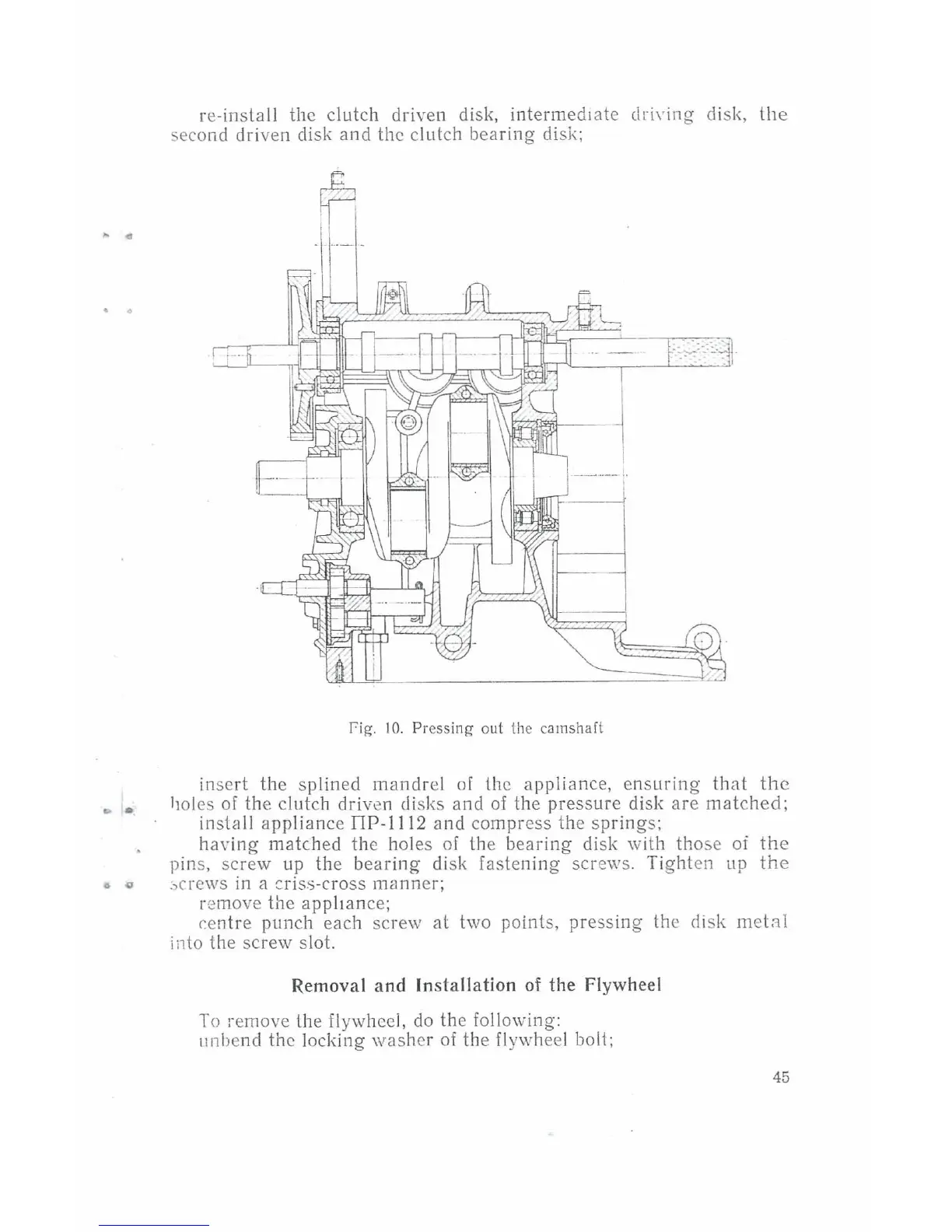
fig.
I
0.
Pressing out
!he
camshaft
insert
the
sp
lined
mandr
el
of (he
appliance,
ensuring
that
the
holes
of
the
clutch
driven
disks
and
of
the
pressure
disk
are
matched;
install
appliance
nP-1112
and
compress
the
sp
ring
s;
having
matched
the
holes
of
lhe
bearing
disk
with
tho
se
of
the
pins,
screw
up
the
bearing
disk
fastening
screws.
Tight
en
up
the
:,
crews
in a cris;;-cro
ss
manner;
remove
the
appliance;
r.en
tr
e
punch
each
sc
r
ew
at
two
points,
pressing
the
disk
met:-:tl
i
il
to
the
screw
slot.
Removal and Installation
of
the Flywheel
To
remove
lhe
flywheel,
do
the
following:
11nbend
the
locking
washer
of
the
flywhe
el bolt;
45

Table of Contents

Related product manuals