User manual DPC Touch V2 DOC.60352-11/20
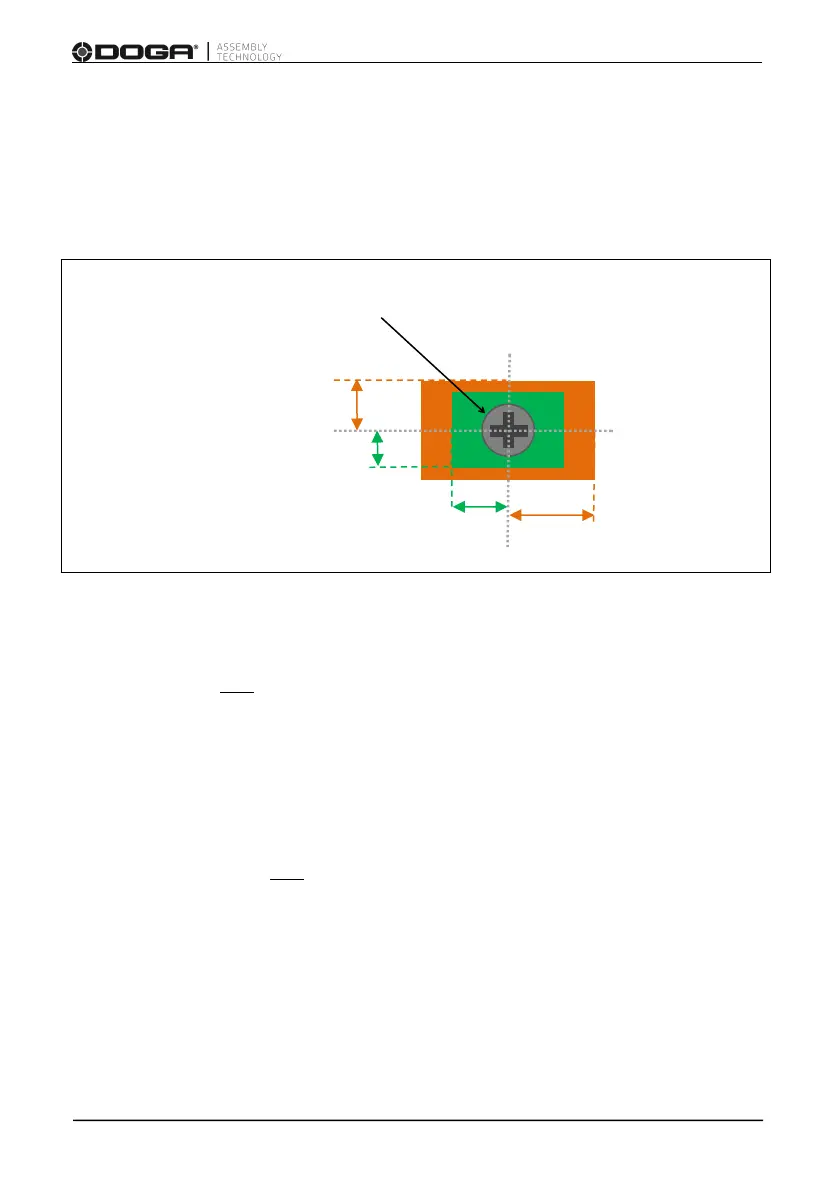
Example:
For a screw position saved as follow CH1: 300 & CH2: 500, and for an
OK zone defined with 80 pts on CH1 and 100 pts on CH2, and a
Tolerance zone defined with 150 pts on CH1 and 200 pts on CH2:
Screw (Location CH1: 300 / CH2: 500)
In the OK zone, tool is enabled.
In this example, this OK zone contains all positions on CH1 between 220 and
380 (300 +/- 80) and on CH2 between 400 and 600 (500 +/- 100).
In the tolerance zone, tool is disabled. If the option «Temporary position loss
time» is activated (see paragraph 3.3.3.), the tool can finish its cycle even if it
enter in the tolerance zone during the fastening.
In this example, the tolerance zone contains all positions on CH1 between 150
and 450 (300 +/- 150) and on CH2 between 300 and 700 (500 +/- 200).
Out of those zones, tool is disable.
Smart tolerance: the OK zone can be defined using this automatic function
(refer to paragraph 4.4.6). Must be used after the position is defined.



 To Next Page