User manual DPC Touch V2 DOC.60352-11/20
4.4.7 Logical Input step creation
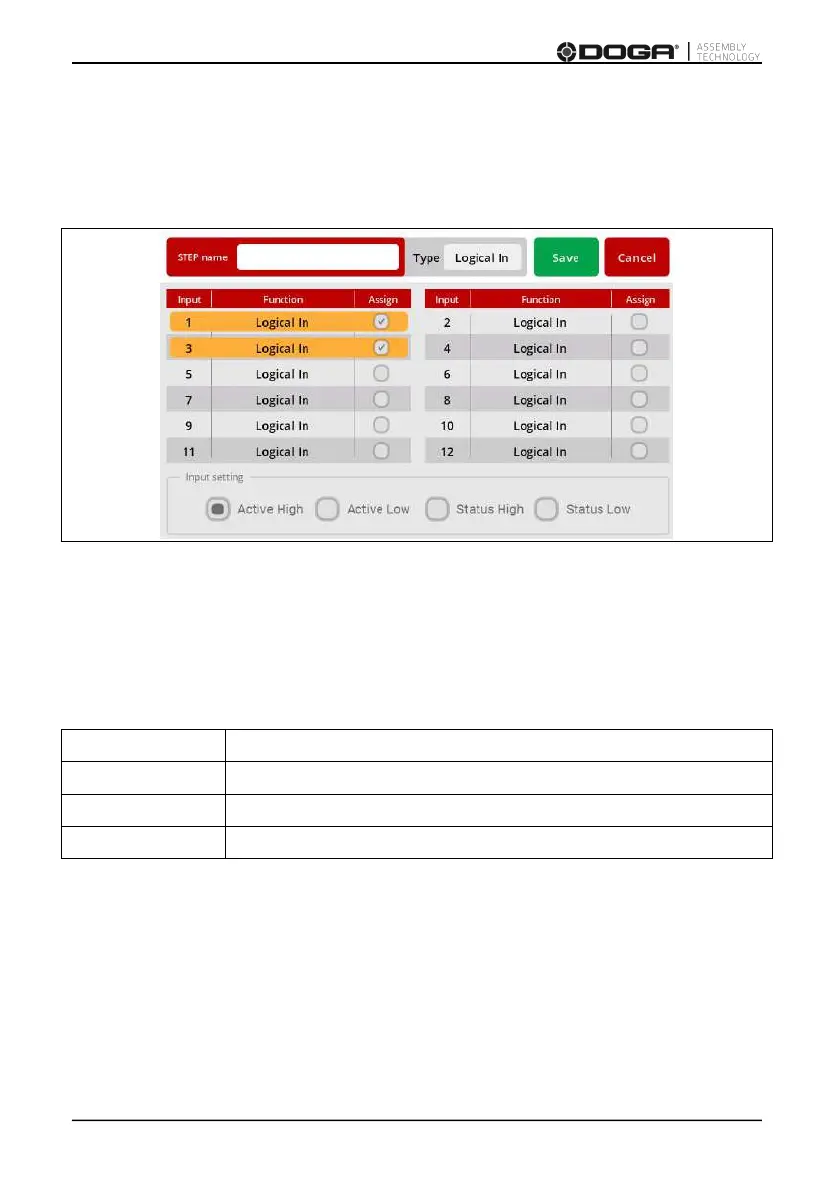
While on the Job modification screen, tap the LOGICAL IN button.
The Logical In step creation screen will appear.
Select an available input from the list of Inputs.
If an Input was assigned for a specific function in Input settings it is not
available to be used as a logical signal.
Select the type of the signal. There are four types of input signals:
it is necessary to detect a transition from 0 to 1.
it is necessary to detect a transition from 1 to 0.
it is enough to detect if the signal is equal to 1.
it is enough to detect if the signal is equal to 0.
Logical input step is completed if the corresponding input signal matches the
condition of the selected signal type.
If two or more signals are selected, then the condition will be applied for
selected signals to complete the step.
Press the SAVE button to save the step, or the CANCEL button to quit
programming without saving changes.



 To Next Page