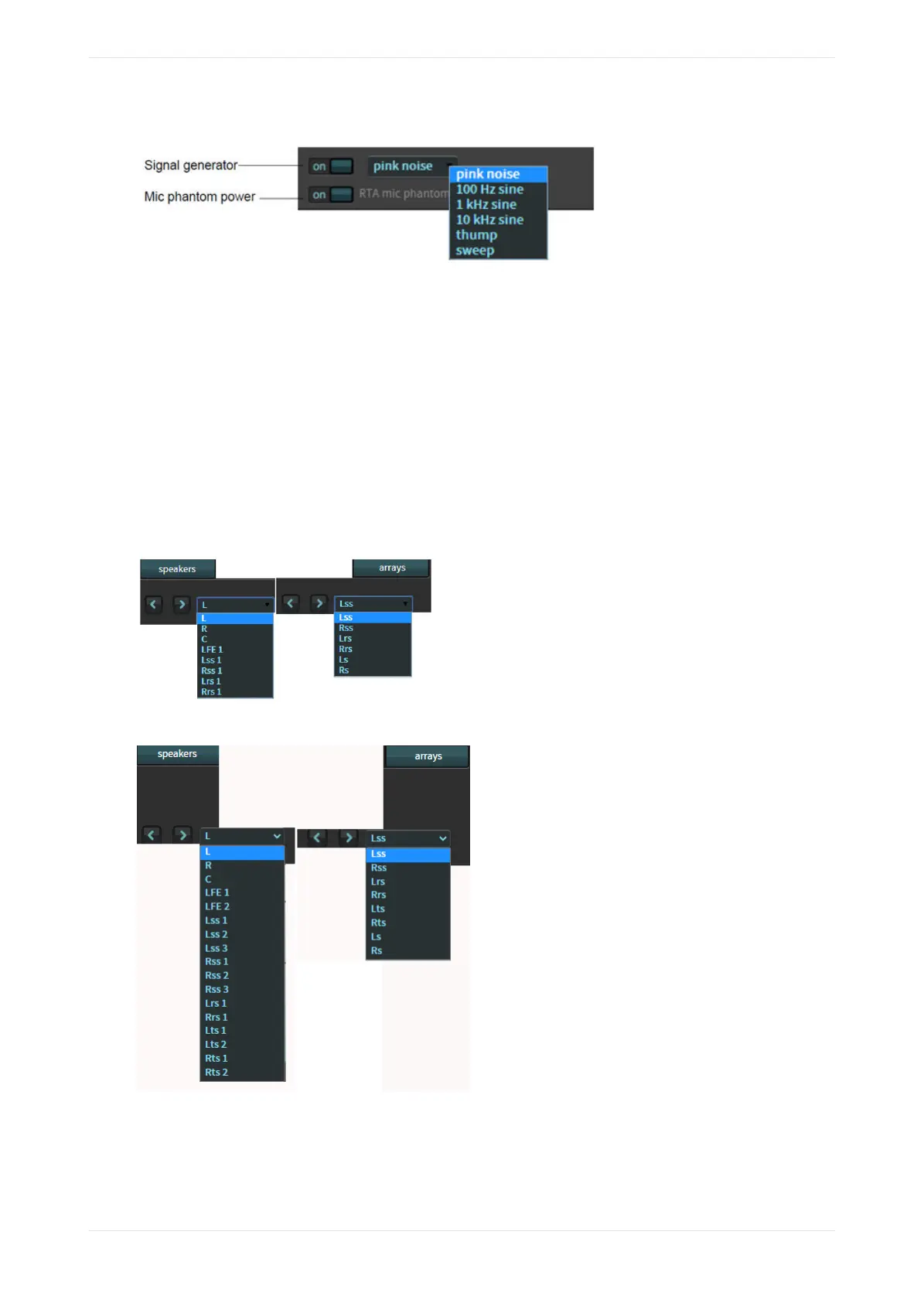
Figure 68: Real-Time Analyzer test-signal generator and microphone phantom Power
The default output level for thump and sine signal tones is -30 dBFS. The default output level for the sweep
signal tone is -40 dBFS.
Pink noise is slightly dierent, as it is configured via SMPTE standard ST2095-1:2015 Section 6.2, which states
that the level should be -33.74 dBFS.
Analog levels are aected by the EQ being used. You should follow the instructions provided in this manual
for calibrating a room.
Speakers and array feeds
Select speakers or arrays, and then click in this field to select the respective output. You can view the EQ for
each output or make changes. To move between outputs, select from the drop-down menu shown in the
following figures (examples) or use the arrow buttons to scroll through the list.
Figure 69: CP950 speaker and arrays feeds
Figure 70: CP950A speaker and array feeds
Real-Time Analyzer mic input level
The RTA mic input level represents the average power received by the microphone input, which is the
average power measured for input frequencies between 50 Hz and 2 KHz. If you are using the internal RTA
Working with the web client user interface
Dolby Cinema Processor CP950 and Dolby Atmos Cinema Processor CP950A Manual 58
Issue 9 Part Number 8800298 19 January 2022



 To Next Page