DuraLabel.com | 800.788.5572
6. Lobo Diagram | 11
6. Lobo Diagram
J
I
K
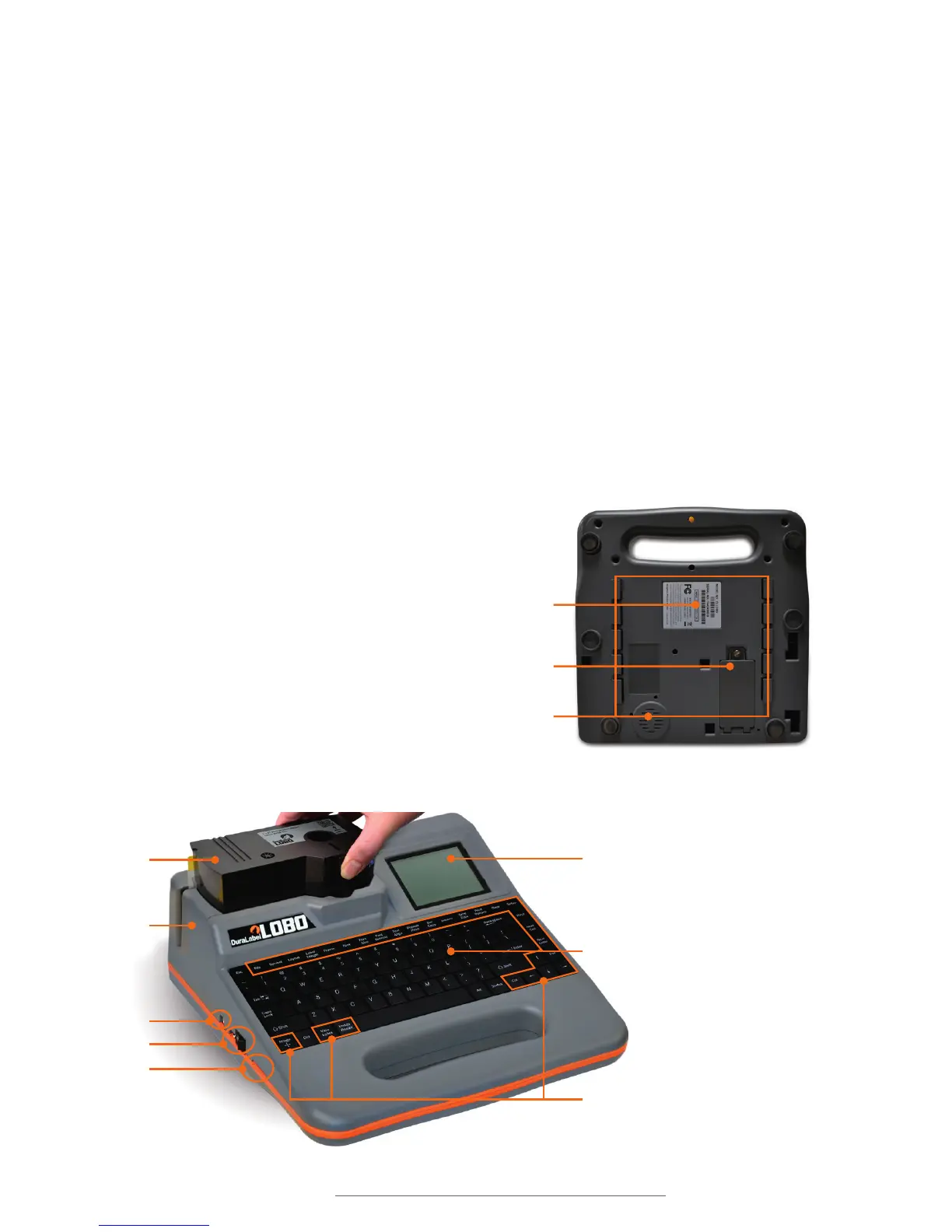
A. Display screen: Displays the label canvas and the control screens.
B. Keyboard: A full-size 11.125” QWERTY keyboard allows input of text and
numerical data.
C. Function keys: Used for various label editing and formatting functions.
Pressing most of these keys brings up a control screen.
D. Print cartridge: Holds the print supply reel and ink ribbon reel.
E. Print compartment: Where printing takes place. When a print cartridge is loaded,
labels are printed, cut and exit here.
F. USB port: USB connection allows labels to be created on a computer and printed
on the Lobo.
G. Power: On/Off switch and DC power cable input are located here.
H. SD card port: Accepts an SD card. Allows for
saving and transferring label files.
I. Product info: Includes model number, serial
number and support information.
J. Battery compartment: The optional battery
is inserted into this compartment.
K. Reference card: This card has a label-
making tutorial and an overview of
important Lobo functions.
(Reference card ts within the outlined area)
A
C
B
D
E
G
H
F



 To Next Page