14 | 9.1 Loading Cartridge
DuraLabel.com | 800.788.5572
9. Print Cartridge
The Lobo is a thermal transfer printer. This type of printer uses heat to transfer resin ink
from a ribbon onto the label material, also called the label supply.
In the Lobo, the resin ink and the label supply reels are both located in one pre-loaded
print cartridge. When a cartridge is seated and locked in its compartment, the Lobo
automatically scans the cartridge and detects important information about the cartridge
such as supply color, width and approximately how much supply remains.
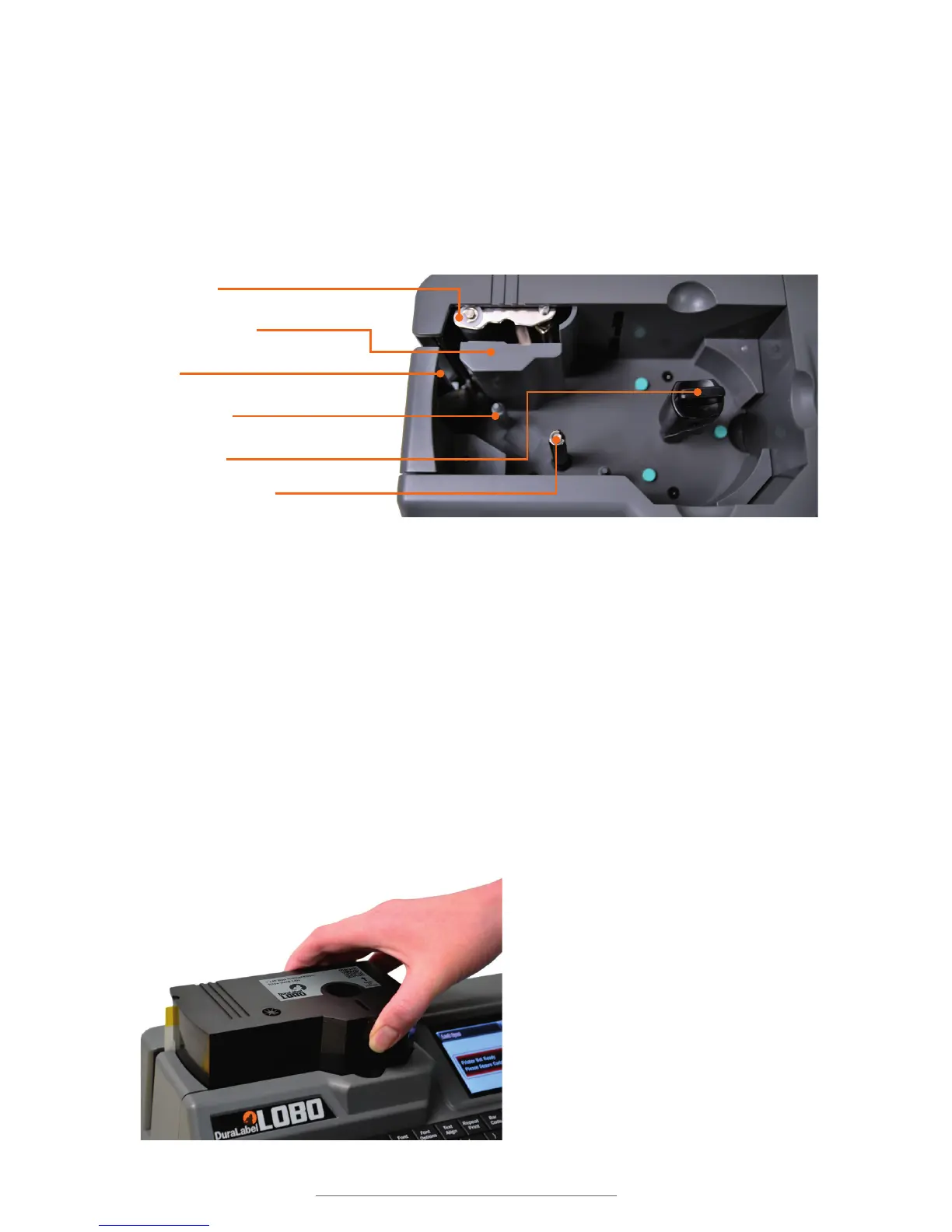
9.1 Loading Cartridge
It is easy to load a new cartridge into your Lobo. The cartridge will only fit one way.
To load the printer, position a cartridge face-up above the cartridge compartment. The
label supply should feed out of the cartridge on the left side. Slide the cartridge into
place so that the Cartridge Lock goes through the hole in the cartridge.
The cartridge is spring-loaded, so you may need to press the cartridge down into its
flush position.
When the cartridge is fully in place, turn the Cartridge Lock clockwise one quarter-
rotation. This locks the cartridge and prepares the Lobo for printing. It won’t be possible
to create a label until the cartridge is correctly loaded and locked.
Platen roller
Thermal print head
Blade
Alignment post
Cartridge lock
Ribbon rewind spindle
Load and lock the cartridge. You’re ready to print.



 To Next Page