DESCRIPTION OF BASIC CONTROLS
The Client of EMU device consists of several basic controls, that facilitate the proper configuration
of the device. We can divide it into particular types:
ICONS DESCRIPTION
ICON DESCRIPTION
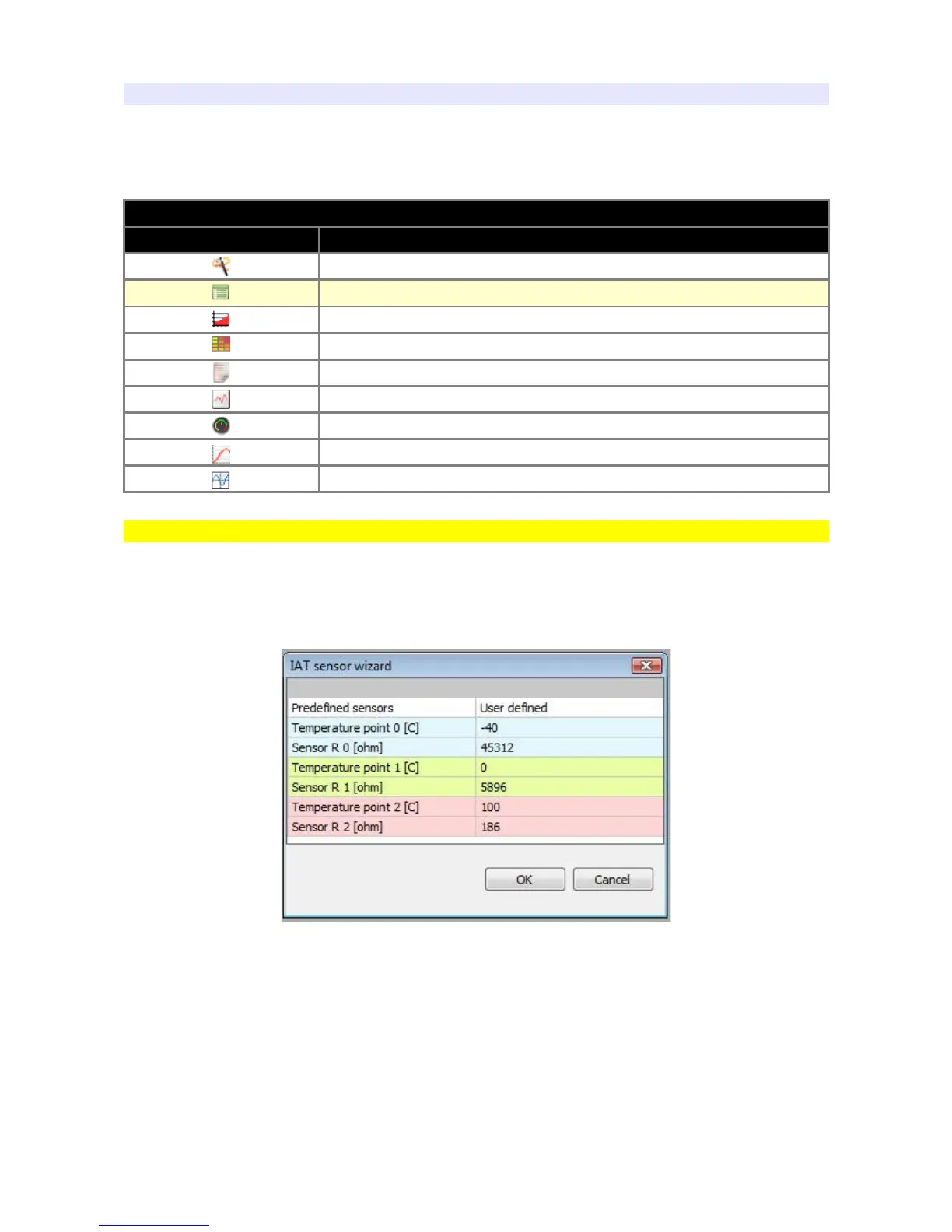
Wizard (creator)
Paramblock (parameter's block)
Table 2D
Table 3D
Visual log (parameters’ log)
Graph log (graphical log)
Gauge
Road dyno
Scope
Wizard
This tool allows you a quick selection of the saved, pre-specified, configuration of the given sensor.
An example of a wizard for an intake air temperature sensor is as follows:
The first cell in the right column is always in the form of a drop-down list. It allows to select the right
characteristics from the sensors or other devices defined by the manufacturer, such as:
thermistors, NTC, injectors, or – by the option "User defined" – open a blank column to fill in the
values for other sensors not defined in the program. Options for specific wizards will be discussed
in appropriate sections of the manual.
Page 19


 To Next Page