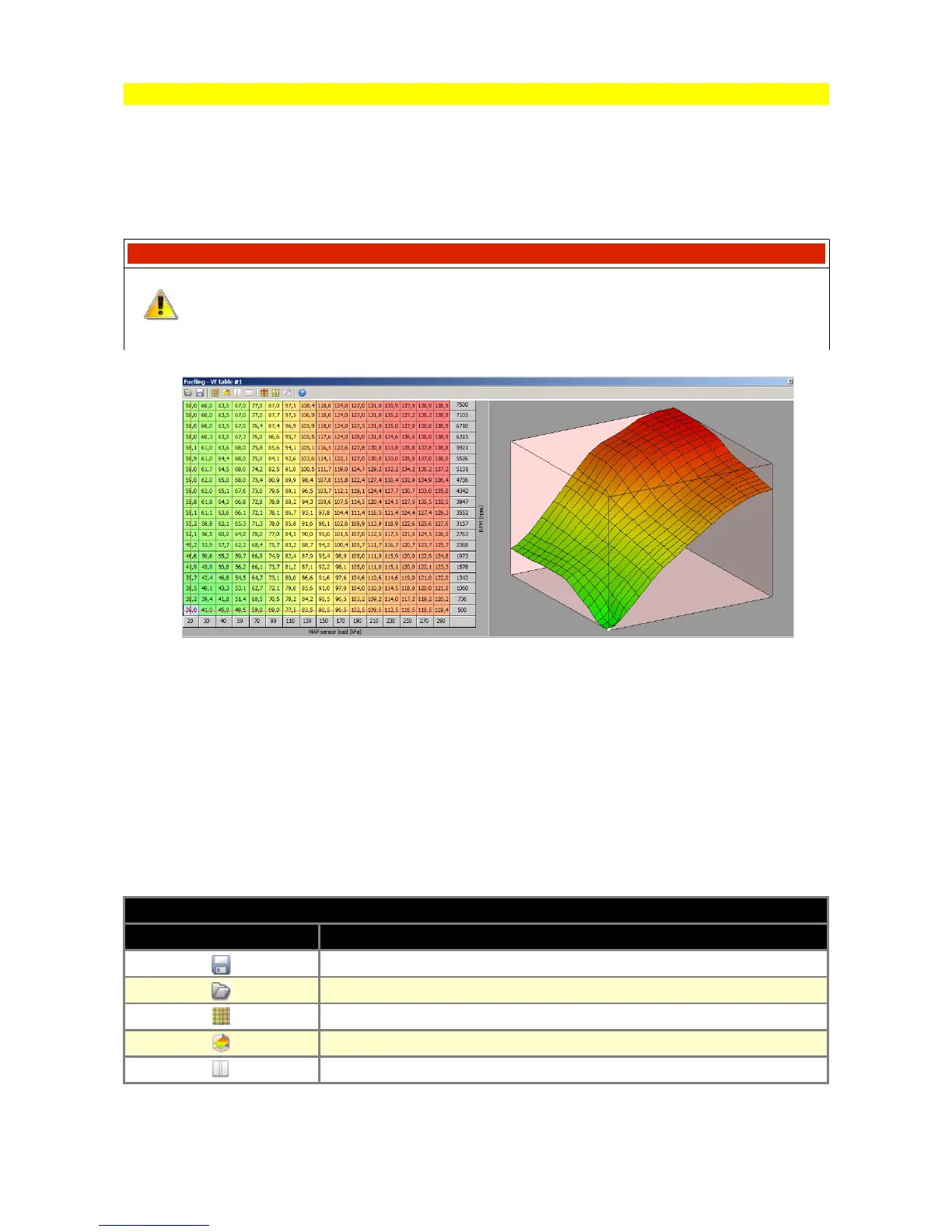
Table 3D
Tables 3D are used for representing three dimensional non-linear functions in an easy to use
graphical form. Each 3D table is comprised of numerical values that define a variable (such as
ignition timing) as it corresponds to values on two axes (such as load and RPM).
There is a wizard available for axis setup (right click on axis description).
WARNING !
Some of the axis definitions are common for several tables (eg. load, RPM).
When axis definitions are modified in one table, the axis definition will change
for other tables as well.
To interpolate between table cells use the context menu (right click on the table area).
There are 3 interpolations available: horizontal, vertical and diagonal. Arithmetic operators may be
used on the selected cells by entering value followed by an arithmetic operator.
For example to add a value of 5 to the selected cells, you should enter 5+. To scale down all the
selected cells by 50%, you should enter 0.5*.
To save or load a 3D table, use the appropriate disk icon on the toolbar. To load a table from an
existing project, change the file extension mask to *.emu in the open dialogue window.
ICONS DESCRIPTION
ICON DESCRIPTION
Save current 3D table to disc
Open current 3D table from disc
Change view to table view
Change view to 3D graph view
Change view to both table and 3D graph horizontally divided
Page 23


 To Next Page