TP-00347-01 31
Write Protecting Tape Cartridges
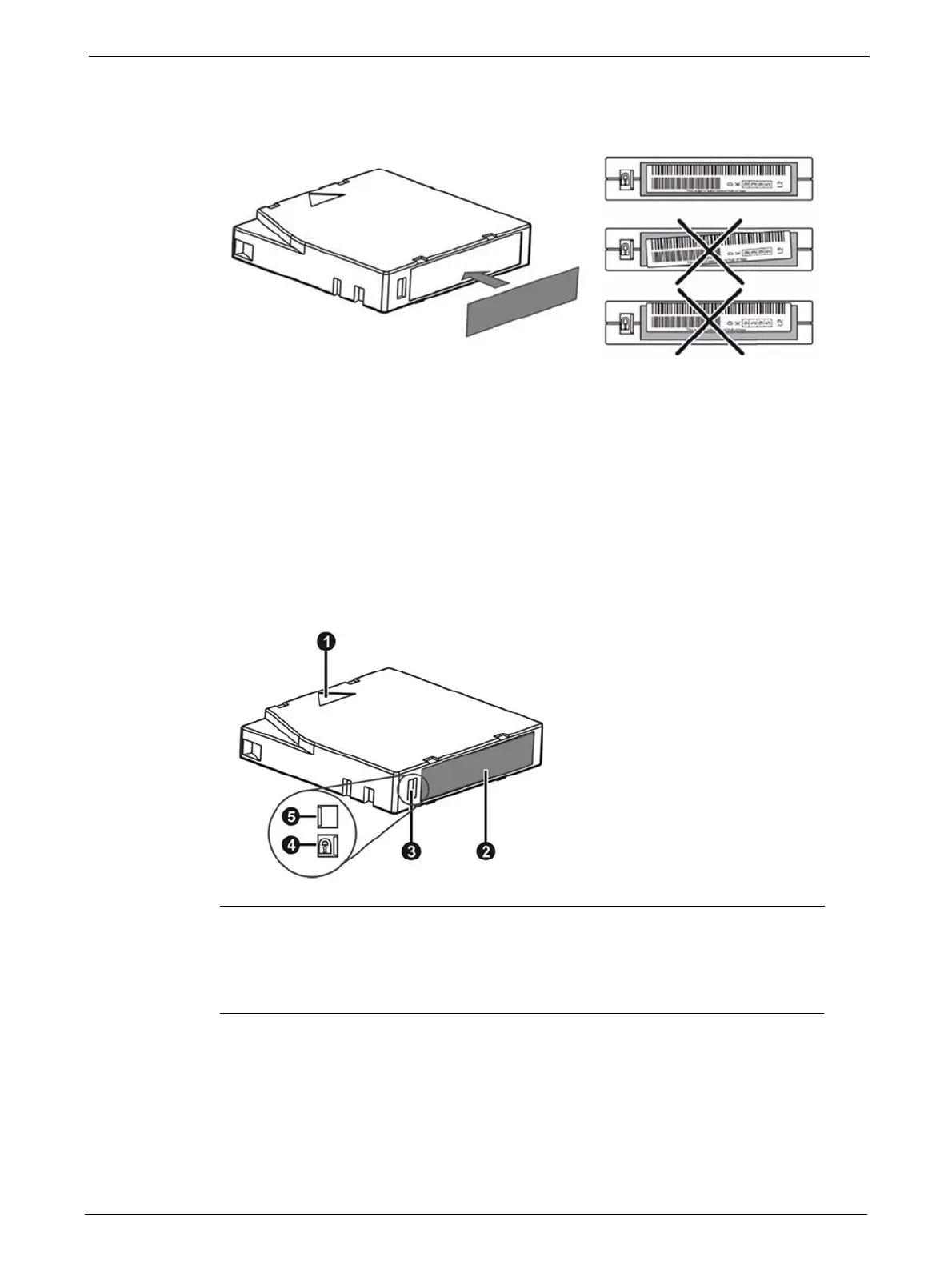
LTO tape cartridges have a recessed area located on the face of the cartridge next to the
write-protect switch. Use this area for attaching the adhesive-backed bar code label. Only apply
labels as
shown:
The bar code label should only be
applied as shown, with the alphanumeric portion facing the hub side
of the tape cartridge. Never apply multiple labels onto a cartridge because extra labels can cause the
cartridge to jam in a tape drive.
Write Protecting Tape Cartridges
All rewriteable data cartridges have a write-protect switch to prevent accidental erasure or
overwriting of data. Before loading a cartridge into the device, make sure the write-protect switch
on the front of the cartridge is in the desired position.
1 Insertion Arrow
2 Barcode Label
3 Write-Protect Switch
4 Write-Protected
5 Write-Enabled
1. Slide the switch (3) to the left to allow the device to write data to the cartridge.
2. Slide the switch to the right to write-protect the cartridge. An indicator, such as a red mark
or small padlock, is visible showing that the cartridge is write-protected.



 To Next Page