TP-00347-01 45
Overview
• Releasing magazines for removal
5) Service
• Performing a general diagnosis of the library
• Determining and updating firmware
• Reboot of the library
• Viewing library logs
• Cleaning tape drive(s)
•Cartridge memory
Login
Some options of the RMU take the library offline. This inactive mode can interfere with
EditShare Ark Tape, causing data loss. Make sure the library is idle before attempting to
perform any remote operations that will take the library offline.
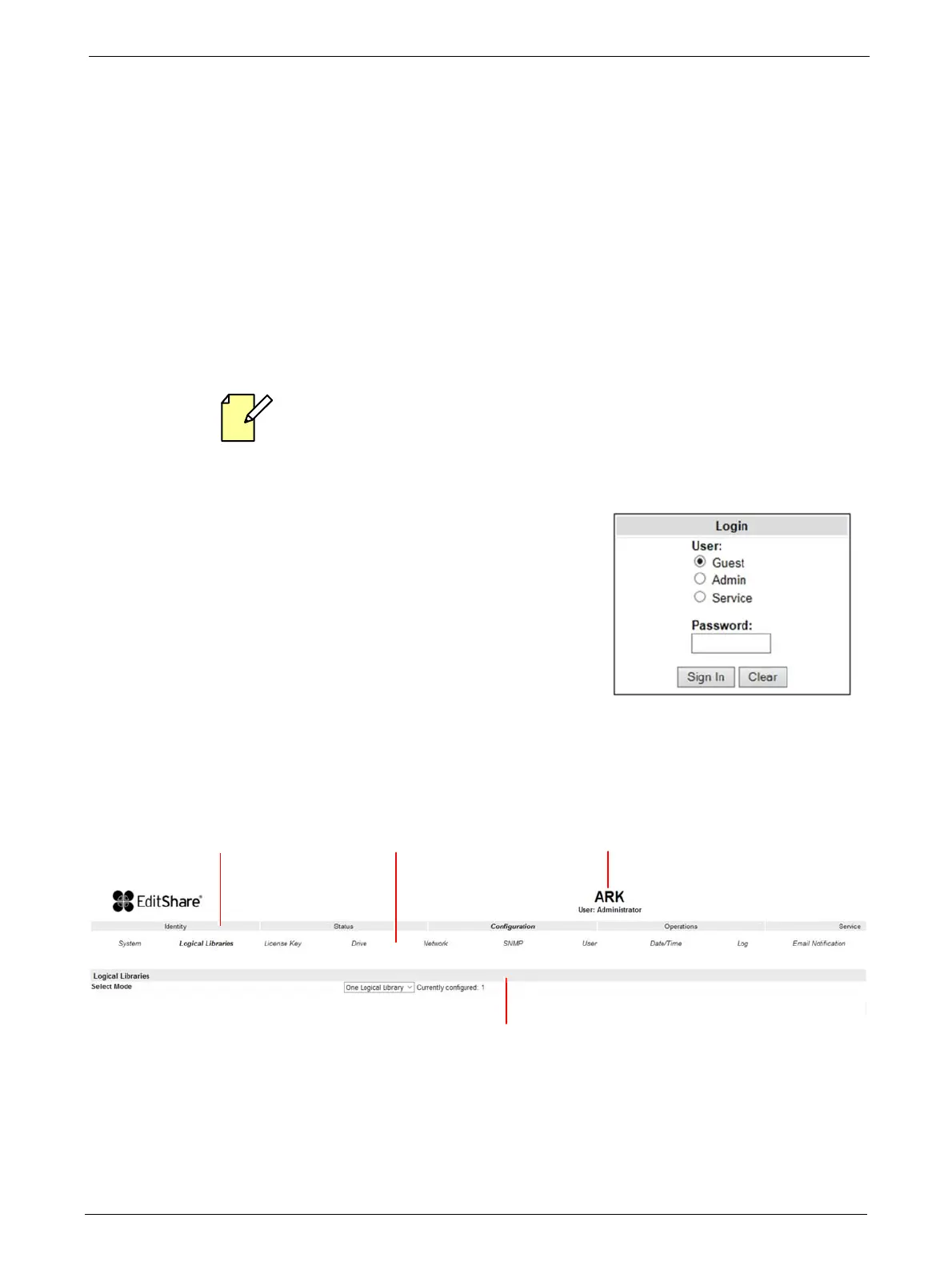
To login, select the access type and enter the correct password. There are three levels of access:
• Guest - (standard user level - default password
std001).
• Admin - (administrator user level - default password
adm001).
• Service - (service user level; for access by service
personnel only - default password ser001).
Each level affects the areas to which you have access and
what actions you can initiate in those areas.
RMU Screen Layout
Once logged in, the general layout of all RMU screens is similar:
Menu items in the Action bar and Object bar are selectable, and the currently selected item is
displayed in bold italics. The items listed in the Action bar are fixed, but the items in the Object bar
vary according to the action selected (see "Operating Modes" on page 33). Similarly, the contents
of the detailed information area shown below the two bars depend on the selected action and
object.
Model NameAction Bar
Object Bar
Details



 To Next Page