SMART-2 Multi Functional Wireless Weighing Indicator User Manual
________________________________________________________________________________________________
Page 22
WEIGHT CALIBRATION
WARNING: In order for these menu functions to be active, the P2 connection inside
the indicator must be open circuit; otherwise an error code special for this situation
is displayed on the indicator's screen.
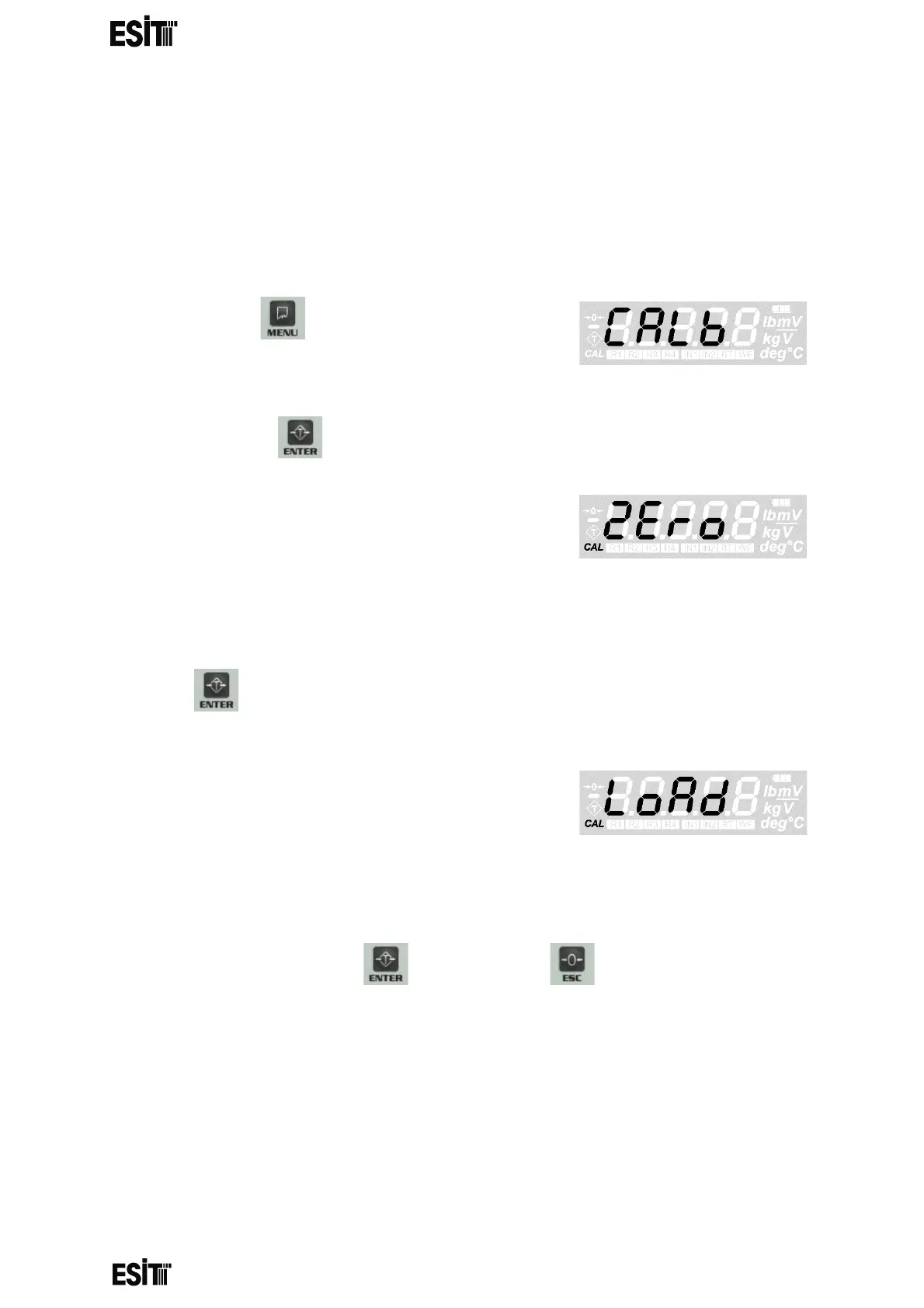
ZERO CALIBRATION
(1) Press key until you reach the
'Calibration' menu
(2) Press the key to confirm the menu
(3) The 'Zero Calibration' menu flashes for a
short time and the internal count value
information starts to be displayed on the
screen. When this internal count value is
displayed, the CAL segment at the bottom left of the screen flashes
(4) After the platform is emptied, zero calibration is performed with the
key.
(5) When zero calibration is done, the indicator
automatically switches to the 'Load
calibration' menu (Load). This screen
information flashes for a short time and the
display shows the internal count value after the reset and the CAL
segment at the bottom left of the screen is lit continuously
(6) When this internal count value is displayed, the reset operation can be
performed with the key. Press the key to go back to the
normal operation (measurement) screen.



 To Next Page