SMART-2 Multi Functional Wireless Weighing Indicator User Manual
________________________________________________________________________________________________
Page 43
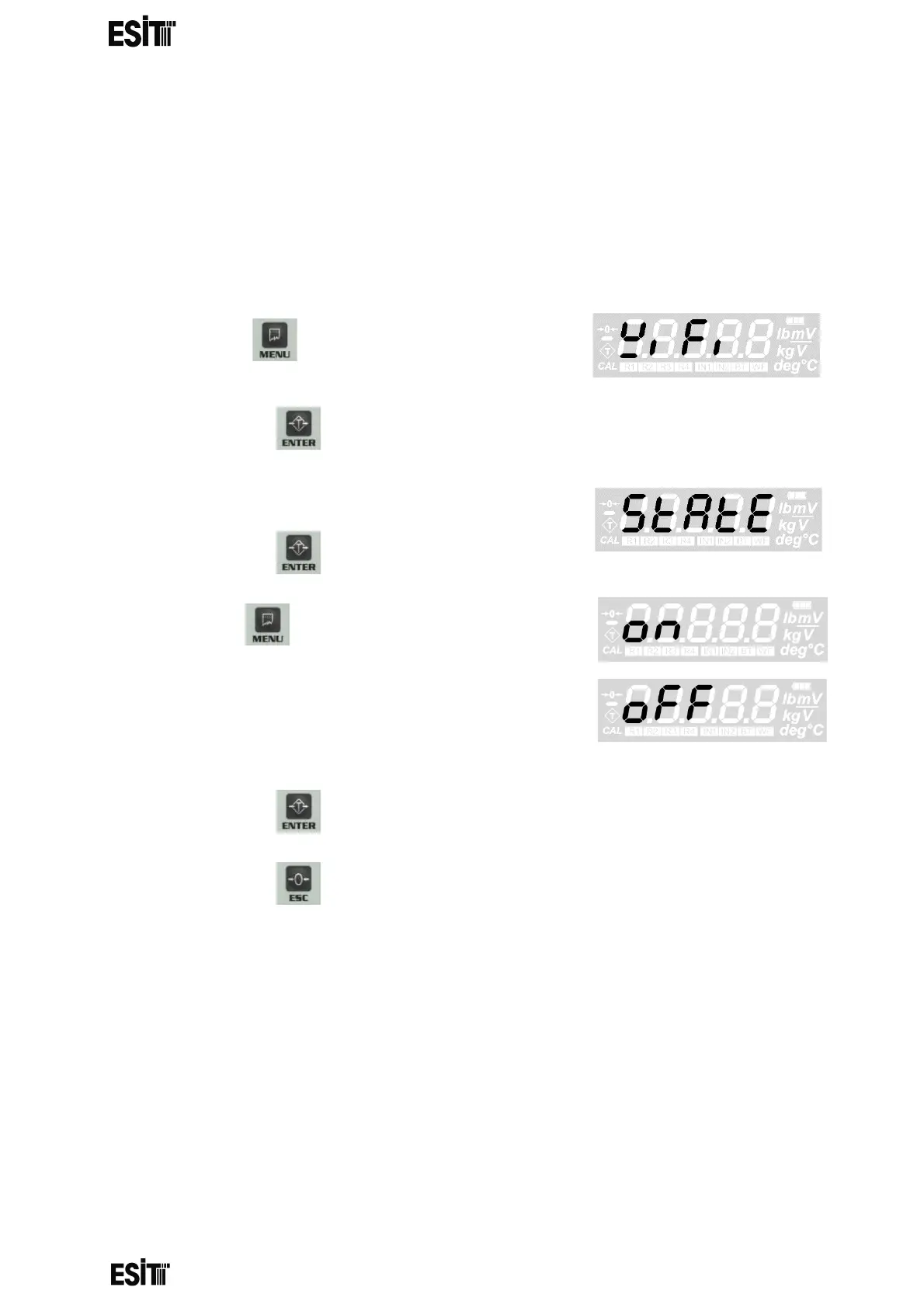
WIFI SETTINGS
WIFI STATUS SETTING
With this menu you can turn the device WiFi feature on or off.
The wifi module must be plugged in to the device in order to be active.
The communication distance is 40 meters.
(1) Press key until you reach the 'WiFi
settings' menu
(2) Press the key to confirm the menu
(3) The first option is the 'WIFI Status' menu.
(4) Press the key to confirm the menu
(5) Press key until reaching 'ON' for
activating and 'OFF' for deactivating the WIFI.
When 'ON' is selected, the display will show
"Wait" message for 1-2 sec.
(6) Press the key to save the WIFI status setting.
(7) Press the key to go back to the measurement screen.



 To Next Page