SMART-2 Multi Functional Wireless Weighing Indicator User Manual
________________________________________________________________________________________________
Page 53
ANDROID APPLICATION SETTINGS
Settings that can be made via Smart can also be done via the android application.
Device settings can be made via following application is wireless connection
Bluetooth/WiFi is used.
CONNECTION WITH WIFI MODULE
First, open the Smart's WiFi by following the "WIFI STATUS SETTING" section.
Make sure that "WIFI MODE SETTING" is "AP" (see "WIFI TYPE SETTING" section
for this).
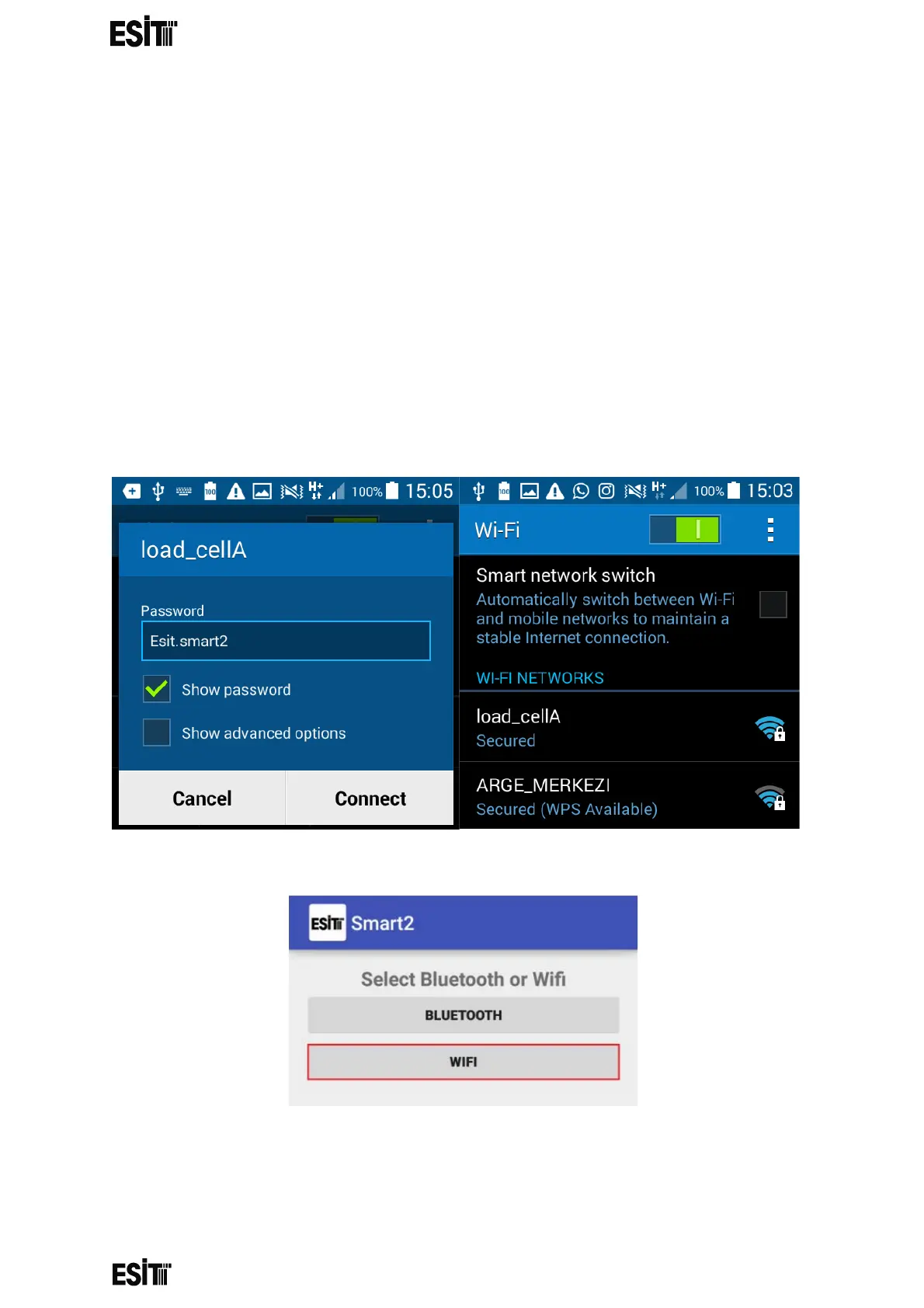
Scan your WIFI networks from your Android phone and connect to the "loadcellx"
network by typing "Esit.smart2" to password field.
Once connected, open the "Smart2" android application and click the "WIFI" button.
”ALERT You are already connected to loadcellA. Do you want to use that loadcell” ,
“No” , “Yes” appears on the screen. Please perform operation step 4 when
proceeded with “Yes” and step 1 when proceeded with “No”



 To Next Page