SMART-2 Multi Functional Wireless Weighing Indicator User Manual
________________________________________________________________________________________________
Page 23
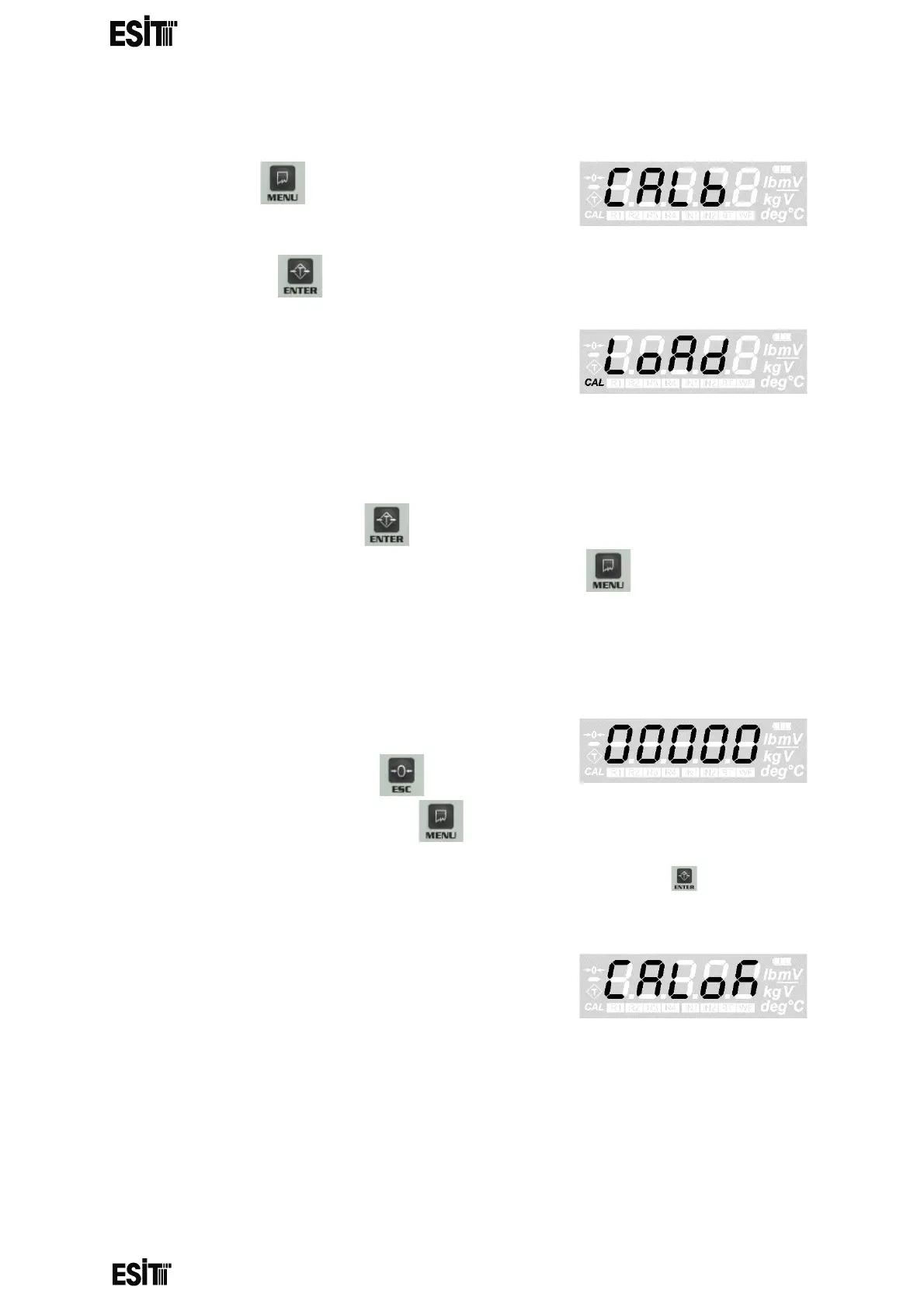
LOAD CALIBRATION
(1) Press key until you reach the
'Calibration' menu
(2) Press the key to confirm the menu
(3) The 'Load Calibration (Load)' menu flashes
for a short time and the internal count value
information starts to be displayed on the
screen. When this internal count value is
displayed, the CAL segment at the bottom left of the screen does not flash
like it does in zero calibration
(4) When this internal count value is displayed, the reset operation can be
performed with the key. When reference weight is placed on the
platform and stability of the platform is ensured, key must be pressed.
NOTE: IT IS RECOMMENDED THAT THE REFERENCE WEIGHT IS AT LEAST
HALF OF THE LOADCELL CAPACITY
(5) After this operation the ten thousands digit
blinks. Numeric value of the blinking digit
can be increased with key. The place
value can be changes with key.
(6) Once the desired value is displayed on the screen, the key must be
pressed to complete the calibration and record the value.
(7) The ‘CALok’ message indicating that
the calibration is successful will appear and
the device will start to operate according to
the calibration performed in the normal
operation mode



 To Next Page