SMART-2 Multi Functional Wireless Weighing Indicator User Manual
________________________________________________________________________________________________
Page 60
(4) Change Smart "wifi mode setting" as "STA".
(5) When the "WAIT" message disappears from the Smart screen, connection to
the local network is done.
(6) If you cannot connect to the local network, an error ERR.09 will be displayed
on the smart screen. In this case check the necessary connections and repeat
the procedure.
(7) When the Smart is taken to "STA" mode, the "IP" submenu will appear under
the WIFI menu. You can check your smart's IP address from this section.
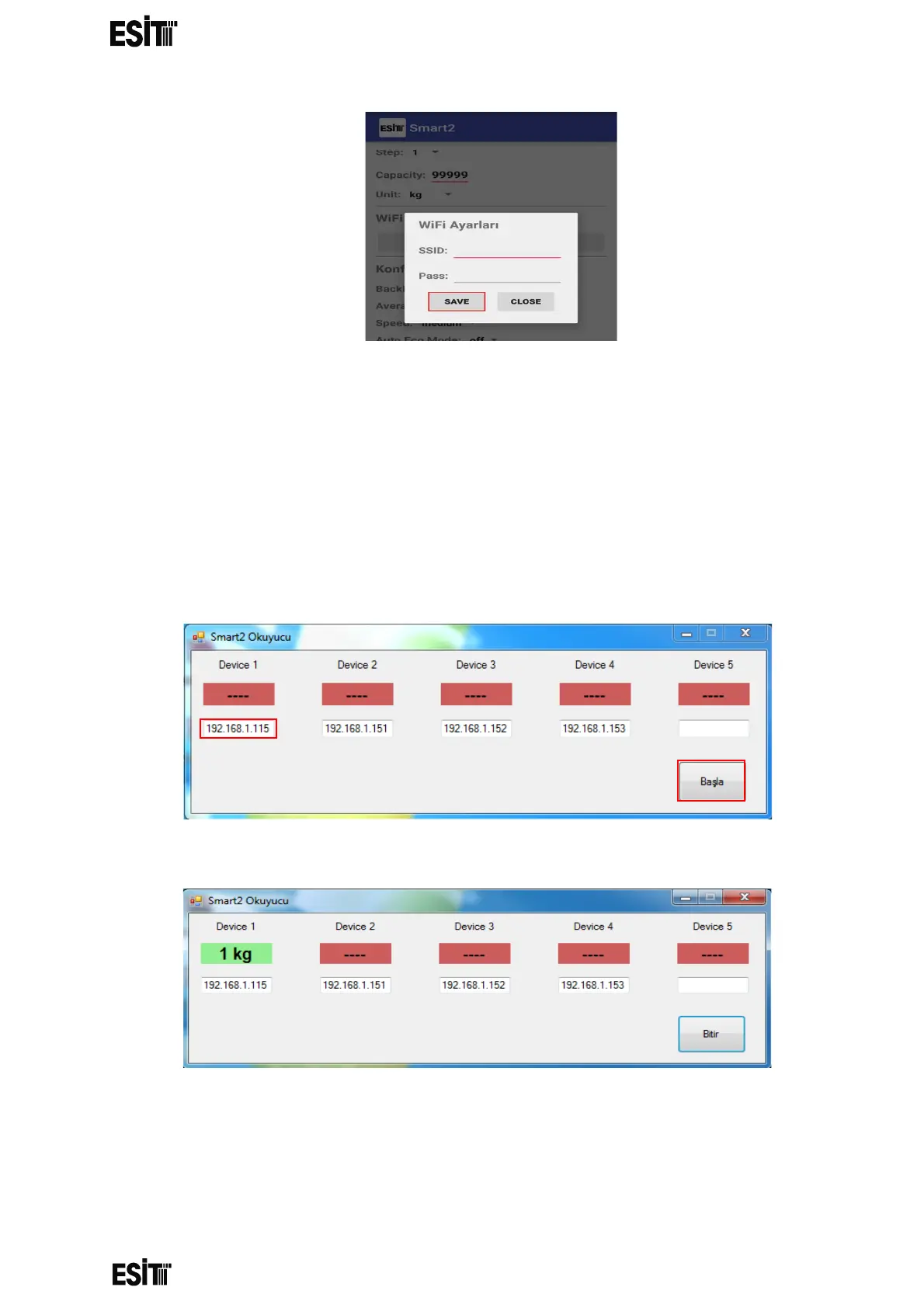
(8) The desktop application "Smart2 reader" can be used to access the weight
information sent by the Smarts connected to the local network.
(9) After opening the application, the IP address of the Smart that is intended to
get data from must be written to the text box under the indicators.
(10) Then click the "Start" button to see the weights of the respective Smart
or Smart devices.
(11) The source code for the desktop program is available on the CD
included in the product package. For further information, please contact us.



 To Next Page