RESTRICTED USE ONLY Fargo Electronics, Inc.
DTC300/DTC300M Card Printer/Encoder User Guide (Rev. 2.2)
5-95
Using the Print Top of Form Option
Use this option to adjust the lengthwise or horizontal position of the printed image on a card
so it appears centered. (Note: When adjusting this value, keep in mind that cards always
remain in the same landscape orientation while moving through the Printer.)
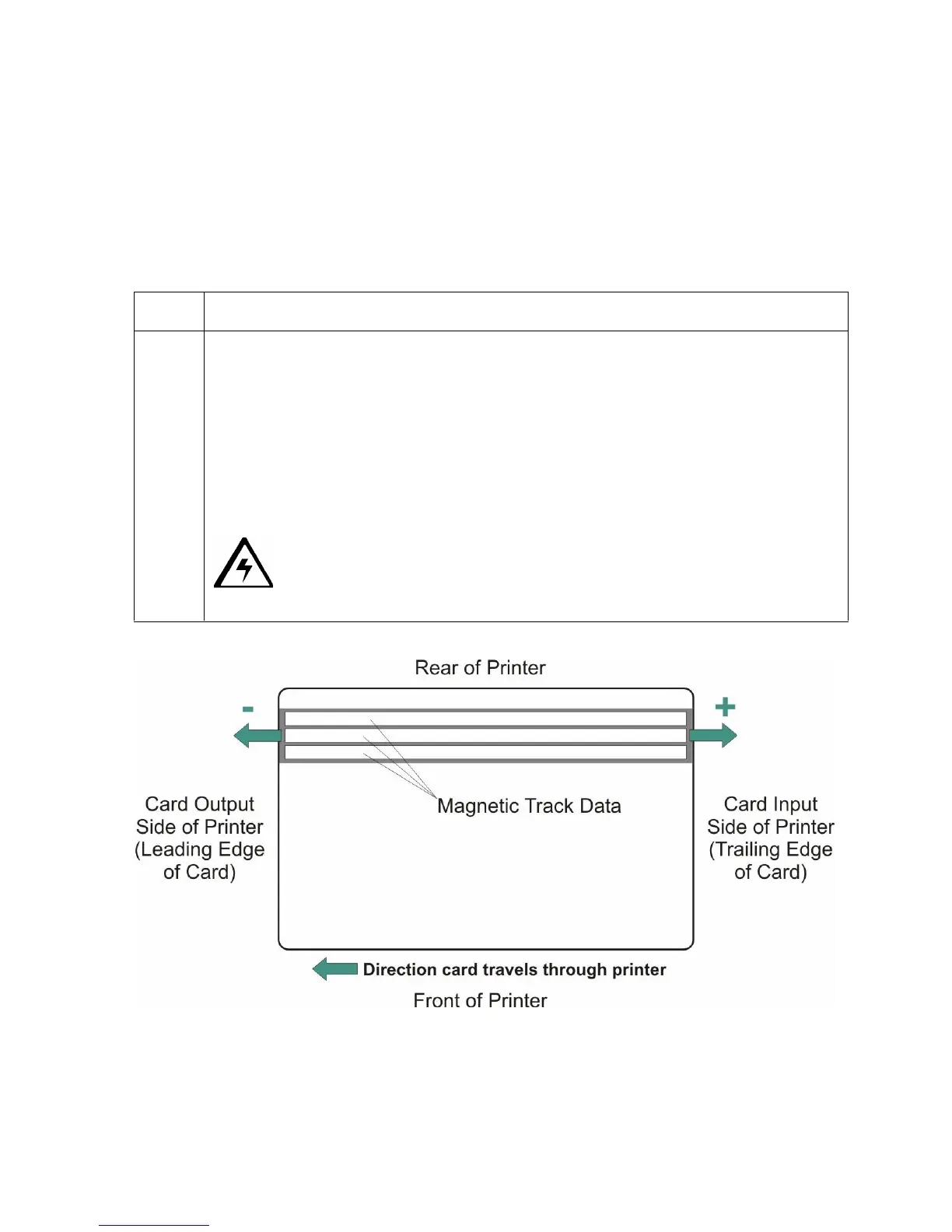
The diagram (below) represents how the printed image will move in relation to the fixed card
position as a positive or negative Image Placement value is entered.
Step Procedure
1 Enter a negative value to move the printed image toward the leading edge of the
card, or the card output to the side of the Printer.
OR
Enter a positive value to move the printed image toward the trailing edge of the
card, or the card input to the side of the Printer.
Maximum Adjustment Range: The maximum adjustment range is ±127. As a
rule, 10 equals about .030"/. 8mm, which is about the same as the thickness of
a standard CR-80 size card.
Caution: If the negative value is set too high, the print Ribbon may
break.



 To Next Page