FARO
®
Laser Scanner Manual
108
Chapter 7: Controller Software
Format Card - Format the inserted SD card.
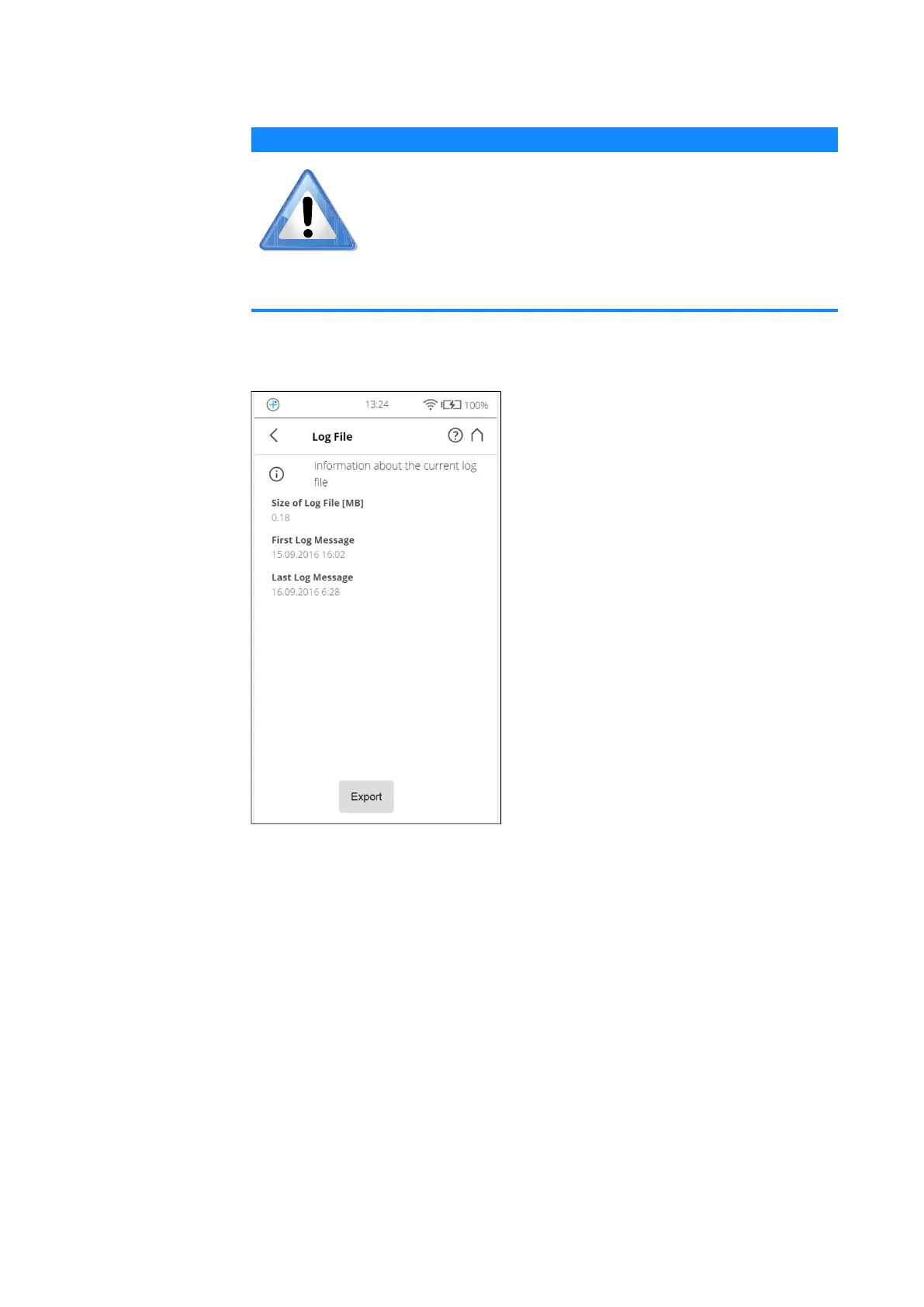
Log File Important scanner operations, sensor data as well as warnings and errors will
be saved to the log file that can help customer service to identify problems and
the cause of possible errors.
Figure 7-45: Service, Log File
Export - Writes the scanner log file to the SD card. It will be saved to a folder
called Logfile.
Backup Automatic backup
The scanner creates an automatic backup of the scanner settings and saves it
to the inserted SD card. This backup will automatically be updated with the
current scanner settings each time you start a scan. It includes the current
scan profiles, scanning parameters, operators, and general settings.
Manual backup
Additionally, you can also create manual backups of certain scanner settings.
This manual backup option saves scanner parameters, operators, and scan
profiles to the SD card.
NOTICE
Format the inserted SD card.
This operation will delete all scans and other data of the SD
card. Always use this formatting function for SDXC cards
with a capacity of 64 GB or more as Windows will format
such cards with its own file system which is not supported by
the scanner.
For more information, see Preparing an SD Card on page 36.


 To Next Page