FARO
®
Laser Scanner Manual
121
Chapter 8: Special Scanning Modes
8.2.2 Map Page
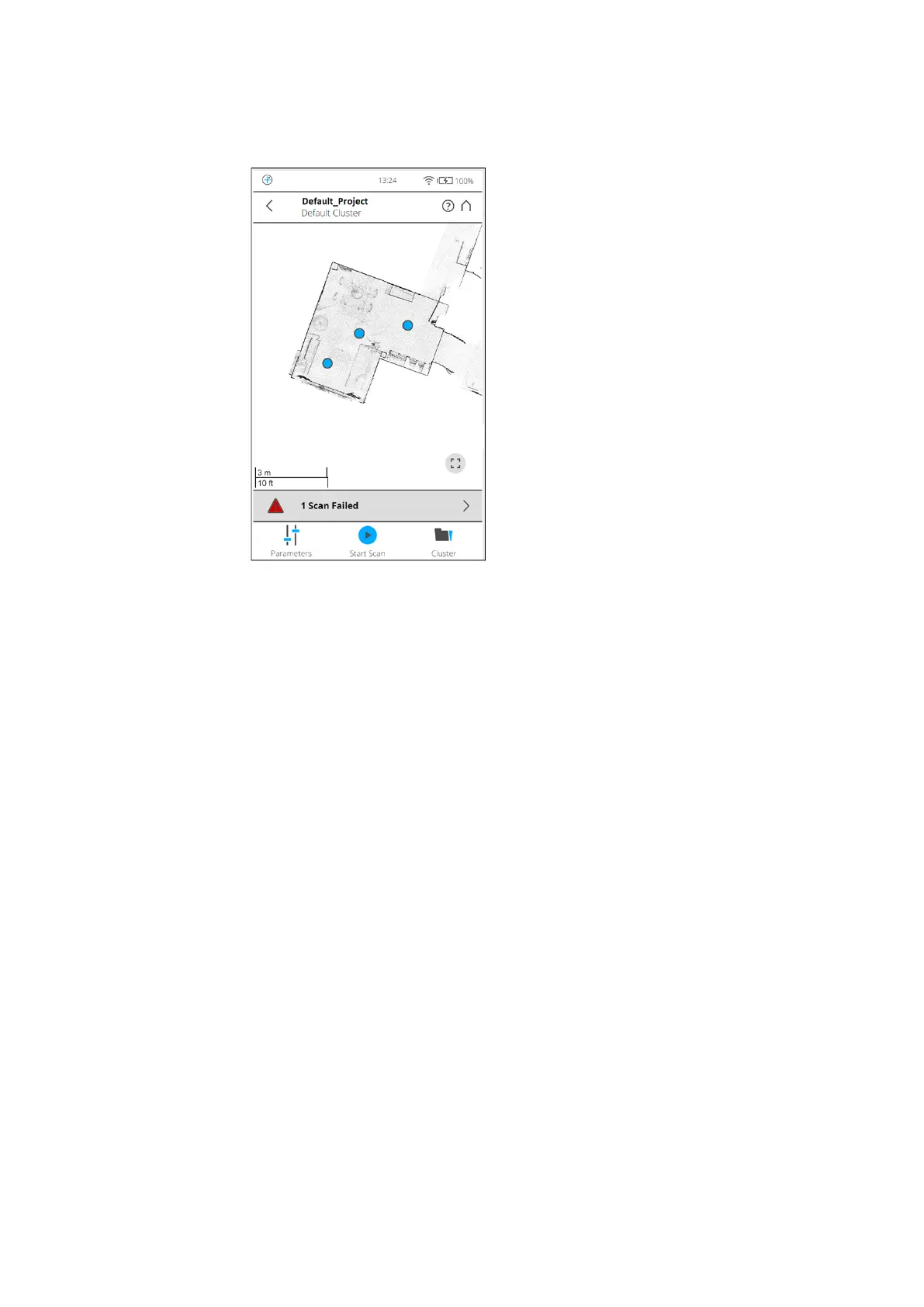
The map page shows an overview of the area that was scanned so far.
Figure 8-7: Map page
The Map page has the following components:
Overview Map
Displays the map of a top down view of all scans in the current cluster or
project that have been successfully registered. Scan positions are shown by
blue markers. Click the markers to highlight the points of one scan in the map.
A small popup menu opens showing the name of the scan. Tap the scan point
on the map to open the
Scan Details page. Tap the button in the lower right
corner of the map to reset the view so that all markers are visible.
Status Bar
The status bar is shown below the overview map.
On large screens, the list of scans with their processing status is shown left to
the map. It shows you the most important information. The following different
messages may be shown:
• ‘Number of scans’ failed: This status is displayed when any part of the
scanning, processing, scan import, or registration process failed.
• ‘Number of scans’ scans in progress.
• ‘Number of scans’ scans finished.
• ‘Number of scans’ unknown: This status is displayed when the scans have
been initiated on the scanner and their completion status is not known.
Click the status bar to switch to the list page. For details, see
List Page



 To Next Page