FARO
®
Laser Scanner Manual
51
Chapter 6: Getting Started
Scanning with HDR capturing
Set the HDR capturing by tapping the
+ or - button from 2x to 5x. This setting
corresponds to the exposure levels. If no option is selected, then OFF
selection is displayed.
Night Mode Select the night mode to improve the quality of the color photos in relatively
dark lighting conditions. The image noise will be reduced in low light
situations. However, enabling the night mode will increase the scan duration
significantly.
Speed Mode Select the Speed Mode to reduce the scan duration at the cost of a reduced
color picture quality. It cannot be combined with the HDR or Night Mode
feature.
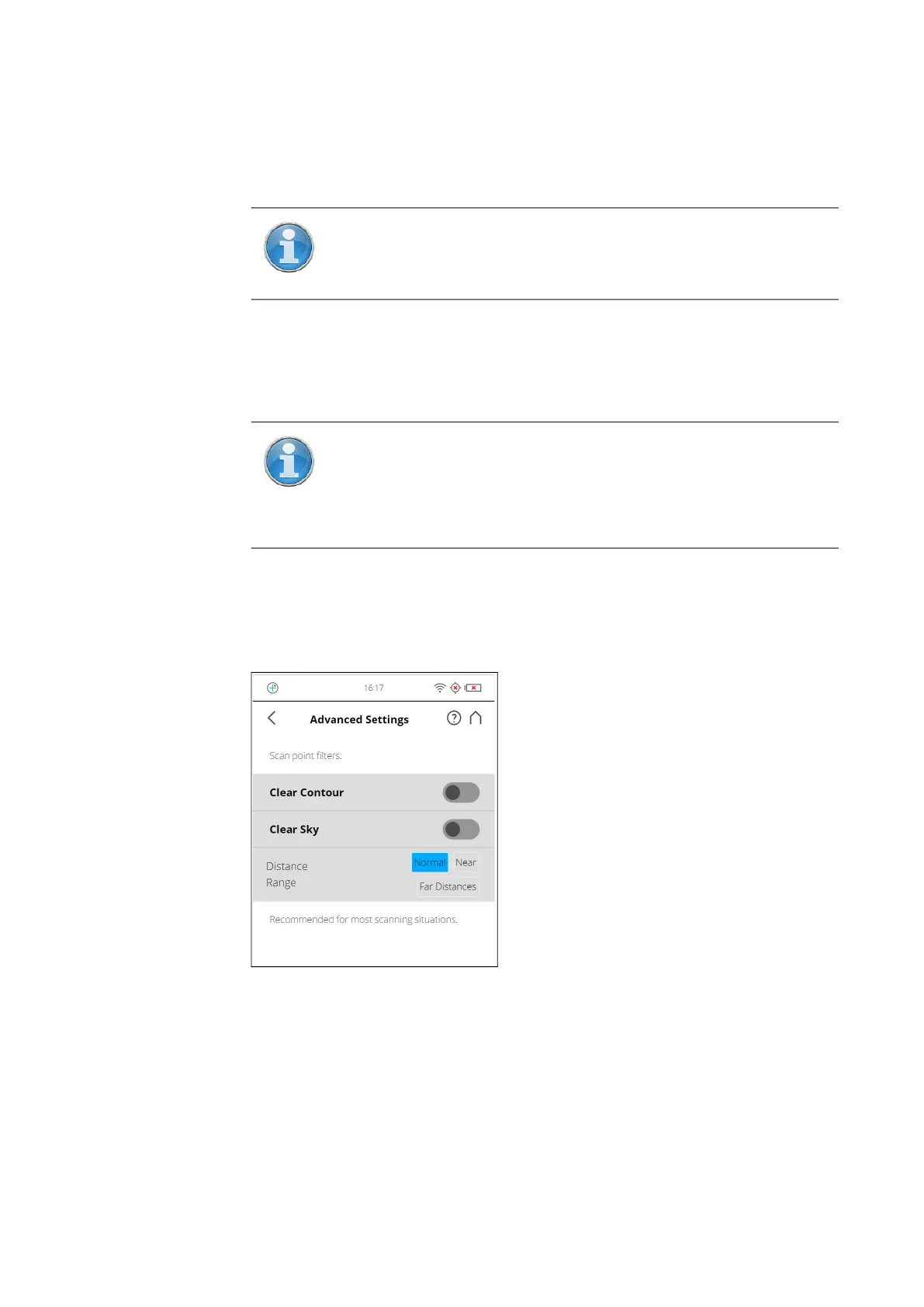
Advanced Settings
Figure 6-22: Advanced Scanning Settings
Clear Contour - Enables the dynamic contour filter. This hardware filter
removes scan points resulting from hitting two objects with the laser spot,
which mainly happens at the edges of objects.
Clear Sky - Enables the dynamic sky filter. During scanning, this hardware
filter will remove scan points resulting from scanning empty spaces in the sky.
Distance Range - The Distance Range setting configures the scanner to
increase the quality of the points captured at specified distances.
NOTE: When HDR is enabled, the larger number of captured
images will result in a longer capturing time. The processing time
will be longer in SCENE.
NOTE: The best scanning results can be achieved if Night Mode is
enabled along with
Horizon Weighted Metering or Zenith Weighted
Metering
. However, very dark lighting conditions may lead to a
poor picture quality even if night mode is activated. This can lead
to grainy images and other artifacts.



 To Next Page