FLEX-6000 Signature Series – Maestro User Guide
Copyright 2024 FlexRadio, Inc. All Rights Reserved. | Page 167
35.2.2 Slice Receiver Menu
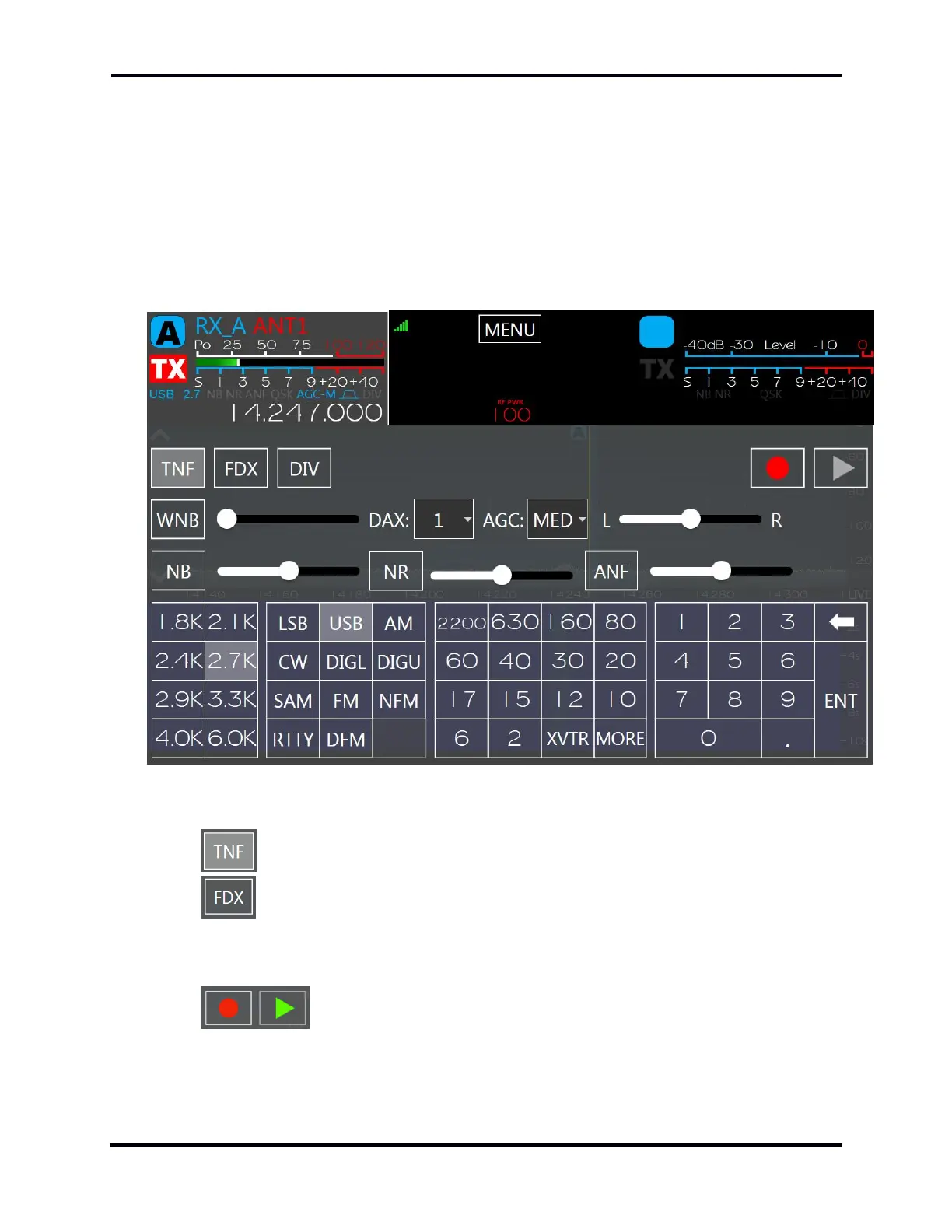
The Slice Receiver Menu contains the controls associated with a Slice Receiver. These include the
receiver mode, band, frequency, filter width, noise reduction, DAX channel assignment, AGC
recovery time, and others.
Open the control panel by tapping on the frequency in the Slice Flag, or by pressing the tuning knob
inward until it clicks. The control panel covers the Slice Flag and all of the Panadapter. Close the
control panel by tapping the frequency display, tapping outside of the control panel, or by another
tuning knob press.
The elements of the control panel from top to bottom, left to right are:
Tracking Notch Filter button. Enables and disables tracking notch filters.
Full Duplex button. When enabled, allows certain receivers to operate in full
duplex mode. See section 32, How to Operate in Full Duplex (FDX) Mode for details on
using this mode.
The red Quick Record button records the received or transmitted audio of
the Slice Receiver. Pressing the green Quick Play button will play back the recorded audio.
When the radio is transmitting, the recorded audio will be played through the transmitter.



 To Next Page
 Loading...



