ProSim 8
Users Manual
34
Simulate a Swan-Ganz Procedure
To simulate IBP during a Swan-Ganz procedure:
1. Push the Tests softkey in the IBP screen.
2. Push or to highlight Swan-Ganz – Channel 1 or Swan-Ganz –
Channel 2.
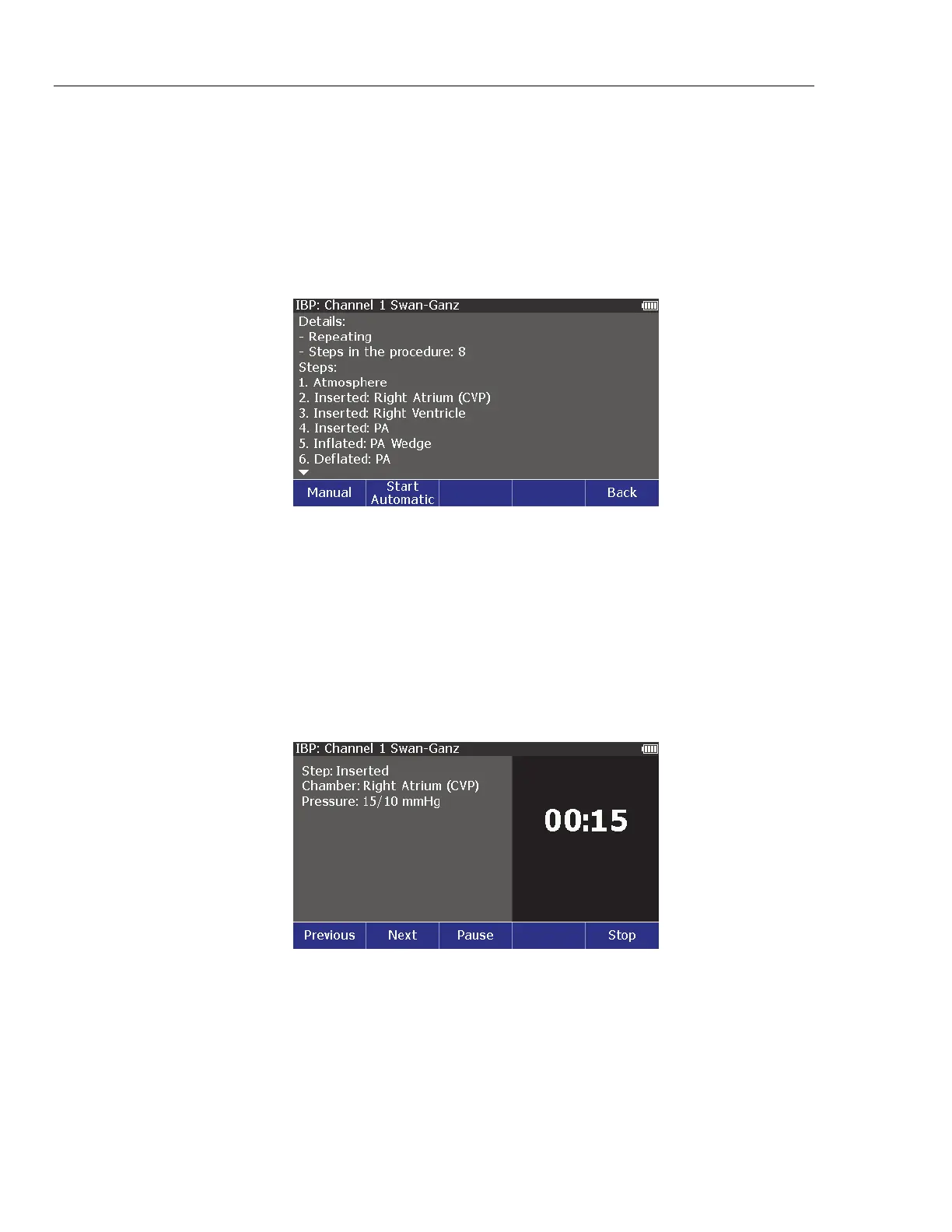
3. Push . The details and steps in the procedure shown in Figure 19 are
shows on the display.
glh012.bmp
Figure 19. Initial Swan-Ganz Procedure Simulation Screen
You can do the Swan-Ganz procedure manually or automatically.
To step through the procedure manually, push the Manual softkey. Each
procedure step shows on the display. To move to the subsequent step push the
Next softkey.
After the first step, push the Previous softkey to go back a step. To stop the
procedure, push the Stop softkey.
To do the steps automatically, push the Start Automatic softkey. The display in
Figure 20 shows the Inserted (Right Atrium) step for the Swan-Ganz procedure.
glh014.bmp
Figure 20. Insert Step in Swan-Ganz Procedure Simulation
There is a 15 second period between steps. The remaining time for each step
shows in the right part of the display. You can push the Pause softkey to stop the
countdown to the subsequent step while the Product continues the patient
simulation for that step. Continue replaces Pause when the procedure step is
paused. Push Continue to continue the step.



 To Next Page