ProSim 8
Users Manual
6
Instrument Familiarization
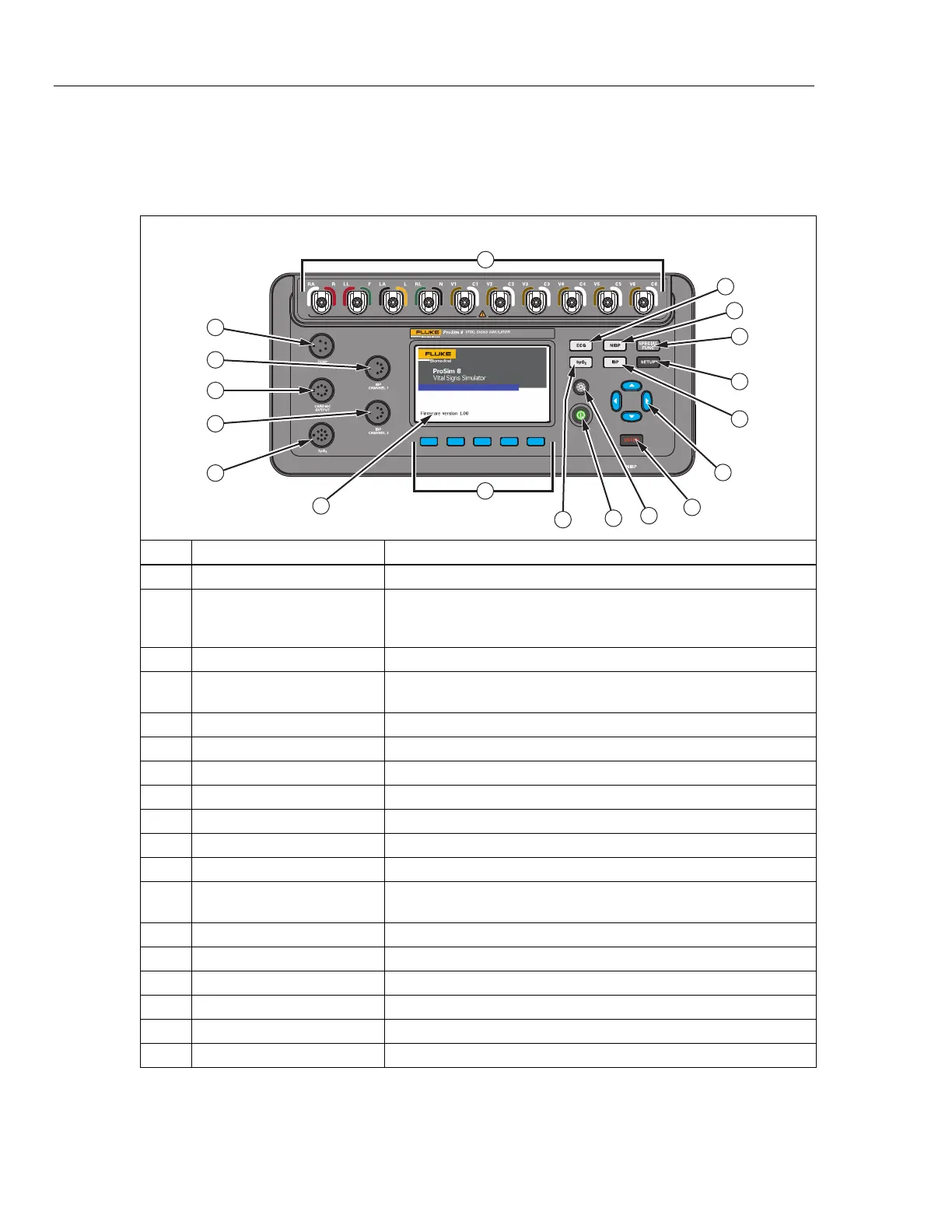
Table 5 is a list of Product top-panel controls and connections.
Table 5. Top-Panel Controls and Connections
F1 F2 F3 F4 F5
Top
14
13
10
11
9
8
7
6
5
4
2
3
15
16
18
17
1
12
lh034.eps
Item Name Description
ECG Posts Connection posts for Device Under Test (DUT) ECG leads.
ECG Function
Accesses the ECG waveforms (adult, pediatric, and arrhythmias),
and ECG test functions (performance waves, QRS detection, Tall T
wave rejection, and R wave detection).
NIBP Button Accesses the Non-Invasive Blood Pressure (NIBP) functions.
Special Functions
Accesses the temperature, respiration, cardiac output, fetal
simulation, autosequences, and view memory functions.
SETUP Button Accesses the setup controls.
IBP Button Accesses the Invasive Blood Pressure (IBP) functions.
Navigation Buttons Cursor control buttons for navigating menus and lists.
Enter Button Sets the highlighted function.
Backlight Button Turns the display backlight on and off.
Power Button Turns the Product on and off.
SpO
2
Button Accesses the SpO
2
functions.
Function Softkeys
Keys F1 through F5 are used to select from a number of selections
that appear in the LCD display above each function softkey.
LCD Display Color display.
SpO
2
Connector Connector to the SpO
2
accessory.
IBP Channel 2 Connector Connector to an IBP input of the patient monitor.
Cardiac Output Connector Connector to the Cardiac input of the patient monitor.
IBP Channel 1 Connector Connector to the IBP input of the patient monitor.
Temperature Connector Connector to the Temperature input of the patient monitor.



 To Next Page