ProSim 8
Users Manual
52
Do a Pressure Leak Test
The leak test measures leaks in a non-invasive blood pressure monitor, the
hoses connected to the monitor, and the pressure cuff.
Note
Before you do a pressure leak test on a monitor, do the pressure
leak test without the monitor to identify the leak rate of the Product.
Use this leak rate to offset the rate of the full system with the monitor
connected.
Note
Put the NIBP monitor in “calibrate” or “service” mode to close the
vent valve, so the Product can inflate the pneumatic system. Refer to
the service manual for the NIBP monitor.
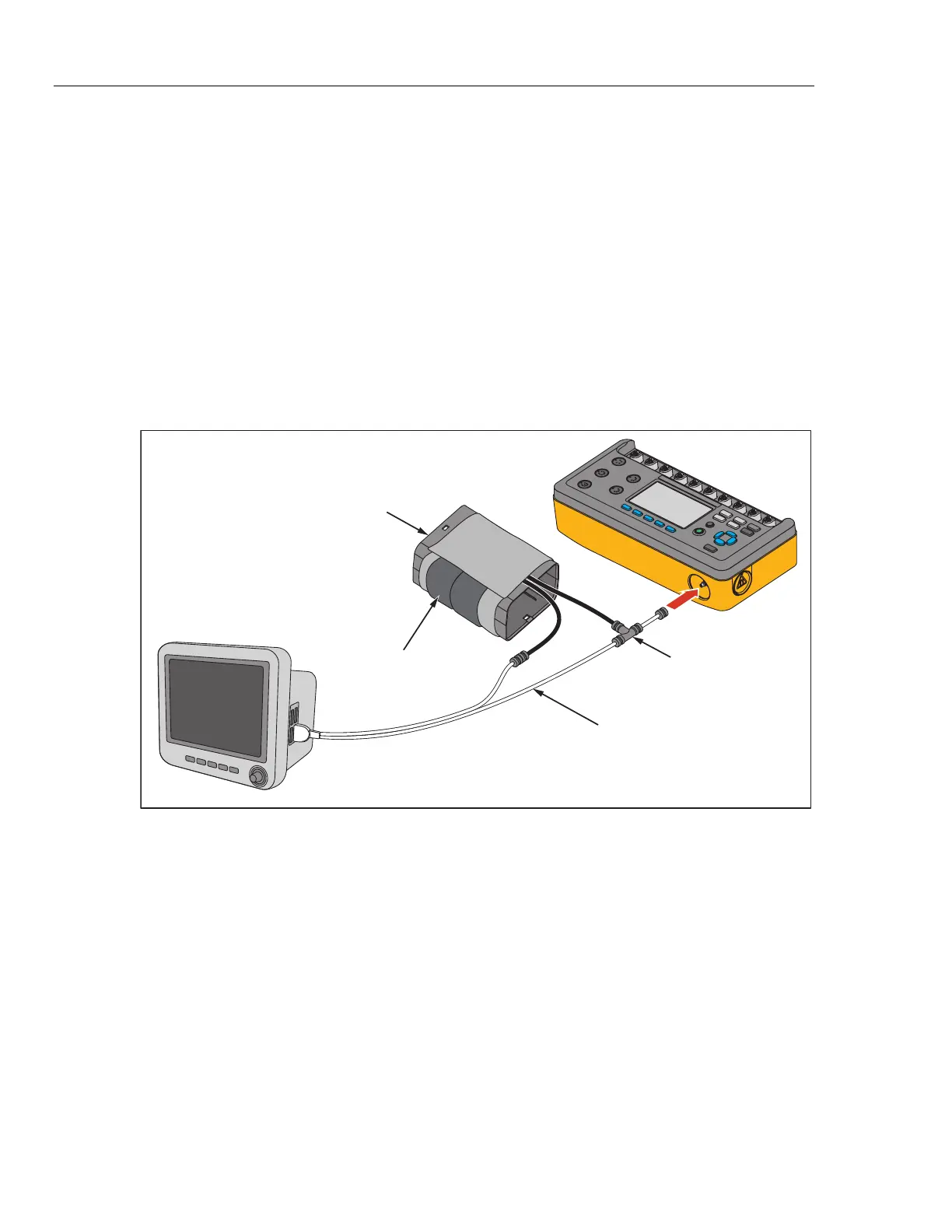
Connect the Product to the monitor and cuff as shown in Figure 35.
Mandrel
Blood Pressure Cuff
Wraps around mandrel.
ProSim 8
Patient
Monitor
Dual hose system: connect Cuff Adapter to
hose marked “Sense”. If both hoses are
unmarked, connect Cuff Adapter to either
hose.
Must be connected closer
to the cuff than monitor.
glh008.bmp
Figure 35. Pressure Leak Test Connections
Note
If the NIBP device has an internal system leak test or one that vents
the cuff inflation pneumatic circuit to the atmosphere when idle, do
not use the Leak Test. Rather, do a Manometer check to test for
internal system leaks. Refer to the NIBP monitor operators manual
for the recommended test protocol.



 To Next Page