2.6 Batteries and Charging
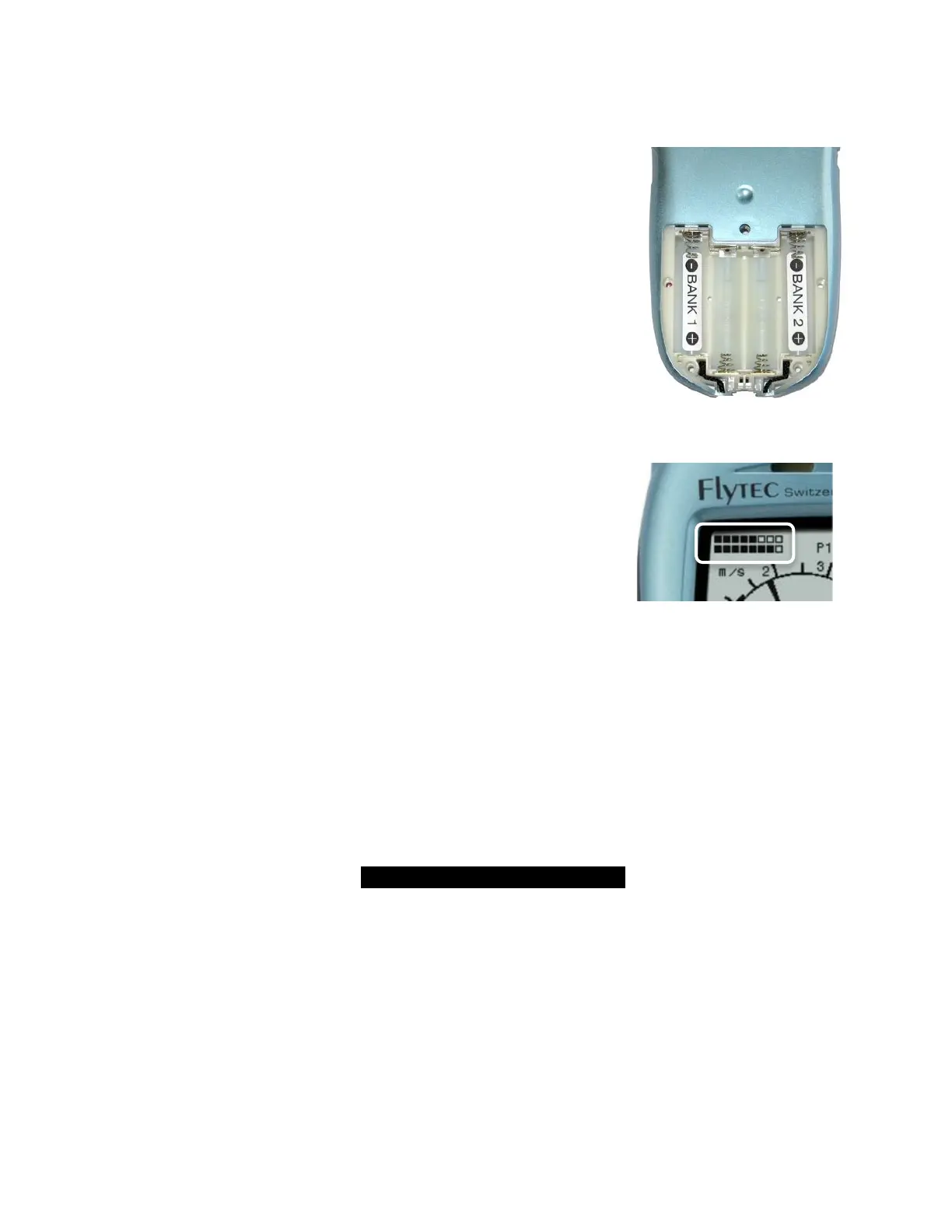
The 6030 operates on two banks of two AA batteries and comes equipped
with four 2100 mAh NiMH batteries installed, for a total run time of
approximately 30 hours. The instrument always starts on Bank 1 and will
automatically switch to Bank 2 when Bank 1 is exhausted. However, if you
attempt to start-up the 6030 when battery Bank 1 is too weak for proper
operation, the 6030 will be unable to auto-switch to battery bank 2 and will
automatically shut down. If this occurs, do not attempt to turn it on again until
the batteries have been charged or replaced with fresh batteries. Important:
failure to observe this precaution can result in malfunction.
When the 6030 is turned on, it performs a battery test during the start-up
sequence and shows the approximate charge level of the two battery banks
on the start-up screen. When the 6030 is on, the battery status of each bank
is shown in the upper left corner of the display on the Main Pages (Bank 1
on the top line and Bank 2 on the bottom line). When the 6030 is shut down,
the display will show the battery status of both banks on the shutdown
screen. It is recommended that the rechargeable batteries in Bank 1 be
swapped with Bank 2 once a year so that they age equally.
The 6030 has a built-in dual charging system that will simultaneously and
independently charge Banks 1 and 2. When either the wall adapter or the
vehicle charging cable is plugged in (under the right side port cover) the
charging status LEDs on the bottom of the instrument will illuminate. The
LEDs may blink for a few minutes when the charging cable is first plugged in
while the charger assesses the condition of both battery banks. Each LED
will turn off when its respective battery bank has been fully charged (4-6
hours if the batteries were nearly fully depleted). When the LEDs turn off, the
batteries will continue to trickle charge and can be left this way to top-off the
batteries. However, for safety reasons, it is recommended that the charger
cable be disconnected after a few hours of trickle charging. Note: If the
charging is terminated before the LEDs turn off, the battery status will
falsely show that the batteries are full. The ambient temperature should
be between 50° and 86°F (10°–30°C) during charging. It may happen in
warm ambient temperatures that the charging process will be discontinued – indicated by flashing LED(s) –
because the batteries have gotten too hot. In this case the charging cable should be removed and replaced after
the batteries have been allowed to cool down. Important: The 6030 should not be switched on during
charging, as this will interfere with proper charging of the batteries.
If you forget to charge the batteries and discover at the takeoff site that they are too weak to use, or if you are in
a situation where recharging is not feasible, you can replace the rechargeable batteries with alkaline batteries. It
is not necessary – but it is recommended – that Bank 2 have batteries installed. However, Bank 1 must have
batteries installed. If alkaline batteries are used, the battery type should be changed to alkaline in Menu>Device
settings>Battery type. It is important that the correct battery type be set, to prevent the 6030 from inadvertently
switching off when it attempts to auto-switch from Bank 1 to 2.
Please recycle spent batteries.!
2.7 User-Fields
On the Main Display Page, the 6030 can display either five or seven user-fields that can be selected from the
list below. There are three pages of user-fields that can be scrolled with a short press of the$ key. The page
number (i.e., P1, P2 or P3) of the sub-page is shown left of the GPS status indicator. On the Map Page there
are three User-fields. To assign a user-field, press the #key to scroll to the desired user-field position. The
name of the corresponding user-field will be highlighted in black above the selected field and will appear in the
Information Field. To change the user-field shown in the selected position, use the !" keys to scroll through
the list of possible values. If the user-field is not changed within 10 seconds, the highlighting will cancel and the
original data field will remain. During flight you may page among the three pages of user-fields using the $
arrow key; however assignment of the user-fields is blocked. The Selection of 5 or 7 user-fields for each of the
three user pages is set in Menu>Device settings>Userfields. Set each page to “Yes” for 7 user-fields per page
or “No” for 5 user-fields per page. When five user-fields per page is selected, the four user-fields in the lower
portion of the display are considerably larger than when seven per page is selected.



 To Next Page