3 Flight Functions
3.1 Variometer
3.1.1 Analog vario
The most important instrument function for any kind of glider
flying is the variometer. The 6030 displays vertical speed in
ft/min or m/sec and tells whether the pilot is climbing or
descending. By using the vario and its accompanying sounds,
the pilot can search for the most efficient climb or recognize
when he or she is in rapidly descending air.
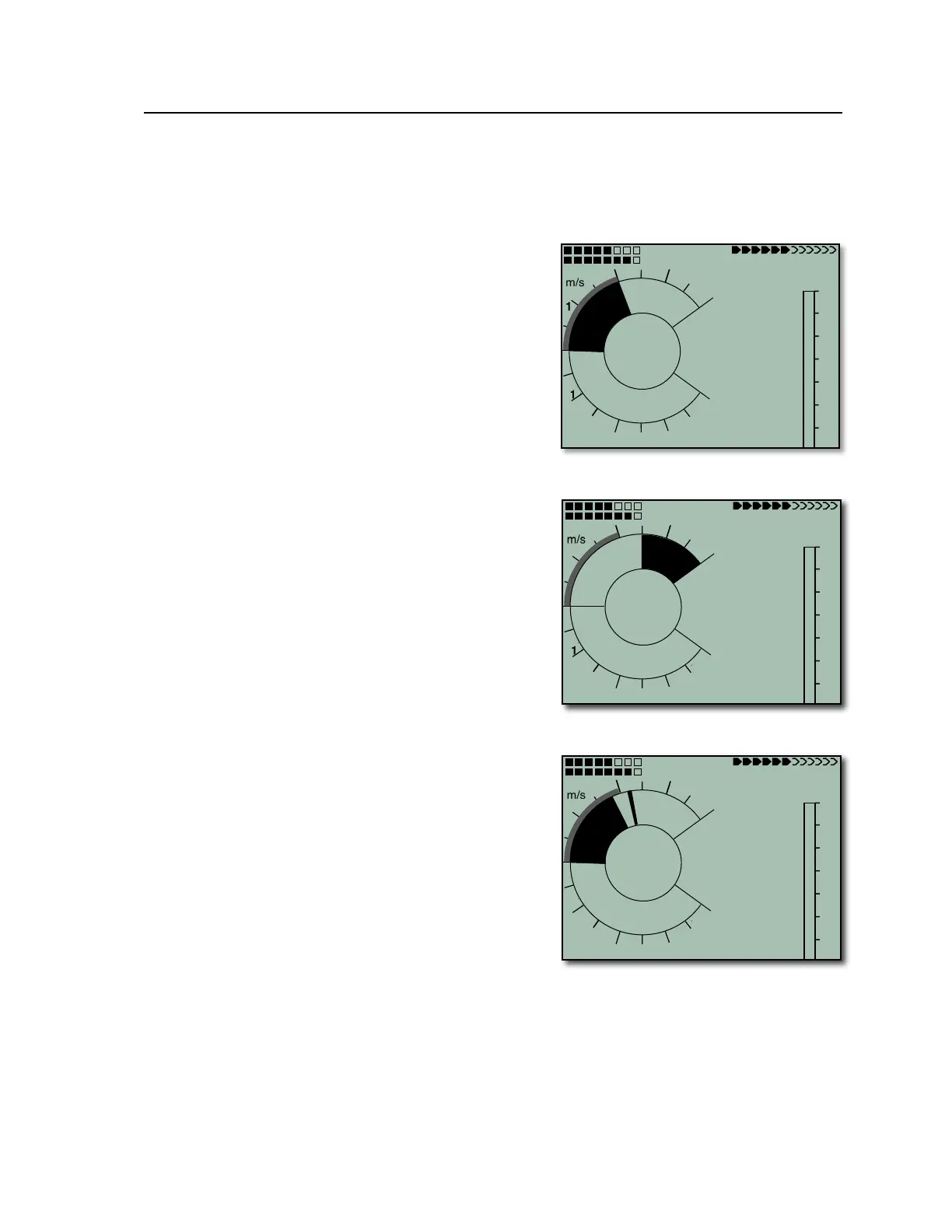
The first scale range on the analog variometer display is +/-800
ft/min (shown as ±4 m/sec in the figure on the right). If the
vertical speed exceeds these limits, the scale automatically
switches to a second range from 800 to 1600 ft/min (shown as
±4 to 8 m/sec in the top figure next page).
The 6030 features a new state-of-the-art pressure sensor and
smart filter technology. This allows the variometer to
dramatically reduce false lift indication caused by turbulence
surrounding lift. This filtering can be controlled in Menu>Pilot
settings>Vario>Vario response delay. The setting range is 0
(dampened and subdued) to 4 (fast and reactive). A setting of
4 will yield a very fast and reactive vario that will respond
almost instantly with vertical ascent and will offer little
dampening of ascent and descent swings associated with
turbulence. This setting is recommended for very smooth light
conditions or for pilots who want to be able to “hear” the texture
of the air and do their own filtering. A setting of 0 will minimize
false indications of lift, however, the vario response will seem
dampened and sluggish. This setting is useful in strong and
turbulent conditions or for pilots that prefer not to be distracted
by a very active variometer. If you are unsure of your
preference, a setting of 2 or 3 is recommend (with a Vario lift
threshold of 4 ft/min or 2cm/s). The effects of this setting can
be seen and heard in the simulation mode, or in test flights, and
the vario response delay can then be adjusted up or down as
desired.
If you are flying too fast while thermaling, thus compromising
your climb rate, the 6030 will provide a visual indication on the
dial display. A radial line will appear above the indicated climb
rate (lower right figure). If this example is compared to the
figure on the bottom of the preceding page, you can see that a
52 km/h thermaling speed is too fast for the 2 m/sec thermal,
and the pilot’s climb rate is compromised by 0.2 m/sec. To
maximize the climb rate, the pilot should reduce air speed until
the radial line converges with the indicated climb rate on the
dial (unless, of course, the turbulence of the thermal dictates a
higher thermaling speed).
3.1.2 Digital Vario and Netto Vario
The digital vario appears to the right of the analog vario dial just above Altimeter 1, and has a resolution of 10
ft/min (0.1 m/sec). The digital variometer has a very wide measuring range of +/-14,000 ft/min (+/- 70 m/sec).
Therefore, it is capable of displaying extreme vertical speeds such as those found in skydiving and base-
jumping. If desired, the digital vario display can function as an averaged vario (also called an integrated vario)
by setting Digital vario mode to 0 in Menu>Pilot settings>Vario>Digital vario mode and then setting the desired



 To Next Page