5 Navigating Waypoints and Routes
5.1 Goto Function
Pressing and holding the Goto key switches the lower half of the display into Goto mode. This function allows
you to search for a waypoint stored in memory and select it as the next waypoint or goal. The closest five
waypoints are displayed, with the nearest waypoint on top. The numbers after each waypoint name indicate the
distance in miles. You can search for a waypoint using the !" keys, and select it by pressing the OK key. The
Goto function can be deactivated from the Goto mode with a short press of the F2 (Cancel Goto) key. If there is
an active Goto but the GPS has not acquired yet the bearing pointer will straight up (12 o’clock).
5.2 Track, Bearing and Cross Track Error
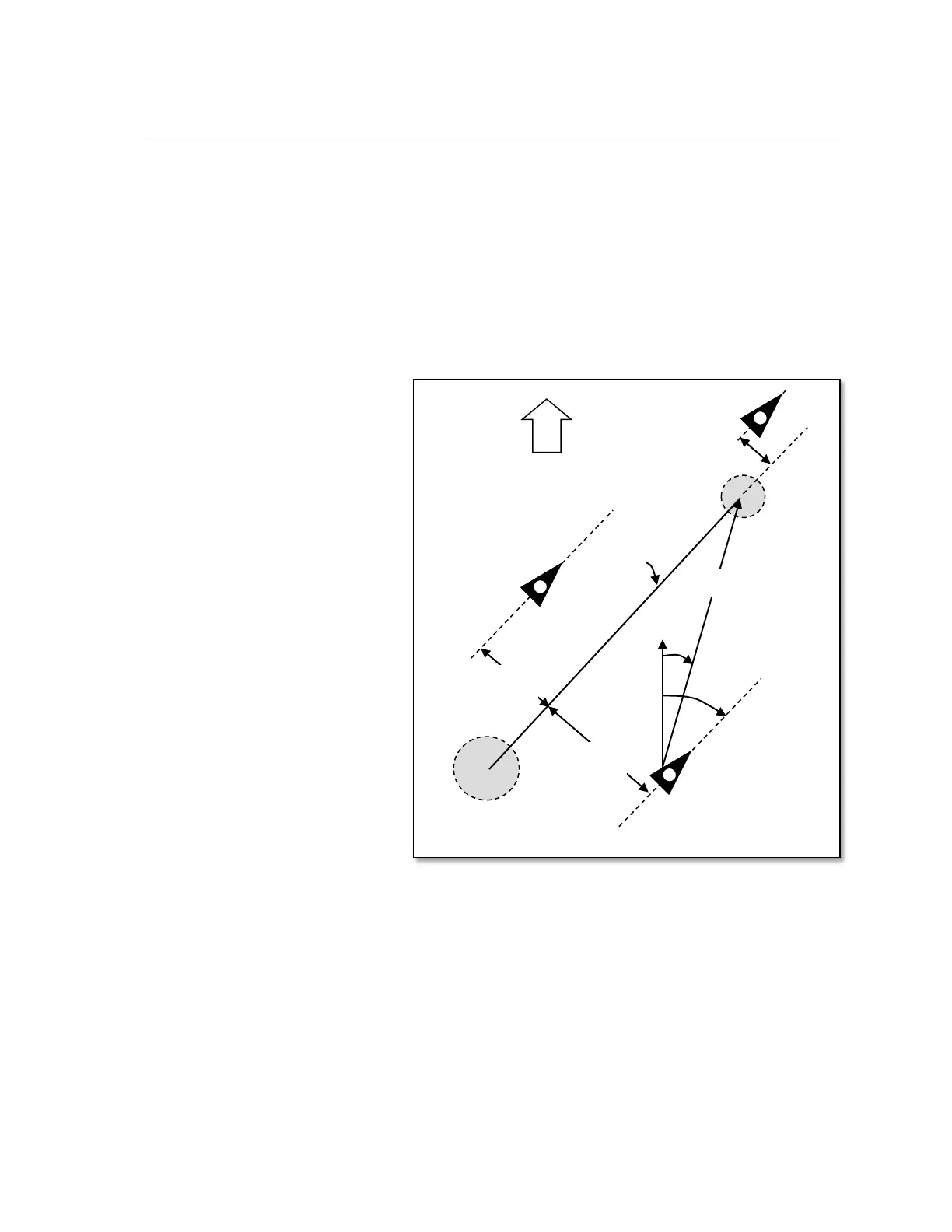
Track is defined as the route of the
glider over the ground and can be
displayed in the user-field Track.
Bearing is the heading in degrees to a
desired point and can be displayed in
the user-field Bearing. Geographic true
north is always 0 or 360 degrees (east
90, south 180, west 270 degrees). The
bearing is the direction to a specific
destination or waypoint from the glider.
Cross track error is the perpendicular
distance to the active leg of a route and
can be seen in the user-field XT Error.
Positive XT Error indicates that you are
to the right of course line (Pos 1 in
figure). Conversely, a negative value
shows that you are left of course line
(Pos 2). If you fly past the next waypoint
in a route (not Competition Route) a
virtual line is extended past the WP and
the XT Error is given in relation to the
virtual line (Pos 3). If you do not have
an active route and you choose a
waypoint with either the Goto or the
Route key, then a virtual line is drawn
from the position where you invoked the
Goto or Route function to the waypoint.
The cross track error is your
perpendicular distance to that virtual
line. The same applies if you are in an
active route and you change the active
leg with the Prev/Next WP function.
The precision of the XT Error depends on the length of the active leg of the route, with the greatest error
occurring when you are centered between two waypoints of a route. For example, if the leg is 50km the error
can be as much as 400 meters. This error is due to the very flat angles that result from being off-track a
relatively small amount proportional to a long leg.



 To Next Page