3.5 Speed-to-Fly
3.5.1 Best Glide Speed
On the right side of the analog speed scale there is a black arrow that indicates the air speed for best glide,
which is dependent on the polar of the glider, the wind strength and direction, and the sink rate of the
surrounding air. When racing (flying to cover the most distance in the least amount of time), a pilot will generally
fly faster than the best glide speed this indicator is recommending – unless every foot of height is essential
(survival mode). The true value of the best glide speed will increase with increased altitude; however, it does not
matter if you have chosen to display true or indicated air speed, since the 6030 compensates for this on the
various displays. For more information please see Appendix Sections 12.3, True or Indicated Air Speed,
and 12.4, Polars and Best Glide Speed.
3.5.2 McCready Indicator
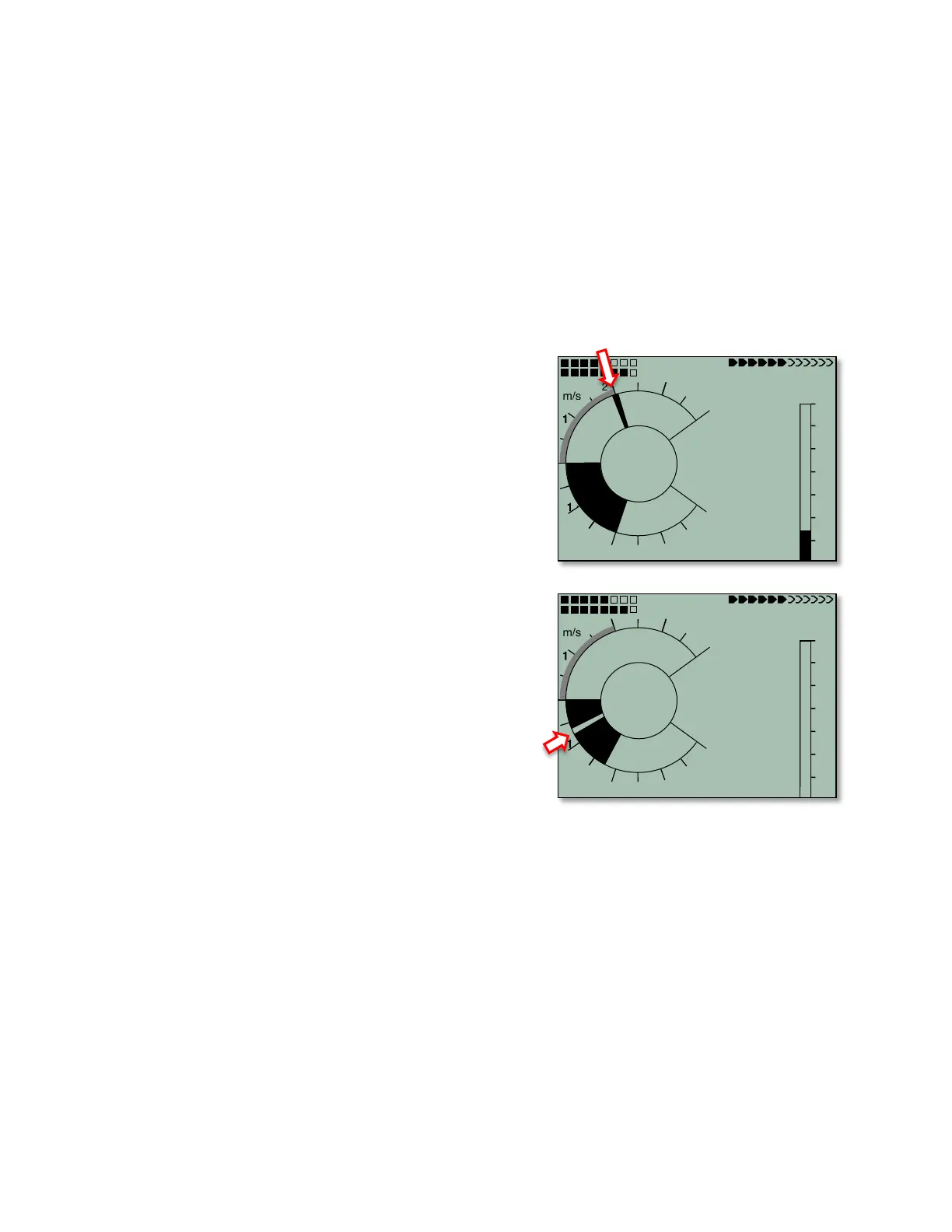
To assist in controlling your glide speed for McCready-
optimized flight, the 6030 has a McCready indictor that shows
the speed ring setting being flown, based on your current
flight speed, the polar of the glider, the wind, and the vertical
speed of the air mass in which you are currently flying. On the
6030 the McCready pointer appears as a radial line in the
analog dial. To fly optimally, you should control glide speed so
that the McCready indicator points to your next expected climb
rate on the analog vario dial. In the example (above right), the
pilot is flying with a speed ring setting of 2 m/sec (400 ft/min).
To complete a competition task in the shortest time possible,
the pilot may consider keeping the McCready pointer as close
as possible to the average climb rates achieved in previous
thermals (indicated by the Average Thermal Climb indicator).
Please refer to Section 12.5, McCready Theory for further
explanation.
If you glide too slowly for the given conditions, the McCready
pointer will appear in the sink sector of the analog vario display.
In the example (below right), the pilot is flying 50 km/h, which is
too slow for the current conditions; therefore the McCready
pointer is seen in the sink sector of the dial display. If the
McCready sounds are on, the pilot will hear The Negative
McCready alarm (rapid low-frequency beep) telling the pilot
to speed up. The pilot should immediately speed up until the
negative McCready alarm stops and the McCready pointer at
least progresses to 0 (best glide).
Using the 6030’s McCready audio feature, you can control glide
speed acoustically. The default for McCready sound is turned off each time the 6030 is turned on. To activate
the McCready sound, press the McC & key once. When the McCready sound is turned on, “MC” will appear at
the top of display (between the battery status and the page number). The Average Thermal Climb indicator will
appear as a solid black outer ring (as opposed to shaded when the McCready sound is off). The frequency of
the McCready tone is proportional to the speed ring setting that you are flying (i.e., the higher the speed ring
setting, the higher the frequency of the McCready tone). If the tone lowers while you are gliding and attempting
to hold a fixed speed ring setting, then you need to speed up; conversely, if the tone increases then you should
slow down.
It is possible to set a dead band for the McCready sound (in Menu>Pilot settings>McCready>tonegap) so that
there will no McCready sound when flying at or near the desired speed ring setting. Each time the McCready
sound is turned on, the dead band will be centered on the speed ring setting you were flying when you pressed
the McC/& key. If a deadband has been set in the McCready settings, the deadband will appear shaded in the
Average Thermal Climb indicator (assuming the Average Thermal Climb indicator is filled in to the point where
you set the dead band). To move the dead band to a different speed ring setting, adjust your speed so that the
McCready indicator lines up with the new desired speed ring setting and then press the McC/& key twice (the
first press turns the sound off and the second press turns it back on with the new setting). The width of the dead
band in ft/min (m/sec) and time delay (in seconds) for the starting of the McCready sound after leaving a thermal
can be set in Menu>Pilot settings>McCready.



 To Next Page