7.1 Airspace Alerts and Info
There are different types of airspace and it is possible to select which types will be warned according to the
three options below. This can be done in the Main Setup Menu >Pilot settings> CTR Alarm (select 0, 1 or 2).
The list of airspace types is later in this section.
CTR Alarm = 0: No acoustic warning and no automatic display of the CTR info page. The CTR info page can
always be called up with a short press of the information key.
CTR Alarm = 1: Single acoustic warning when entering the warning distance and Single acoustic warning when
entering the airspace. The CTR info page is automatically shown for 10s with broken threshold
highlighted.
CTR Alarm = 2: Single acoustic warning when entering the warning distance and a double acoustic (high pitch-
low pitch) when entering the airspace. The CTR info page is automatically shown for 10s with
broken threshold highlighted.
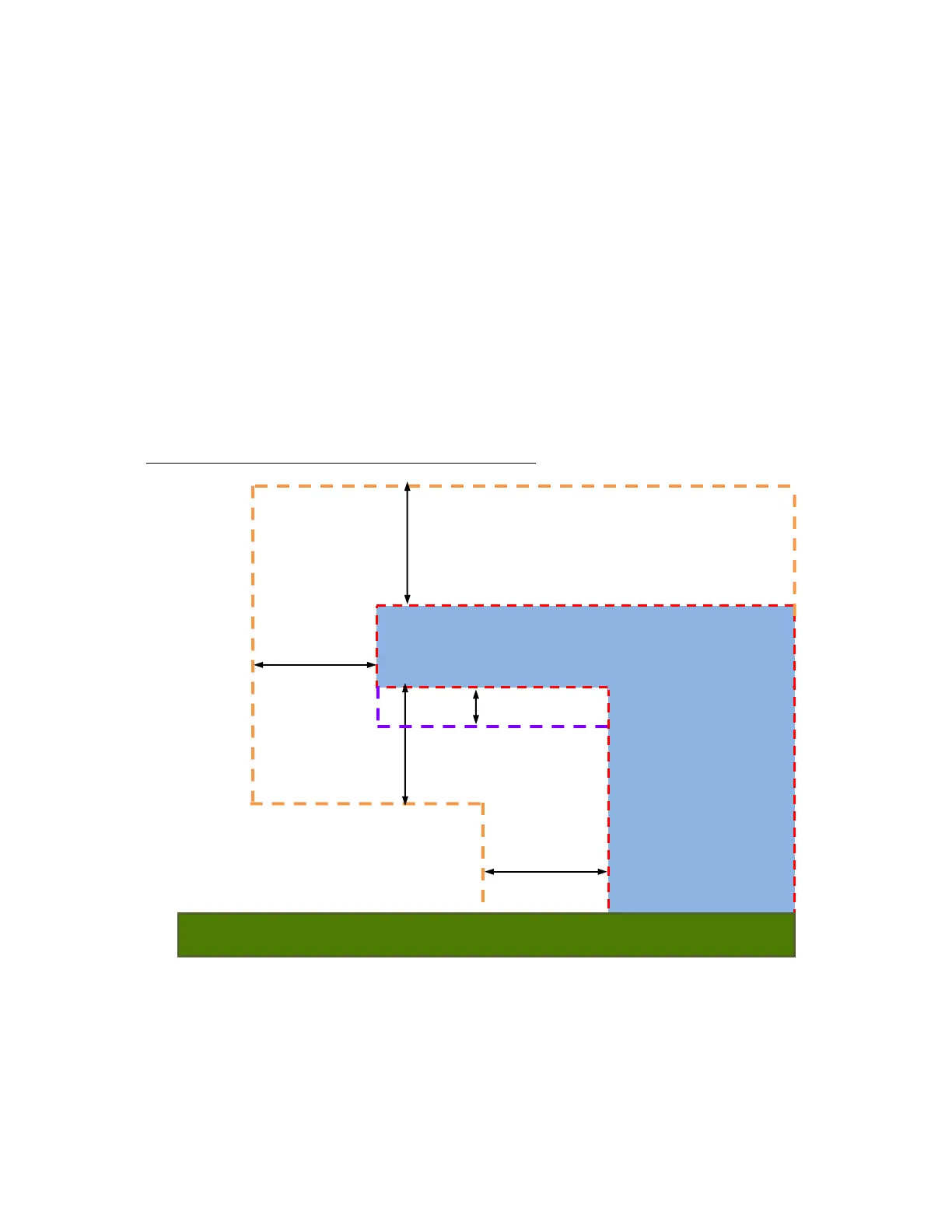
The warning distance of an individual airspace is usually set in the airspace file but can be modified on the
instrument (see section 7.2.2) and applies to the horizontal and vertical distance to the airspace. However, since
approaching the floor of an airspace from below is usually relatively slow (climbing in a thermal as opposed to
gliding), an additional alert is given at 50m below the airspace floor (purple line in the diagram below) regardless
of the warning distance set for the airspace. See following diagram.
Sample airspace: Warning distance 400m (CTR alarm set to 2)



 To Next Page