Another user-field useful in assisting the pilot in arriving at the start cylinder at the designated start time is Spd
StCyl. This user-field shows the ground speed required to get to the start cylinder boundary just as the start
time passes. For example, if you were 1 mile from the start cylinder with a 1pm start, Spd StCyl would show 30
(mph) at 12:58pm indicating that if you flew towards the start cylinder at that moment with a groundspeed of
30mph you would arrive at the start cylinder at 1pm. This user-field is constantly updating so you can see if you
should speed up or slow down to get the correct start. Spd StCyl is active up until the start time passes.
When a Competition Route is active the bottom line of the Information Field will show “next
!
pr
"
wp”. This
serves as a reminder that the next waypoint can be advanced or moved back with the !" keys. This is of
particular importance when you wish to go back and take a later start. If next
!
pr
"
wp is not shown in the
Information Field press the McC &/WP key for 3-seconds to bring it up. This will enable the !" keys to
advance or move back the current active WP. When a valid start occurs, the Competition Route will advance to
the first turnpoint in the route, however, if you wish to go back and take a later start, the " key (prev wp) can be
pressed and the start waypoint will once again be active with the start time incremented forward one interval. If
you change your mind you can advance to the next WP by pressing the ! key (next wp). If you wish to
increment to the next start time before you have achieved a valid start, press the ! key (next wp) followed by
the " key (prev wp) and the instrument will increment the start time by the interval set in the Competition Route.
If the start time is incremented as described above, the countdown timer will be relative to the newly selected
start time. Please also see section 12.6.
The other key piece of information necessary to achieve an optimal start is your position relative to the start
cylinder boundary. Ideally you would want to position yourself just outside an Enter start or just inside an Exit
start, just before the start time. The user-field Dist StCyl will show your distance to the boundary of the start
cylinder. Dist Cyl is also useful when flying the task, so that you do not need to remember the size of the
turnpoint cylinder and goal and subtract that from the distance to waypoint. A positive value indicates you are
outside the cylinder and a negative value indicates you are inside the cylinder.
Usually, but not necessarily, the start cylinder is the first waypoint of the Competition Route. If a waypoint has
been set as the start (marked with an “S” after the cylinder radius), you must also set the start time and the type
of start as described in the section above. By setting the start to “ENTER” or “EXIT” you define whether the race
begins by flying into or out of the cylinder. You must enter/exit the start cylinder after the set start time to cause
the 6030 to automatically transition to the next turnpoint in the route. If no waypoint is set to be the start, you
can start whenever you want and the automatic transition to the next turnpoint occurs as soon you are inside the
first cylinder. For an Enter start, it makes little sense to choose the takeoff place as the start cylinder because
immediately after receiving satellites the 6030 will switch over to the next turnpoint. The criteria for the “turnpoint
reached” signal differ for enter and Exit starts as explained below in the following sections.
5.4.3.1 Exit Start
With the Competition Route set for an Exit start, the “turnpoint reached” signal will be given as soon as the start
time has passed (Countdown timer or Start Race =0:00) and your
position is inside the start cylinder. If you are outside the start
cylinder, the “start time open” signal will be given at the designated
start time (i.e., Countdown timer =0:00) and
the “turnpoint reached” signal will be given
the moment you cross the start cylinder from
outside to inside. In both cases the
sound is given to alert you that it is time
to go to the next turnpoint; the next
turnpoint will then become active (WP2
in the example). All calculations and the
direction arrows will now be with respect
to WP2.
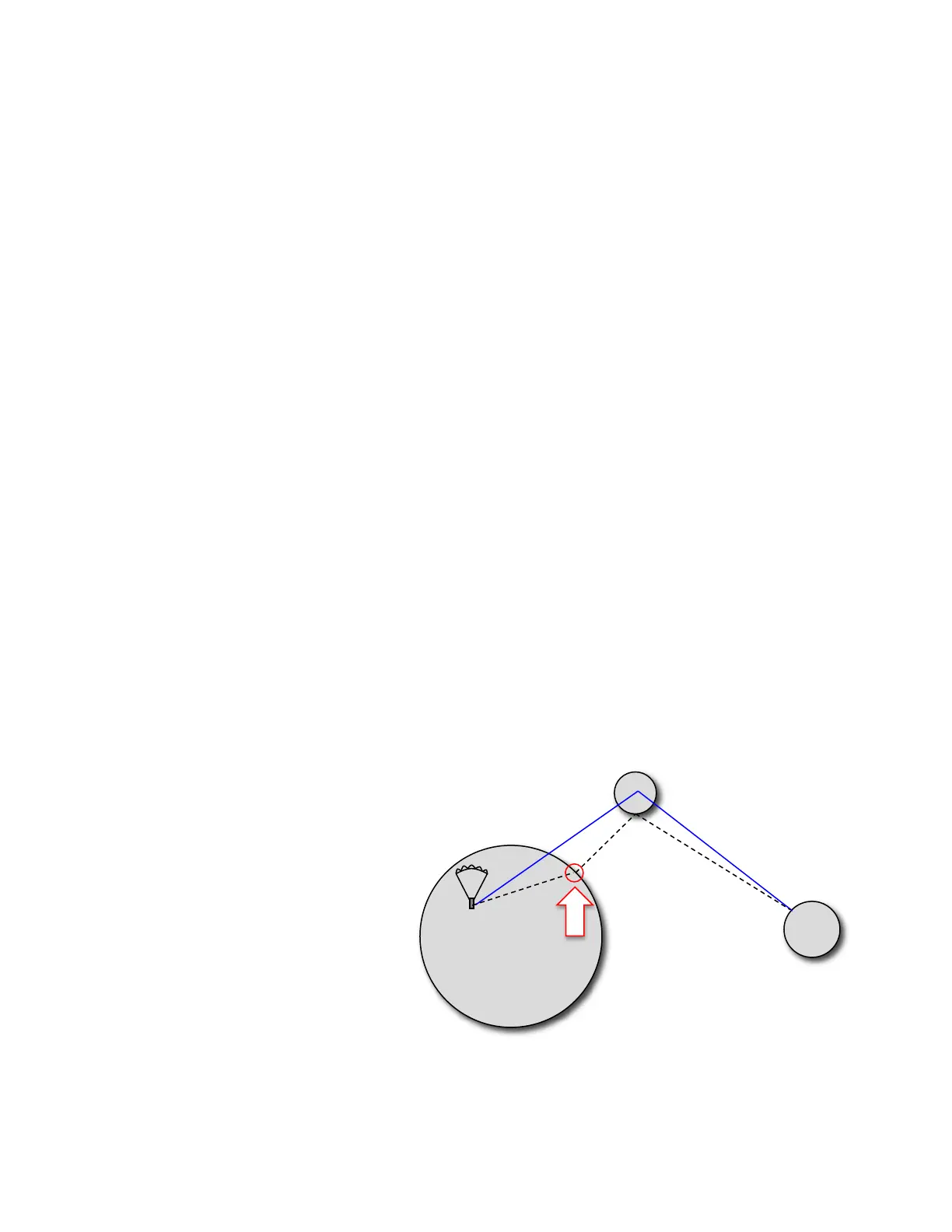
If the Optimized Competition Route is
being used, before start time has passed,
the bearing arrow will point to the C-Wp
calculated at the time the Competition Route was
built. On the Map page, the route will show the bearing line from your current position to the C-Wp on the start
circle. Assuming you are inside the exit cylinder when start time passes, the “turnpoint reached” signal sounds,
the next waypoint becomes active and the directional arrow in the compass points to the next waypoint. Keep in
mind that before the start time has passed, the directional arrow in the compass points to the optimal point (C-
Wp) and not to the start circle center (as is the case with a normal Competition Route). If you are trying to



 To Next Page