© Flytec USA, 2007 – 2014 Printed on 100% post-consumer recycled paper
3. Double click the icon for the language you want to start the program.
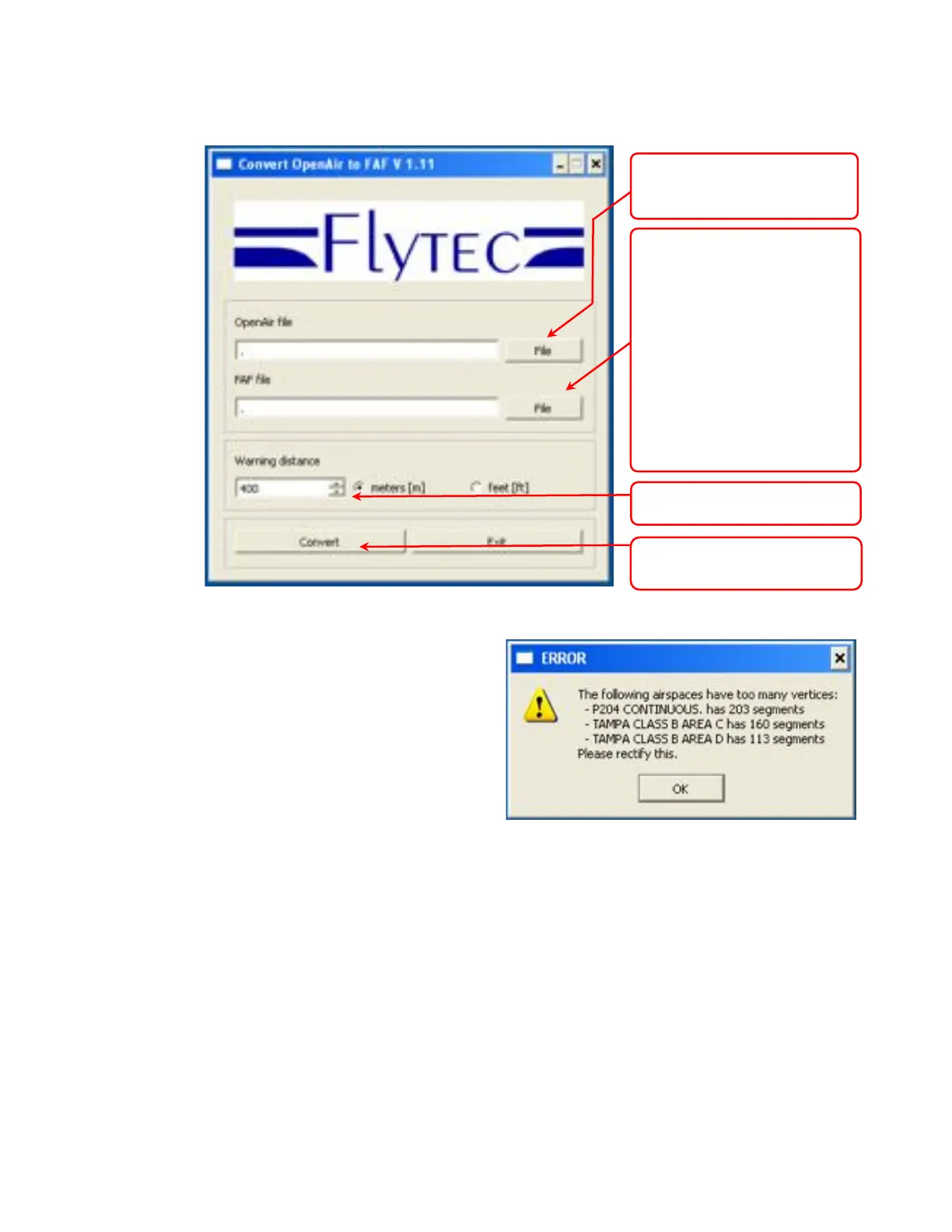
Upon clicking Convert the program will check to
see if a file with the same name already exists.
If the file exists, the program will ask if the file
should be overwritten, or if the airspace in this
conversion should be added to the existing file. If
the conversion program finds errors in the
OpenAir file it will display the problems found
during the conversion in a list.
4. Create a folder named CTR in the root
directory of the SD card (formatted Fat or
Fat16)
5. Copy the .faf file created above into the CTR folder in the root directory of the SD card
6. Insert the SD card into the instrument and it will recognize the airspace the next time the instrument is
turned on. The instrument will clear the internal airspace memory, search for the closest 100 CTR's in
the specified file and load it into the internal airspace memory (the GPS must be acquired).
Click button and browse to
OpenAir file you downloaded in
Step 1 and select the file.
Click button and browse to the
location where the converted file
to be saved to. The name of the
converted file can be entered in
the File Name field. Skip this step
and the converted file will be
saved to the same location as the
source file with the same name
but with a .faf extension. Note: In
order for the converted file to be
recognized by the instrument, the
file name (preceding the .faf file
extension) must be 8 letters or
less.
.
Click to process file and save to
the location above
Select feet or meters and set
airspace warning distance



 To Next Page