110
14 ADDITIONAL TOPICS
DIGITAL INPUT SOURCES
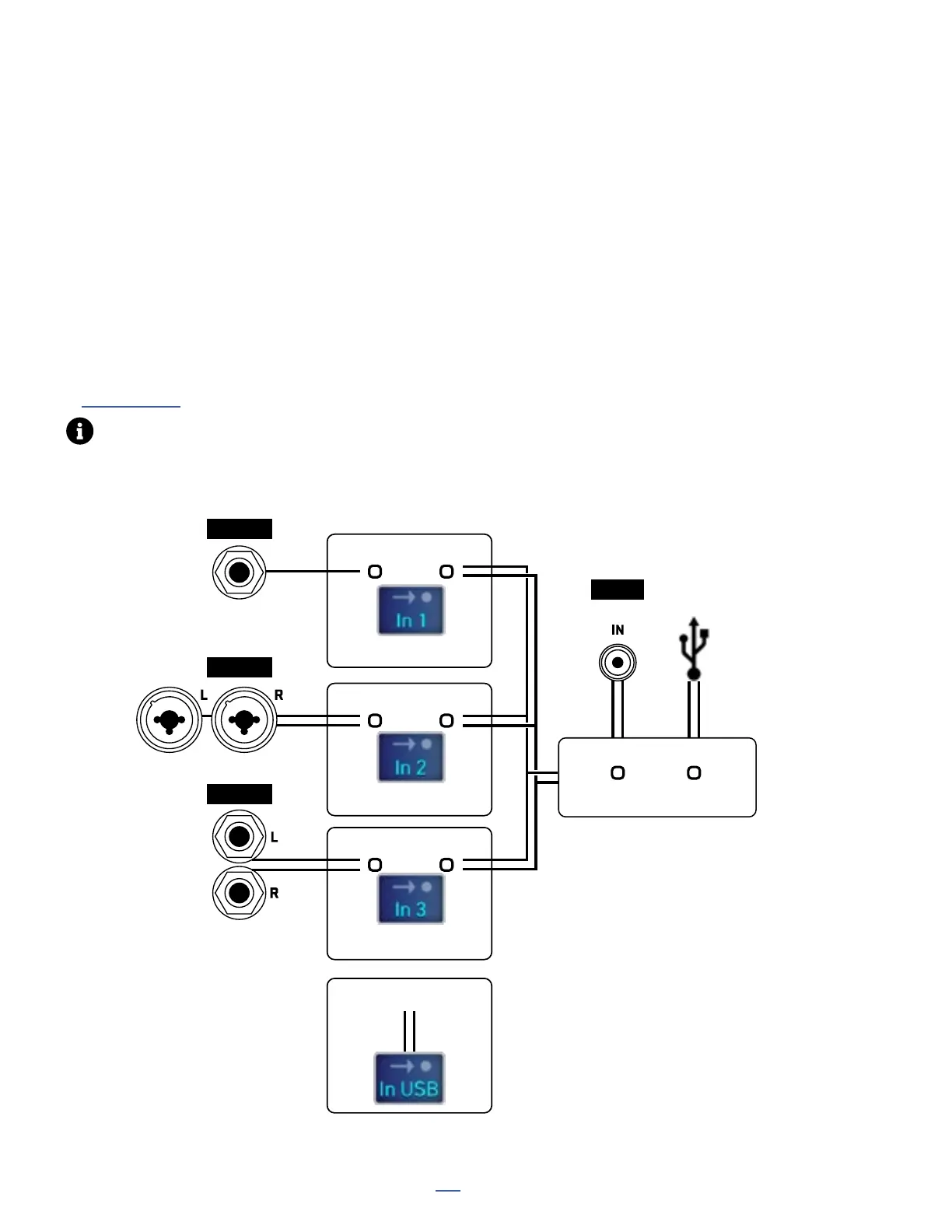
The FM9 allows incoming digital signals from SPDIF or USB 5/6 playback to be routed to your choice of input
blocks 1, 2 and/or 3 on the Layout grid. This supports a range of applications such as digital reamping, digital
send and return, and processing of digital sources.
Each FM9 input has a corresponding Input Source parameter found in the INPUT CONFIGURATION section of
SETUP: I/O: Audio. Set a source to “ANALOG” if you want the corresponding grid block to utilize signal from the
analog input jacks. Set a source to “DIGITAL” for digital input, and then set the global Digital Input Source to your
choice of “SPDIF” or “USB 5/6”. Multiple inputs can be set to use the same digital source at the same time. All
inputs default to ANALOG. The diagram below illustrates these options.
A fourth grid input block, “IN USB” always uses USB 7/8 as its source. Additional USB input options are detailed
in Section 3: USB
Optimal performance of multiple digital devices requires synchronized clocks. See the FAQ on the next page.
Input 1 Source
Analog Digital
Input 2 Source
Analog Digital
Input 3 Source
Analog Digital
Digital Input Source
SPDIF USB 5/6
INPUT 1
INPUT 2
INPUT 3
SPDIF
— OR —
— OR —
— OR —
— OR —
USB 7/8



 To Next Page